

Introduction
I have already provided the Use HTML and CSS file in the Windows Phone Apps article. So you can see for Windows Phone Apps.
Now In this article, you will see the use of HTML and CSS files in Android apps.
First, create an Android Application Project in Eclipse.
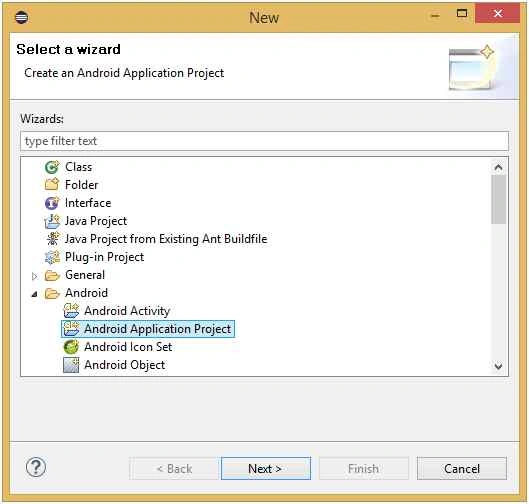 Layout XML file
Then open the Layout XML file. Drag the first Linear Layout then WebView Element to the Relative Layout of the Activity.
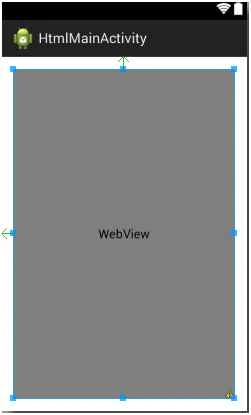 XML File Code
- <RelativeLayout
- xmlns:android="http://schemas.android.com/apk/res/android"
- xmlns:tools="http://schemas.android.com/tools"
- android:layout_width="fill_parent"
- android:layout_height="fill_parent"
- android:keepScreenOn="true"
- android:paddingBottom="@dimen/activity_vertical_margin"
- android:paddingLeft="@dimen/activity_horizontal_margin"
- android:paddingRight="@dimen/activity_horizontal_margin"
- android:paddingTop="@dimen/activity_vertical_margin">
- <LinearLayout
- android:layout_width="fill_parent"
- android:layout_height="fill_parent"
- android:orientation="vertical" >
- <WebView
- android:id="@+id/webview"
- android:layout_width="fill_parent"
- android:layout_height="fill_parent" />
- </LinearLayout>
- </RelativeLayout>
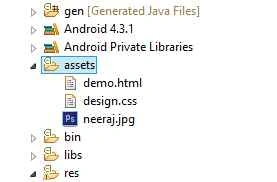
- import android.app.Activity;
- import android.os.Bundle;
- import android.view.Menu;
- import android.view.MenuItem;
- import android.webkit.WebView;
- public class HtmlMainActivity extends Activity {
- WebView webview;@Override
- protected void onCreate(Bundle savedInstanceState) {
- super.onCreate(savedInstanceState);
- setContentView(R.layout.activity_html_main);
- webview.loadUrl("file:///android_asset/demo.html");
- }@Override
- public boolean onCreateOptionsMenu(Menu menu) {
- // Inflate the menu; this adds items to the action bar if it is present.
- getMenuInflater().inflate(R.menu.html_main, menu);
- return true;
- }@Override
- public boolean onOptionsItemSelected(MenuItem item) {
- // Handle action bar item clicks here. The action bar will
- // automatically handle clicks on the Home/Up button, so long
- // as you specify a parent activity in AndroidManifest.xml.
- int id = item.getItemId();
- if (id == R.id.action_settings) {
- return true;
- }
- return super.onOptionsItemSelected(item);
- }
- }
- webview.loadUrl("file:///android_asset/demo.html");
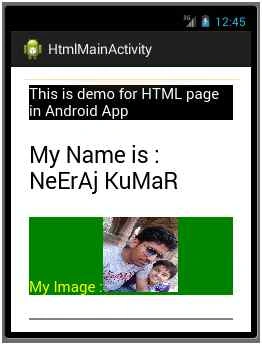
Sibeesh VenuPosted Jul 29, 2015, 6:08 AM
Nice Share.
Debasis SahaPosted Jul 29, 2015, 5:29 AM
nice one..
Rajeesh MenothPosted Jul 29, 2015, 12:13 AM
Good ONe
Nilesh JadavPosted Jul 29, 2015, 12:06 AM
NIce article sir
Pankaj Kumar ChoudharyPosted Jul 29, 2015, 12:02 AM
Nice Explain Neeraj..........
RakeshPosted Jul 28, 2015, 11:05 PM
Nice one
Gopi ChandPosted Jul 28, 2015, 11:04 PM
Good work
Afzaal Ahmad ZeeshanPosted Jul 28, 2015, 4:35 PM
Interesting use of WebView control, Neeraj.