
Initial chamber
Step 1: Open Visual Studio 2010 and create an Empty Website. Give it a suitable name, reportview_demo.
Step 2: In Solution Explorer you get your empty website, then add a Web Form SQL Server Database, View and Dataset. By going like the following:
For Web Form:
reportview_demo(Your Empty Website) - Right Click, Add New Item, then Web Form. Name it reportview_demo.aspx.
For SQL Server Database:
reportview_demo(Your Empty Website) - Right Click, Add New Item, then SQL Server Database. Add Database inside the App_Data_folder.
For DataSet:
reportview_demo (Your Empty Website) - Right Click, Add New Item, DataSet. Add DataSet inside the App_Code_folder.
Database chamber
Step 3: In Server Explorer, click on your database [Database.mdf] - Tables, Add New Table and make table like the following:
Table - tbl_data (Don’t Forget to make ID as IS Identity -- True)

View - View_tbl_data
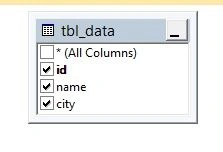
Double click on the dataset that resides under App_code_Folder. Here's the image:

When you double click the dataset you get the blank area, there you have to do something like the following:
Right click on the blank area, Add, then DataTable.
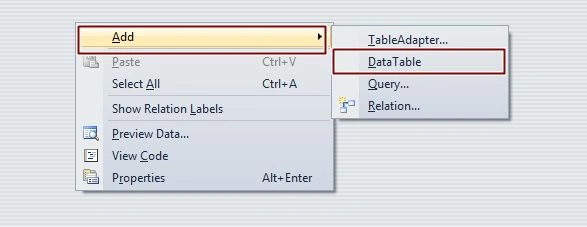
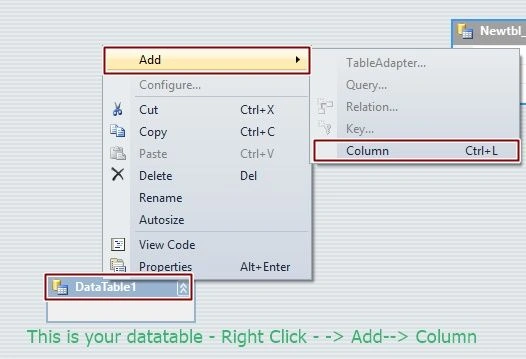
Change the name of the table from Datatable1 to Newtbl_data, there you have to add 3 columns for ID, Name, City as we had taken in tbl_data. So add three Columns and you will get the following:
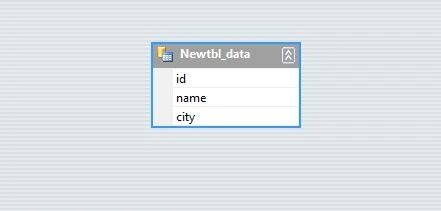
Add three Columns and you will get something like the following image:
After this process you have to go to the reportview_demo - Right Click, Add New Item, then find Report.rdlc file.
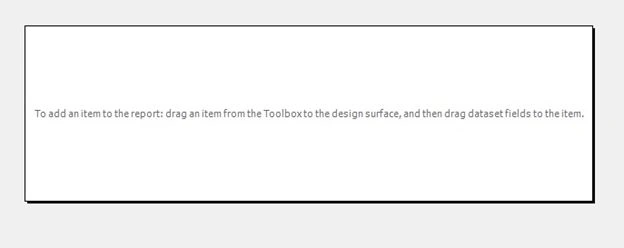
Right Click on Report - Insert table, then database properties window will open. In that select your DataSet and table.

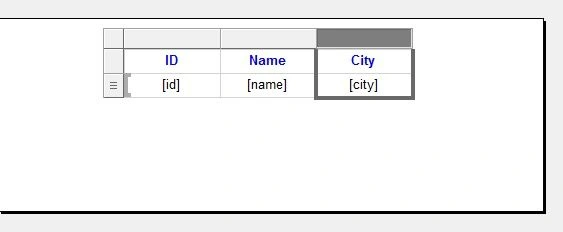
After pressing OK in report.rdlc you will see Header and Data. In data row, right click and add the respective column as – ID, Name, City. You will see something like the following image:
Design chamber
Step 4: Now open your reportview_demo.aspx file, where we create our design for report viewer. We will add Report Viewer here.
Go to the toolbox and find Reporting. Drag and Drop Report Viewer.
reportview_demo.aspx
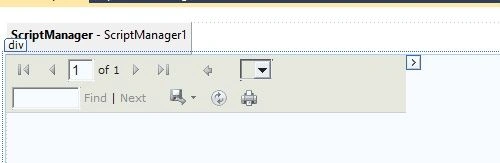
Now add Report.rdlc from Choose Report.

Use Report Viewer In ASP.NET Using C#
- <%@ Page Language="C#" AutoEventWireup="true" CodeFile="Default.aspx.cs" Inherits="_Default" %>
- <%@ Register assembly="Microsoft.ReportViewer.WebForms, Version=10.0.0.0, Culture=neutral, PublicKeyToken=b03f5f7f11d50a3a" namespace="Microsoft.Reporting.WebForms" tagprefix="rsweb" %>
- <!DOCTYPE html PUBLIC "-//W3C//DTD XHTML 1.0 Transitional//EN" "http://www.w3.org/TR/xhtml1/DTD/xhtml1-transitional.dtd">
- <html xmlns="http://www.w3.org/1999/xhtml">
- <head runat="server">
- <title></title>
- </head>
- <body>
- <form id="form1" runat="server">
- <asp:ScriptManager ID="ScriptManager1" runat="server">
- </asp:ScriptManager>
- <div>
- <rsweb:ReportViewer ID="ReportViewer1" runat="server" Font-Names="Verdana"
- Font-Size="8pt" InteractiveDeviceInfos="(Collection)"
- WaitMessageFont-Names="Verdana" WaitMessageFont-Size="14pt">
- <LocalReport ReportPath="Report.rdlc">
- <DataSources>
- <rsweb:ReportDataSource DataSourceId="ObjectDataSource1" Name="DataSet1" />
- </DataSources>
- </LocalReport>
- </rsweb:ReportViewer>
- <asp:ObjectDataSource ID="ObjectDataSource1" runat="server"
- SelectMethod="GetData"
- TypeName="DatabaseDataSetTableAdapters.tbl_dataTableAdapter">
- </asp:ObjectDataSource>
- </div>
- </form>
- </body>
- </html>

Hope you liked it. Thank you for reading. Have a good day!
Join the conversation! Your thoughts help the community grow.
Sign in to leave a comment
It is the same account you read, post and publish with — and you will come straight back to this page.
shah jahanPosted Nov 11, 2018, 10:50 PM
Good Work Great
Sonu ChaudharyPosted Mar 17, 2016, 7:35 AM
good one
Christopher AndrewsPosted Nov 18, 2015, 5:58 AM
The article was extremely helpful, thank you. I found this .net error tracking tool amazingly simple and nice www.redfly.io
Shridhar SharmaPosted Oct 30, 2015, 6:24 PM
good one nilesh
Gowtham KPosted Oct 30, 2015, 12:42 PM
Good One
Sibeesh VenuPosted Oct 30, 2015, 5:09 AM
Nice Share
Upendra Pratap ShahiPosted Oct 30, 2015, 5:05 AM
Great blast sir....thanks for sharing..
Harshad PansuriyaPosted Oct 30, 2015, 3:17 AM
Nice one