

Imagine opening a Power BI report and instantly seeing only the data you're authorized to view without clicking a single filter. That's the magic of dynamic security, and at the heart of it is the USERPRINCIPALNAME() DAX function.
The USERPRINCIPALNAME() function returns the email address (or user principal name) of the person currently viewing a report in the Power BI Service. This makes it incredibly useful for implementing Dynamic Row-Level Security (RLS), allowing one report to securely serve hundreds or even thousands of users.
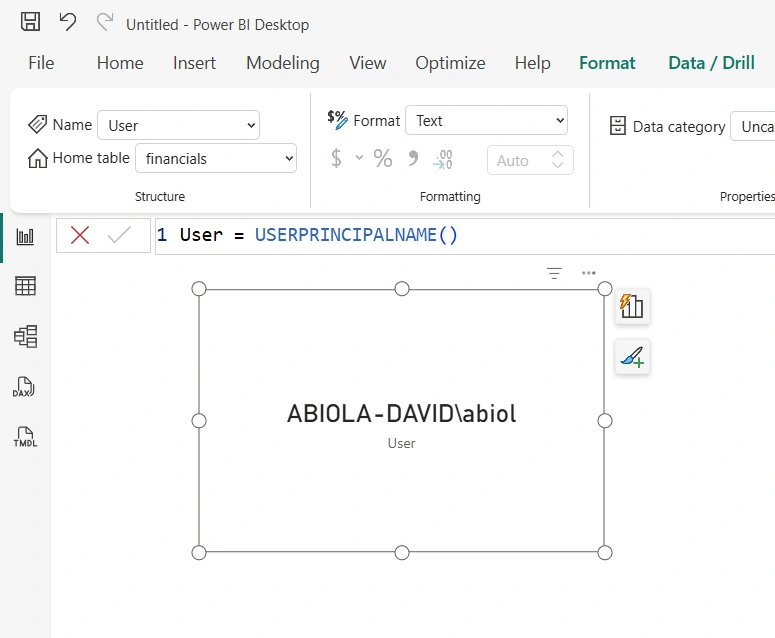
The syntax couldn't be simpler:
USERPRINCIPALNAME()
Unlike many DAX functions, USERPRINCIPALNAME() doesn't require any arguments. It simply returns the identity of the logged-in user. For example, if Sarah signs into Power BI with [email protected], the function returns:
[email protected]
You can then compare this value with an email column in a security table to determine which records Sarah is allowed to access.
Here's a common Row-Level Security expression:
Employees[Email] = USERPRINCIPALNAME()
With this rule in place, each employee automatically sees only their own data, making report maintenance much easier than creating separate reports or security roles for every individual.
One important thing to remember is that USERPRINCIPALNAME() returns meaningful values only when the report is viewed in the Power BI Service. In Power BI Desktop, the returned value may differ depending on your sign-in account and testing environment.
If you're building secure, scalable Power BI solutions, mastering USERPRINCIPALNAME() is essential. It's a small function that plays a massive role in delivering personalized analytics while ensuring sensitive data remains protected.
Join the conversation! Your thoughts help the community grow.