

About Actions: Microsoft Dynamics CRM Actions allows us to define our own custom events/messages, similar to existing standard events like create, update, and delete. Actions are designed using the CRM process editor or using the SDK and we can define parameters (both input and output) for these actions just like we have parameters for standard messages, for example if you want to use a Create message then it takes an entity object as parameter and returns a record's GUID as output. Once activated we can also register a plugin on it.
You can get more details about the action here.
Action Example: We will show how to create and call actions. Actions provide an option to define various types of input and output parameters, but here we will show use of an Entity and EntityReference Parameter. So let's see an example of creating a Contact from an Account, a very simple example for the demo. When creating the contact we want to use information like name, email and telephone from the account entity. Now to pass this information we have two options, we can either pass all these fields from the account to the contact one by one or we can simply pass an account entity object so that the required field can be collected from there. So let's create an action where we will use two input types of parameters, Entity and EntityReference. From the entity we will use the preceding fields and using entityreference we will get it of the sales person (we have created a custom lookup field on contact entity), using the following procedure to design the action.
- Navigate to Settings->Process->New.
- Use the following details and click on OK:
- Process name: ActionDemo.
- Category: Action.
- Entity: None(global).
- Type: New blank process.
- Add an Input parameter of Entity type for ParentAccount record like the following:
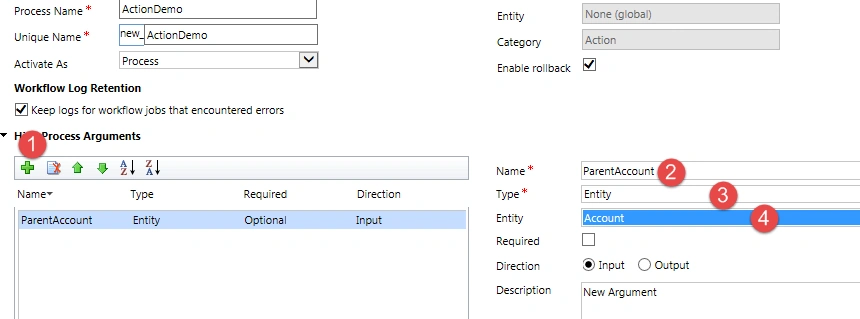

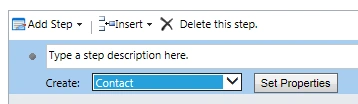
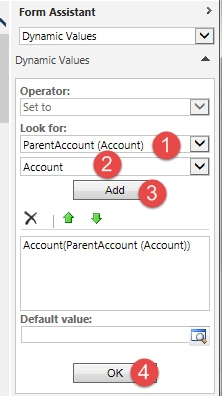


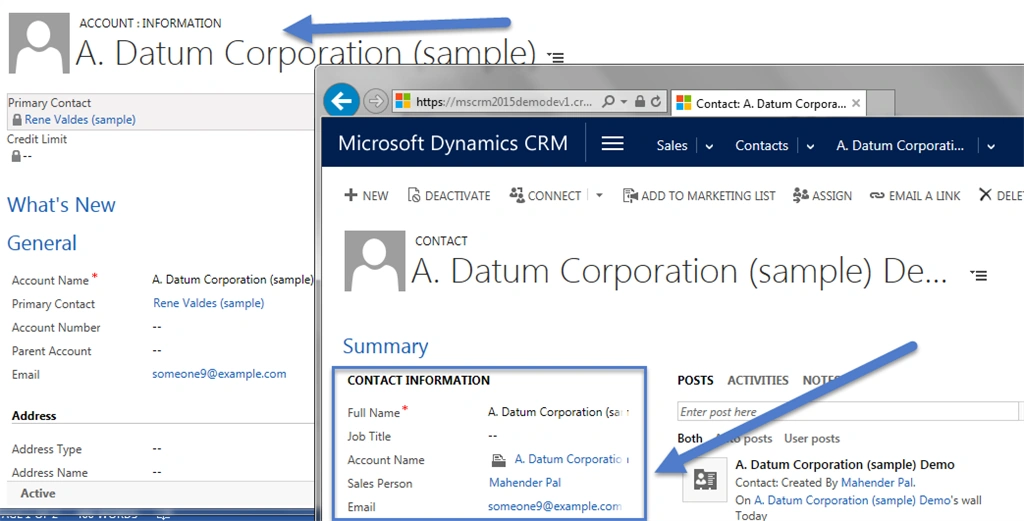
kirit kapuparaPosted Jan 21, 2016, 1:08 AM
hi my plugin was not called and no contact is generated as you define in you screenshot please help me and explain step in detail step by step below is my code. public void Execute(IServiceProvider serviceprovider) { try { ITracingService tracingService = (ITracingService)serviceprovider.GetService(typeof(ITracingService)); IPluginExecutionContext context = (IPluginExecutionContext)serviceprovider.GetService(typeof(IPluginExecutionContext)); Entity entity = (Entity)context.InputParameters["Target"]; IOrganizationService service = (IOrganizationService)serviceprovider.GetService(typeof(IOrganizationService)); //retrieve account record using that we want to create contact Entity accountObj = service.Retrieve("account", new Guid("8377FB0F-29CD-E411-80C2-00155D041617"), new ColumnSet(true)); //Create organization Request object and pass action name as parameter OrganizationRequest Req = new OrganizationRequest("new_actiondemo"); Req["ParentAccount"] = accountObj; //passing our first parameter // Req["Salesperson"] = new EntityReference("systemuser", new Guid("90322292-C8EC-4A72-8B32-B79DEF7DD31C")); //use execute method to call action OrganizationResponse Respons = service.Execute(Req); } catch (CommunicationException ex) { throw new InvalidPluginExecutionException(ex.ToString()); } }
Sanghamitra MohantyPosted Aug 25, 2015, 8:49 AM
Good one
Chervine BhiwooPosted Jul 15, 2015, 10:39 AM
Good one
Santhakumar MunuswamyPosted Jul 8, 2015, 3:04 PM
Thanks for nice article. keep it up
Gowtham RajamanickamPosted Jul 8, 2015, 12:23 PM
good one..
Debasis SahaPosted Jul 8, 2015, 11:27 AM
Thanks for the sharing
Neeraj KumarPosted Jul 8, 2015, 9:09 AM
Nice
Sibeesh VenuPosted Jul 8, 2015, 9:09 AM
Good One! Thanks for sharing
Gopi ChandPosted Jul 8, 2015, 7:46 AM
Good one