

Introduction
In this article, we will see how to use the Bing translation API to translate our text from one language to another language. As all of you know the Google API is no longer available free so our next choice must be Bing. So in this article, we will see how to use the Bing translation API.
In our application, we need to provide a translation facility to the user. Consider you are building a website in which you can help two people speaking two different languages, say one is French and the second knows English so we can translate their conversation with their respective languages.
Pre-requirements
To use Bing translation in your application, first, you need an API key which you can create here. Login using your Windows Live ID and password and create the application ID that we need in our application.
Step 1. First, create one ASP.Net website and design it to take input text from the user and their language of choice. For that, you can create one textbox to take input text and one dropdown list to take language choice but in this dropdown, you have to keep the value as a language code, like.
- For Hindi- hi-IN
- For French- fr
- For Spanish- es etc
Step 2. We will make a web request to the Bing translation service from our application by passing the parameters. This Bing translation service takes four parameters.
- Text To Convert
- Application Id
- From Language
- To Language
Prepare the one method which will call the Bing translation service available here with all required parameters like below.
private void TranslateText()
{
    string applicationid = "<your Bing appId>";
    string fromlanguage = "en"; // From language, change as needed
    string translatedText = ""; // Collect result here
    string texttotranslate = txttext.Text; // Text to be translated
    string tolanguage = ddltolang.SelectedValue.ToString(); // Target language

    // Preparing URL with all four parameters
    string uri = "http://api.microsofttranslator.com/v2/Http.svc/Translate?appId=" + applicationid +
                 "&text=" + texttotranslate + "&from=" + fromlanguage + "&to=" + tolanguage;

    // Making web request to URL
    HttpWebRequest request = (HttpWebRequest)WebRequest.Create(uri);

    // Getting response from API
    WebResponse response = request.GetResponse();
    Stream strm = response.GetResponseStream();
    StreamReader reader = new StreamReader(strm);

    // Reading result
    translatedText = reader.ReadToEnd();
    Response.Write("Converted Texts Are: " + translatedText);

    response.Close();
}
In the above code, we are making one web request to the Bing translation service with the application ID, text to translate, from language and to language and simply reading the response given by the Bing translation service.
Step 3. In the button click event, call the above method run your application, and see the result like below.
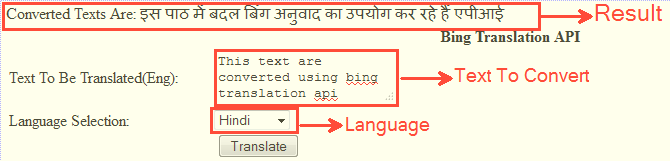
Conclusion
Using simple steps we can implement a translation service using Bing in our ASP.Net web application.
Pradeep PatelPosted Dec 16, 2013, 7:03 AM
Hiii Finally I've done with Google API if you want source code then click on this link http://www.c-sharpcorner.com/Forums/Thread/240459/ working 100%
Pradeep PatelPosted Dec 16, 2013, 12:00 AM
Actually I new and i want to implement this api in my web project please anybody help me out what is a Your
Pradeep PatelPosted Dec 15, 2013, 11:59 PM
What is a your bing appId?
Krishna GaradPosted Aug 16, 2012, 5:58 AM
your key may be wrong or fails to authenticate you.
sai sindhuPosted Jul 18, 2012, 10:51 AM
hi can any one tell me how to solve "The remote server returned an error: (400) Bad Request." in this particular line "WebResponse response = request.GetResponse();" please
sagar jjjjjPosted Mar 30, 2012, 6:37 AM
<string xmlns="http://schemas.microsoft.com/2003/10/Serialization/">????</string> ,,,sir i m getting this output when i gave input text as Sagar .....so plss help me out to get exact output...what i should i do if i wanna translate to kannada...pls help thanks
sagar jjjjjPosted Mar 30, 2012, 6:29 AM
hiiiiiii sir nice post but i got error as "The remote server returned an error: (400) Bad Request." in this particular line WebResponse response = request.GetResponse();... so pls help me out sir thanks in advance
sagar jjjjjPosted Mar 30, 2012, 6:27 AM
hi sir nice post but i got this error "The remote server returned an error: (400) Bad Request." in this particular line "WebResponse response = request.GetResponse();" can u pls help me out sir thank u in advance
Chris WendtPosted Feb 1, 2012, 9:25 PM
Hi Krishna, nice example. I need to point out that the Bing appid mechanism for using Translator is deprecated and will stop working. It is replaced by the much more secure Azure AccessToken mechanism, explained here: http://msdn.microsoft.com/en-us/library/hh454950.aspx. Chris Wendt Microsoft Translator
Arjun PanwarPosted Feb 1, 2012, 11:25 AM
This is useful for every one,Thanks
Amit MaheshwariPosted Feb 1, 2012, 11:03 AM
It's a very helpful to us, having great effort to accomplish such task thanks for sharing and keep it up...............
Stephen JohnsonPosted Feb 1, 2012, 3:17 AM
Its a very nice and useful article. I will surely try this.
Emmy DickensPosted Jan 31, 2012, 11:54 PM
Useful article,Thank you