
Let's create a new Silverlight Project SLSimpleCommands.
Let's add the following Dlls as references to the Silverlight project.
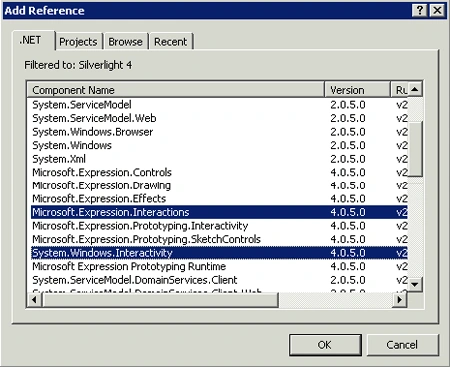
Create a ViewModel as shown below:
public class ViewModel
{
public ICommand PopupVM
{
get
{
return new InvokeChildCommand();
}
}
public class InvokeChildCommand : ICommand
public bool CanExecute(object parameter)
{
if (parameter != null)
{
CanExecuteChanged.Invoke(parameter, new EventArgs());
}
return true;
}
public event EventHandler CanExecuteChanged;
public void Execute(object parameter)
{
//Push the ViewModel into the Popup
Child child = new Child();
child.Show();
}
}
}
Add a new Child Window control to the project.
Let's move on to the MainPage.xaml.
<UserControl x:Class="SLSimpleCommands.MainPage"
xmlns="http://schemas.microsoft.com/winfx/2006/xaml/presentation"
xmlns:x="http://schemas.microsoft.com/winfx/2006/xaml"
xmlns:d="http://schemas.microsoft.com/expression/blend/2008"
xmlns:mc="http://schemas.openxmlformats.org/markup-compatibility/2006"
xmlns:i="http://schemas.microsoft.com/expression/2010/interactivity"
xmlns:local="clr-namespace:SLSimpleCommands.ViewModels"
mc:Ignorable="d"
d:DesignHeight="300" d:DesignWidth="400">
<UserControl.Resources>
<local:ViewModel x:Key="popup"></local:ViewModel>
</UserControl.Resources>
<Grid x:Name="LayoutRoot" Background="White" DataContext="{Binding Source={StaticResource popup}}">
<Ellipse Fill="#FFF4F4F5" Height="31" Margin="149,199,278,0" Stroke="Black" VerticalAlignment="Top">
<i:Interaction.Triggers>
<i:EventTrigger>
<i:InvokeCommandAction Command="{Binding PopupVM}"/>
</i:EventTrigger>
</i:Interaction.Triggers>
</Ellipse>
</Grid>
</UserControl>
Make sure you have added the namespaces as shown below:
xmlns:i="http://schemas.microsoft.com/expression/2010/interactivity"
xmlns:local="clr-namespace:SLSimpleCommands.ViewModels"
Also important is how I have bound the ViewModel to the Grid.
Add the ViewModel as a Resource.
<UserControl.Resources>
<local:ViewModel x:Key="popup"></local:ViewModel>
</UserControl.Resources>
Bind the ViewModel to the Grid as shown below :
<Grid x:Name="LayoutRoot" Background="White" DataContext="{Binding Source={StaticResource popup}}">
Now the ViewModel is available for any of the child controls of the Grid that want to use the the ViewModel.
Check out the use of InvokeCommandAction:
<i:Interaction.Triggers>
<i:EventTrigger>
<i:InvokeCommandAction Command="{Binding PopupVM}"/>
</i:EventTrigger>
</i:Interaction.Triggers>
The Trigger is triggered when the Ellipse is loaded hence as soon as the page opens the Child window opens with it .
Let's give it a run.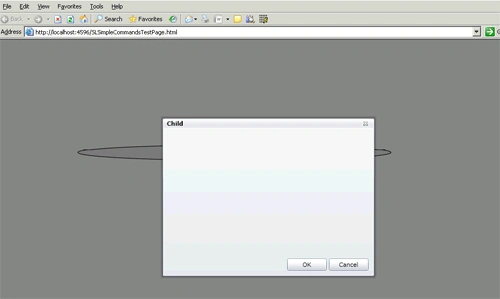
Join the conversation! Your thoughts help the community grow.