

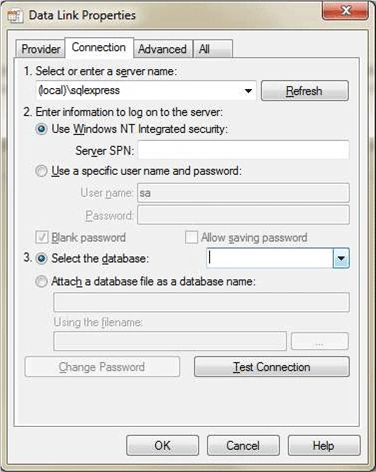
The DataLinksClass class in the Microsoft OLE DB Service Component Library can be used to dynamically create or modify a connection string during execution. The DataLinksClass class will show a dialog similar to the one shown by the Server Explorer in Visual Studio. I am not aware of an equivalent for ADO or for .Net but the connection string created by the DataLinksClass class can be used in the .Net OLE DB classes. The DataLinksClass can be used to create a connection string for most databases, including Access and SQL Server. The following shows samples of the dialog box from the DataLinksClass.
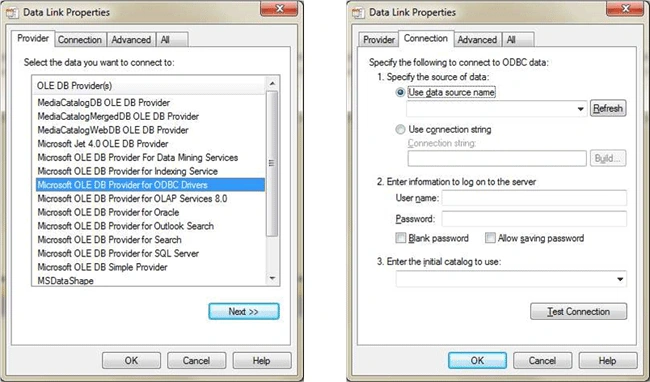
To use the DataLinksClass class, you must have a reference to the "Microsoft OLE DB Service Component 1.0 Type Library". Use the COM tab of the dialog for adding references to a project to add the reference. You will also need to use the OleDbConnection class in the COM version of ADO so you will need to have a reference to the "Microsoft ActiveX Data Objects 6.0 Library", except the version (6.0) can probably be a different version.
Creating a Connection String
Creating a connection string can be as easy as:
MSDASC.DataLinksClass dl = new MSDASC.DataLinksClass();ADODB.Connection c = dl.PromptNew() as ADODB.Connection;if (c == null)ConnectionString = "";elseConnectionString = c.ConnectionString;
The DataLinksClass class can do all the prompting for a connection string.
Hashim ShafiqPosted Aug 21, 2015, 10:17 PM
Nice