Create Table
You will find the table, given below, used in our Application:
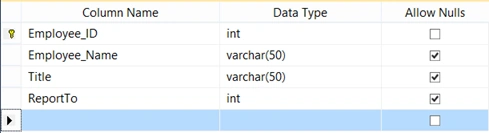
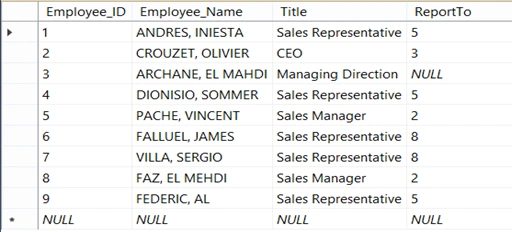
After creating the table, you can fill it, using the data, as shown below:
Create your MVC application
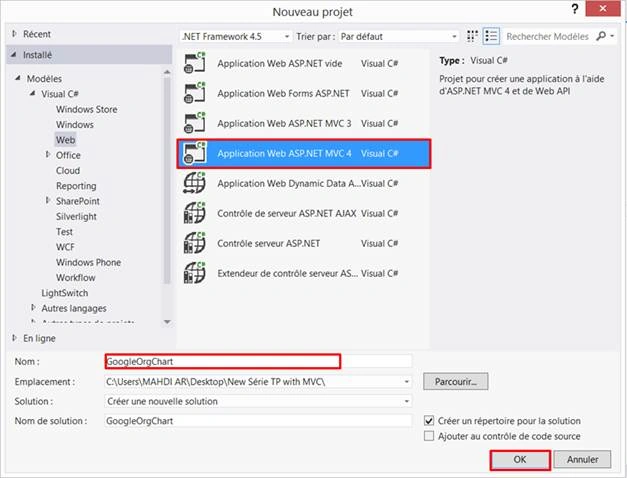
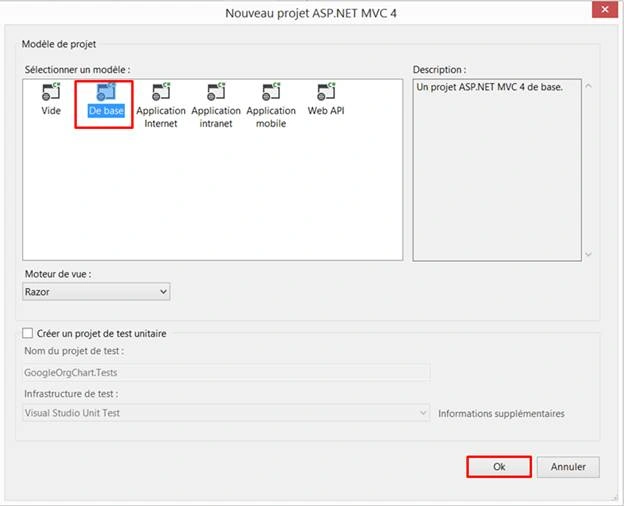
First, open Visual Studio. Click on File > New > Project and name your project, as shown below:
Creating ADO.NET Entity Data Model
You need to follow the steps, given below, to have the same result.
Right click on the project name. Click Add > Add New Item. In the dialog box displayed, select Data > click Add button.
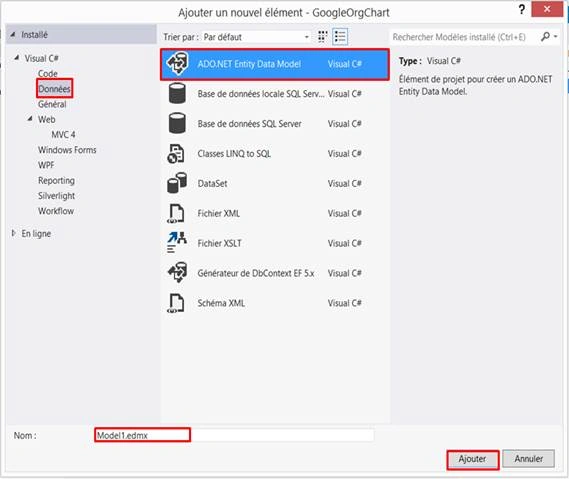
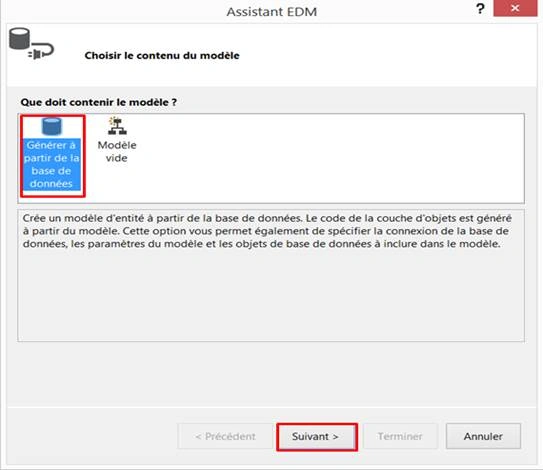
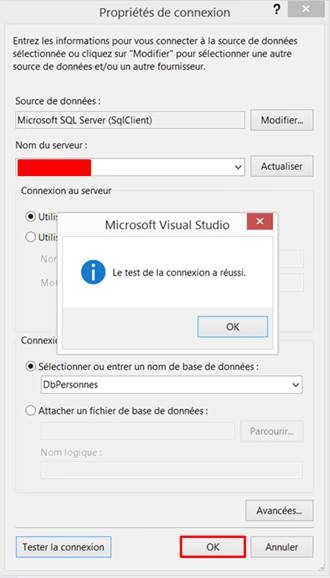
After clicking Next button, we will have the dialog box, given below. You need to choose your Server name and select your database. Finally, click OK.
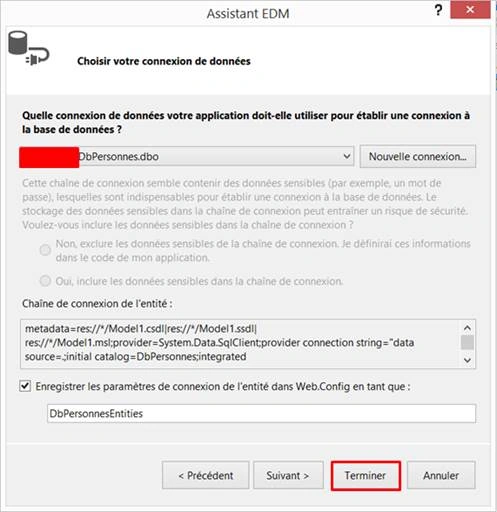
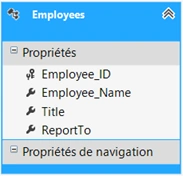
Finally, we see that EDMX model will generate Employees class.
Create a controller
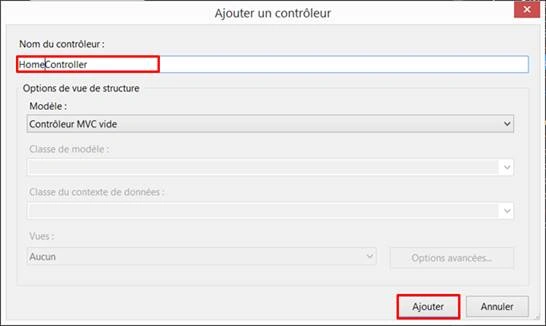
Now, we proceed to create a controller. Right click on controller folder > Add > Controller > Enter Controller name. In our case, it is ‘HomeController’.
HomeController.cs
- using System;
- using System.Collections.Generic;
- using System.Linq;
- using System.Web;
- using System.Web.Mvc;
-
- namespace GoogleOrgChart.Controllers
- {
- public class HomeController : Controller
- {
-
-
- private DbPersonnesEntities db = new DbPersonnesEntities();
-
-
-
-
- public ActionResult Index()
- {
- return View();
- }
-
- public JsonResult GetEmployee()
- {
- var DbResult = db.Employees.ToList();
-
- return Json(DbResult, JsonRequestBehavior.AllowGet);
- }
-
- }
- }
As you can see, I am creating GetEmployee() action, that should be used to retrieve the data from Employees table and return the output in JSON format.
Creating a strongly typed view
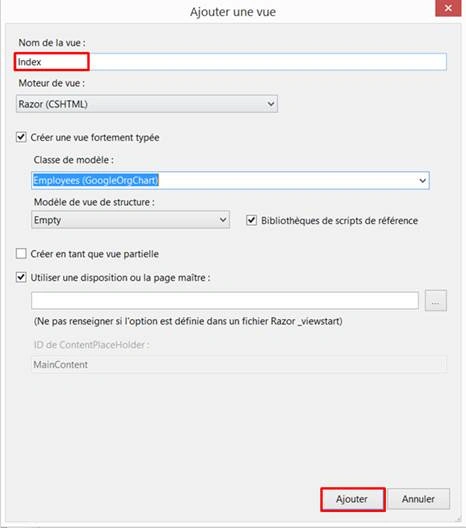
We are going to create a strongly typed view.
Populate Google Organizational Chart from the database
Index.cshtml
- @model GoogleOrgChart.Employees
-
- @{
- ViewBag.Title = "Google Org Chart";
- }
-
- <h2 style="text-align: center;"> Google org chart - ASP.NET MVC 4 </h2>
- <div id="chartOrg">
- </div>
-
- @section scripts
- {
-
- <script type="text/javascript" src="http://ajax.googleapis.com/ajax/libs/jquery/1.8.3/jquery.min.js"></script>
- <script type="text/javascript" src="https://www.google.com/jsapi"></script>
-
- <script type="text/javascript">
-
- google.load("visualization", "1", { packages: ["orgchart"] });
-
- google.setOnLoadCallback(drawChart);
-
- function drawChart() {
-
- $.ajax({
-
- type: "POST",
- url: "Home/GetEmployee",
- data: '{}',
- contentType: "application/json; charset=utf-8",
- dataType: "json",
- success: function (dt) {
-
- var dataArray = [];
-
- $.each(dt, function (i, item) {
- dataArray.push([item.Employee_ID, item.Employee_Name, item.Title, item.ReportTo]);
- });
-
-
-
- var data = new google.visualization.DataTable();
-
- data.addColumn('string', 'Entity');
- data.addColumn('string', 'ReportEntity');
- data.addColumn('string', 'ToolTip');
-
-
- for (var i = 0; i < dataArray.length; i++) {
-
- var Employee_ID = dataArray[i][0].toString();
- var Employee_Name = dataArray[i][1];
- var Title = dataArray[i][2];
- var ReportTo = dataArray[i][3] != null ? dataArray[i][3].toString() : '';
-
- data.addRows([[{
- v: Employee_ID,
- f: Employee_Name + '<br/><b>' + Title + '</b>'
- }, ReportTo, Title]]);
- }
-
-
- var chart = new google.visualization.OrgChart($("#chartOrg")[0]);
- chart.draw(data, { allowHtml: true });
-
- },
- failure: function (dt) {
- alert(dt);
- },
- error: function (dt) {
- alert(dt);
- }
- });
- }
- </script>
- }
The first thing is to load the Google Organizational chart API, as given below:
-
-
- <script type="text/javascript" src="http://ajax.googleapis.com/ajax/libs/jquery/1.8.3/jquery.min.js"></script>
- <script type="text/javascript" src="https://www.google.com/jsapi"></script>
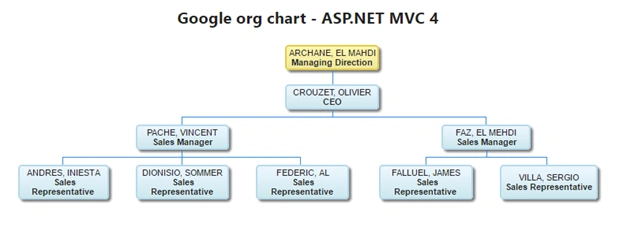
When we receive the AJAX response, an object of Google Visualization is created. This object must contain three columns respectively namely Entity, ReportEntity and ToolTip.
Note
- Entity: This column consists of two properties.
- V: It stores the unique identifier of the entity. In our case, it is Employee_ID.
- F: It stores the details of the entity. In this example, we use Employee_Name, Title.
- ReportEntity: This column stores the unique identifier of the ReportEntity. In this example, it is ReportTo.
- ToolTip: It is used to bind ToolTip to the entity (it is not mandatory).
Output

Imran AliPosted Apr 27, 2021, 4:48 PM
GREAT wORK!!!! Can you share example related to glass cutting optimization with graph????
srinivasan kamalPosted Nov 21, 2017, 5:50 AM
How to change the orientation of the chart?.I want to display the chart from left to right
Vignesh ManiPosted Jul 18, 2016, 6:25 PM
Nice
Humayun Kabir MamunPosted Jul 18, 2016, 9:13 AM
Helpful...
Asad AliPosted Jul 18, 2016, 3:10 AM
Good one
Sanjay KumarPosted Jul 18, 2016, 1:56 AM
Nice article
kalu singh raoPosted Jul 18, 2016, 1:43 AM
Nice...
Raja TPosted Jul 18, 2016, 12:26 AM
Good,Thanks for sharing..