

I was working on a really nice Windows Phone 8 application that uses geolocation techniques to pinpoint a current location. This will track where someone goes and when. In my point of view, ths is awesome. This article is all about sharing the basics of such application. To get the latitude and longitude location co-ordinates via GPS.
To start of with, let's create a Windows Phone 8 application project:
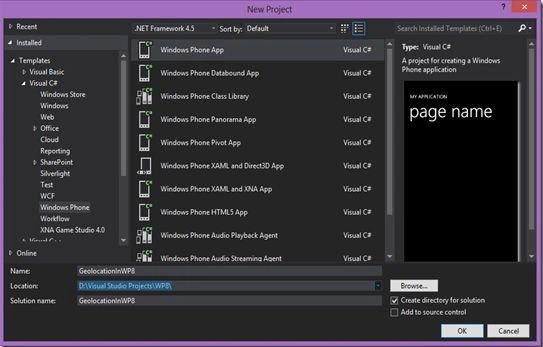
Name the project and click "Ok". Choose your desired Windows Phone OS to work with. In our case we are choosing OS version 8.0.
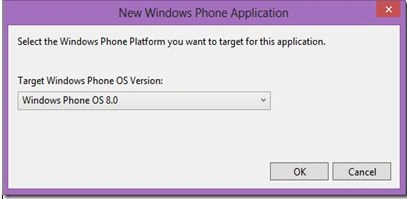
After selecting the OS version, Visual Studio might take some time to prepare your project. Once done, you will have a mainpage.xaml presented. We might not want to do anything on the mainpage's XAML as of now. But we do want to write some code, so navigate to the mainpage.xaml.cs file. At the very beginning, mainpage.xaml.cs will have more comments than code.
- using System;
- using System.Collections.Generic;
- using System.Linq;
- using System.Net;
- using System.Windows;
- using System.Windows.Controls;
- using System.Windows.Navigation;
- using Microsoft.Phone.Controls;
- using Microsoft.Phone.Shell;
- using GeolocationInWP8.Resources;
- namespace GeolocationInWP8
- {
- public partial class MainPage : PhoneApplicationPage
- {
- // Constructor
- public MainPage()
- {
- InitializeComponent();
- // Sample code to localize the ApplicationBar
- // BuildLocalizedApplicationBar();
- }
- // Sample code for building a localized ApplicationBar
- //private void BuildLocalizedApplicationBar()
- //{
- // // Set the page's ApplicationBar to a new instance of ApplicationBar.
- // ApplicationBar = new ApplicationBar();
- // // Create a new button and set the text value to the localized string from AppResources.
- // ApplicationBarIconButton appBarButton =
- //new ApplicationBarIconButton
- //(new Uri("/Assets/AppBar/appbar.add.rest.png", UriKind.Relative));
- // appBarButton.Text = AppResources.AppBarButtonText;
- // ApplicationBar.Buttons.Add(appBarButton);
- // // Create a new menu item with the localized string from AppResources.
- // ApplicationBarMenuItem appBarMenuItem =
- //new ApplicationBarMenuItem(AppResources.AppBarMenuItemText);
- // ApplicationBar.MenuItems.Add(appBarMenuItem);
- //}
- }
- }
I suggest you to remove all the commented code since it's not doing anything more than creating confusion. So our mainpage code will dramatically shrink to:
- using System;
- using System.Collections.Generic;
- using System.Linq;
- using System.Net;
- using System.Windows;
- using System.Windows.Controls;
- using System.Windows.Navigation;
- using Microsoft.Phone.Controls;
- using Microsoft.Phone.Shell;
- using GeolocationInWP8.Resources;
- namespace GeolocationInWP8
- {
- public partial class MainPage : PhoneApplicationPage
- {
- public MainPage()
- {
- InitializeComponent();
- }
- }
- }
- Ain't that looking simple? Next is to initialize the GPS watcher:
- private void GetCoordinate()
- {
- var watcher = new GeoCoordinateWatcher(GeoPositionAccuracy.High)
- {
- MovementThreshold = 1
- };
- watcher.PositionChanged += this.watcher_PositionChanged;
- watcher.Start();
- }
- The function above will start the watcher and will create a position changed event that will always trigger when either of the GPS coordinates (Latitude or Longitude) change.
- private void watcher_PositionChanged(object sender, GeoPositionChangedEventArgs<GeoCoordinate> e)
- {
- var pos = e.Position.Location;
- LatitudeVal.Text = pos.Latitude.ToString("0.000");
- LongitudeVal.Text = pos.Longitude.ToString("0.000");
- }
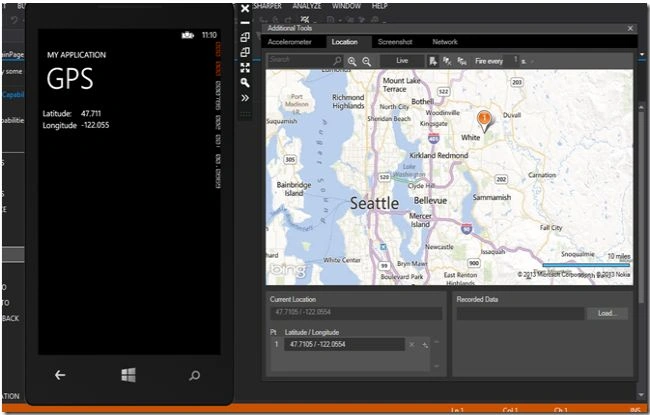
When the change in position occures, we take the value of the Latitude and Longitude and push them all the way to the textblocks we will create in the mainpage.xaml. Let's now move to our XAML of the mainpage. We will do two things here. The first is to create the Loaded event of the mainpage; this is invoked when the mainpage loads at the very beginning. The second is to create Textblocks to display the values onto the screen.
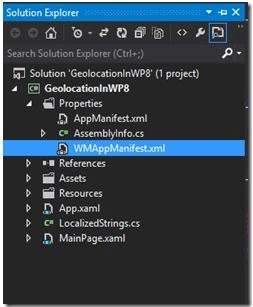
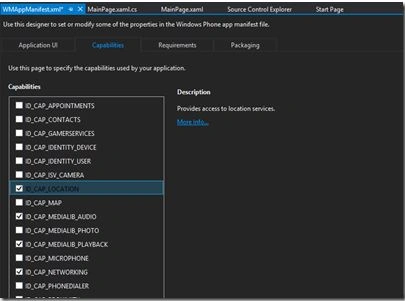
Artem MavrichPosted Feb 17, 2016, 5:21 PM
when I use windows phone emulation i can see >> where i can change my coordinaates in additional tools, but when i am debugging on my real device i cant see it. So how can i use your programm? help me please
hirachand mudhalePosted Oct 16, 2014, 7:37 AM
hey will u please give me vs 2013 ultimate version download link
Vithal WadjePosted Oct 12, 2014, 1:38 PM
good one keep it up
Prakash TripathiPosted Mar 8, 2014, 11:19 AM
Hi, Have you tried running this on Windows Phone 8 device? I tried but it's not running. Also can you please tell why always the location is showing as Seattle?