Introduction
In this article, we are going to learn how to use a Client-side Grid (DataTables Grid) with ASP.NET Core MVC in a step-by-step manner. A few months back, while interviewing for my company, I asked most developers what kind of Grids they were using in their current projects. Most people answered with a “DataTables Grid”. The next question was, why? The answer was: "Because it is easy to use and it is open-source”.
Now, in this ongoing era of web development, most of the work is done on the Client-side and less work is done on the server side.
As you know, there are no inbuilt Grids in ASP.NET Core. You need to either create your own or use third-party Grids available from the NuGet package. The best option is to use the client-side grid. In this article, I am going to use the jQuery DataTables Grid.
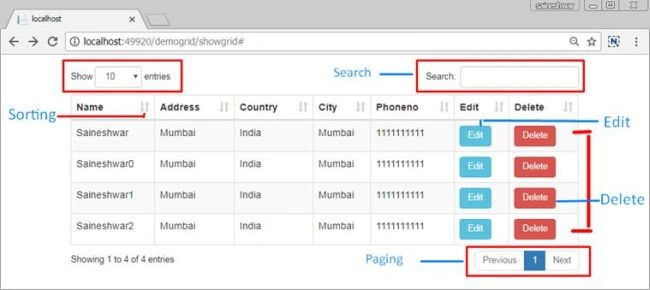
Let’s start with the database part first.
Database Part
I have created a database with the name “CustomerDB”. In that, it has a “CustomerTB” table.
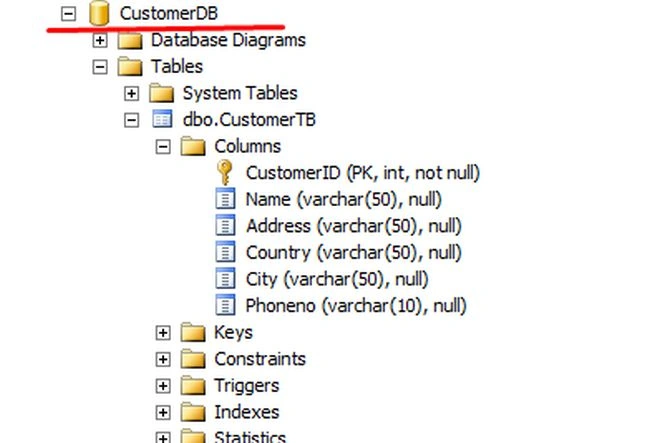
Next, we are going to create an ASP.NET Core MVC Web application.
Creating ASP.NET Core MVC Web Application
Open a New Visual Studio 2017 IDE.
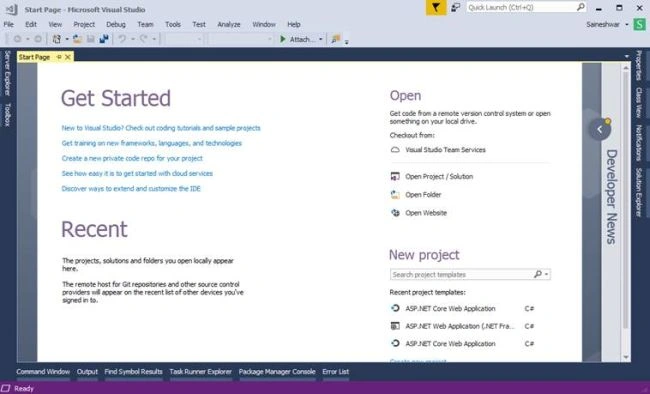
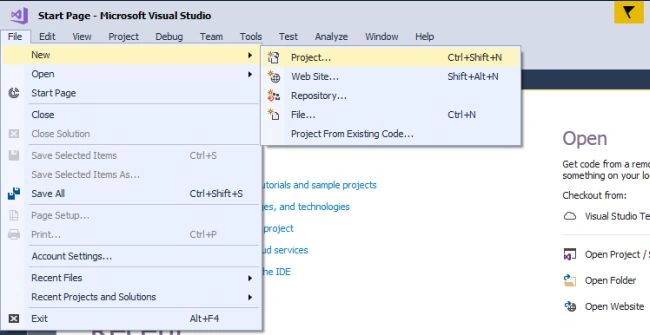
After opening IDE, next, we are going to create the ASP.NET Core MVC project. For that, just click on File >> New >> Project.
After choosing a project, a new dialog will pop up with the name “New Project”. In that, we are going to choose Visual C# Project Templates >> Web >> ASP.NET Core Web Application. Then, we are going to name the project “ExampleGrid”.
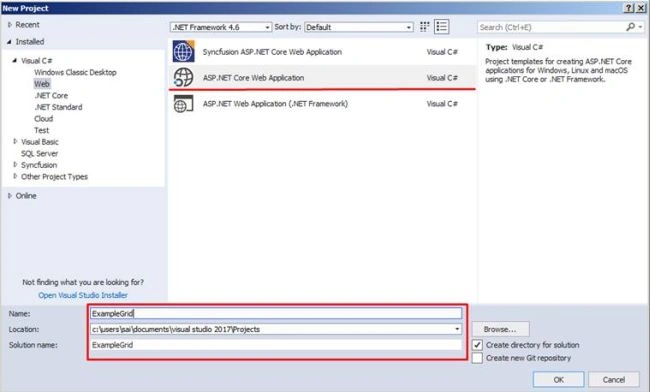
After naming the project, we are going to click on the OK button to create a project. A new dialog will pop up for choosing templates to create an “ASP.NET Core Web Application”. In that template, we are going to create an MVC application. That's why we are going to choose “Web Application (Model View Controller)”. Next, we will have the option to choose framework 1.) Net core, or, 2.) .NET Framework. Also, there's the ASP.NET Core Version. For that, we are going to choose “.NET Framework” and “ASP.NET Core 1.1” as the ASP.NET Core Version. Click on the OK button to create a project.
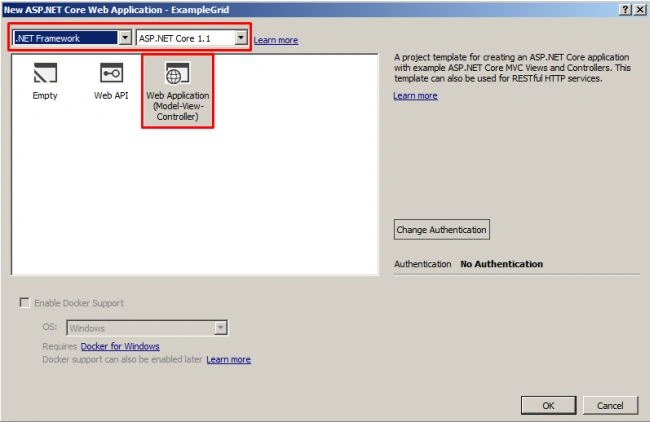
After clicking on the OK button, it will start to create a project.
Project structure
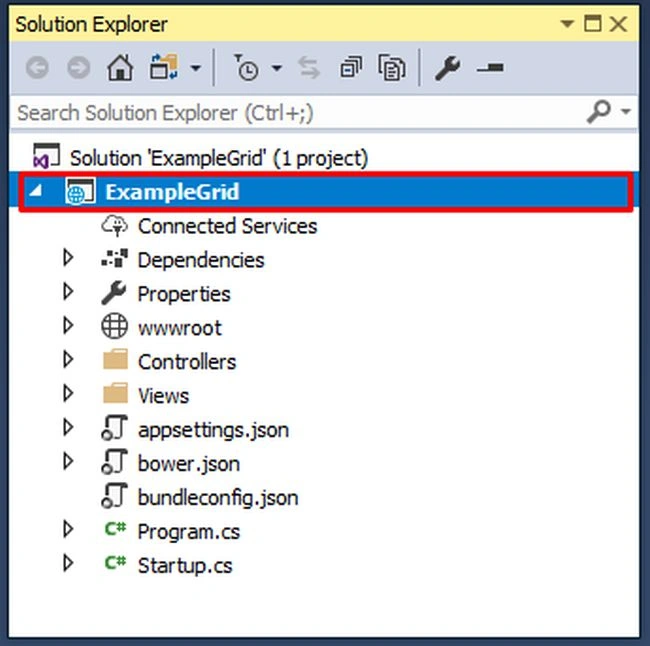
After creating the application, next, we have to add the references needed for Entity Framework Core.
Installing the Package for Entity Framework Core from NuGet
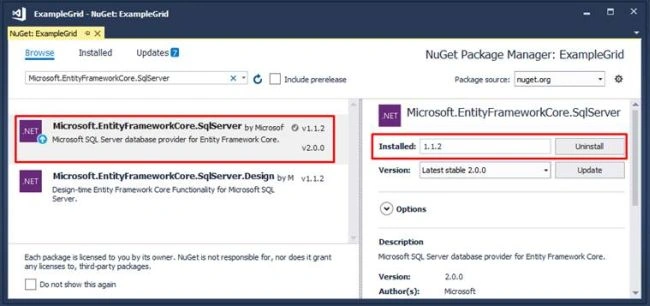
To install the package, just right-click on the project (ExampleGrid) and then select the Manage NuGet package. The below dialog of the NuGet Package Manager will pop up.
In the browse tab, type “Microsoft.EntityFrameworkCore.SqlServer” in the search box and just click on the Install button.
Microsoft.EntityFrameworkCore.SqlServer
Adding a connection string and setting up DbContext
After adding a reference, now add a connection string in the appsetting.json file.
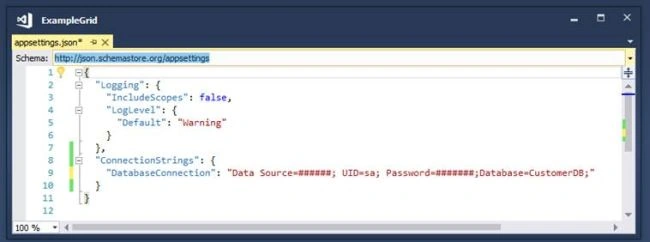
After adding a connection string, the next step is to add a class that will inherit the DbContext class. Before doing this, let's start with creating a folder for models. Inside that, we are going to add this class.
For adding a folder, just right-click on the project (ExampleGrid), then choose Add from the menu that pops up. Inside that, choose New Folder.
Add New Folder.
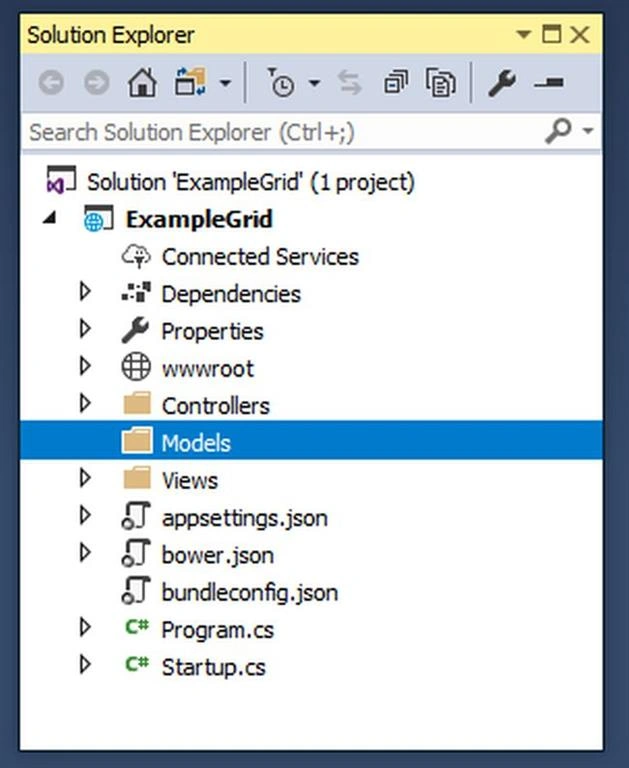
Now, let’s add a class with the name DatabaseContext in the Models folder.
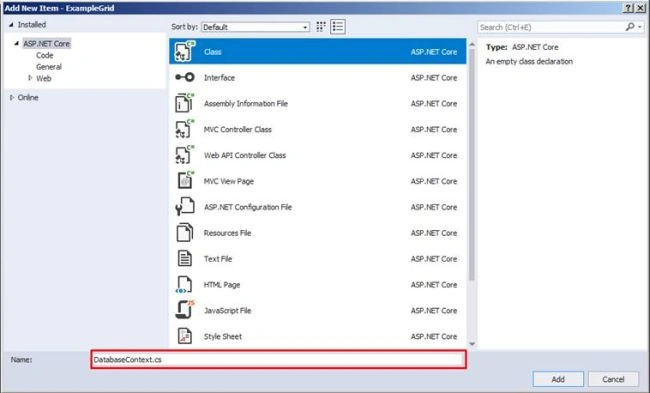
To add a model, just right-click on the Models folder. Then, select Add >> Class. An "Add New Item" dialog will pop up with the default class selected. Name the class as DatabaseContext and click on the Add button.
After adding a DatabaseContext class, next, we are going to inherit the DbContext class.
After inheriting with DbContext, next, we create a constructor that takes DbContextOptions as an input parameter and also inherits the base class constructor (: base(options)) [DbContext].
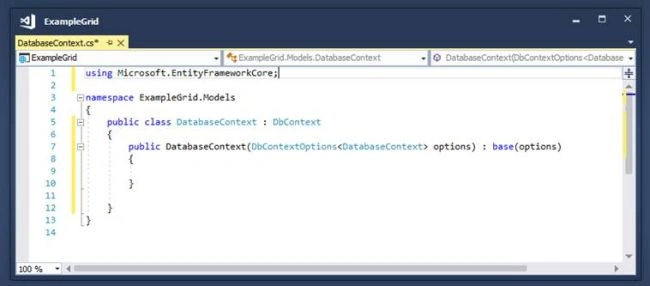
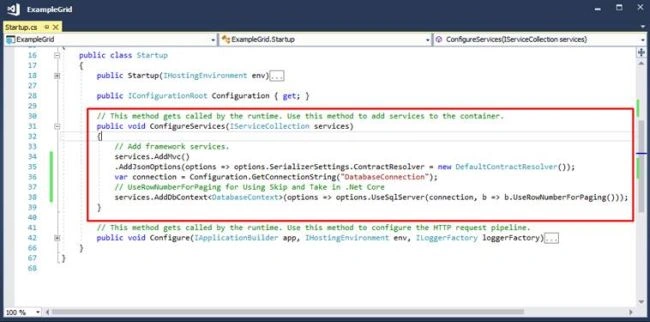
Next, we are going to add a new Service in Startup.cs class for injecting dependency.
Now, whenever you use the DatabaseContext class, the DbContext instance will be injected there.
Adding Model CustomerTB
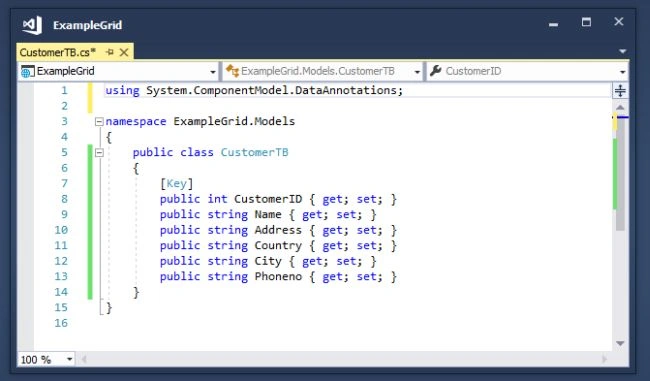
After adding the customer Model, in our next step, we are going to add the best of all models in the DatabaseContext class.
Adding DbSet for CustomerTB Model in DatabaseContext class
Now, let's add DbSet for the CustomerTB Model in the DatabaseContext class, as shown below.
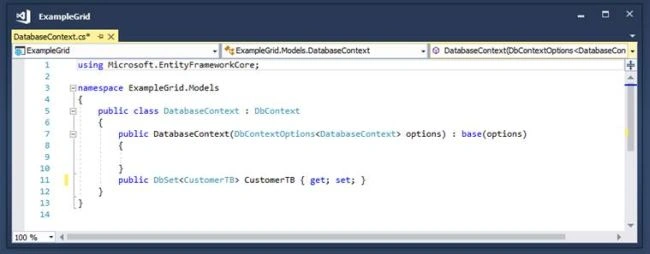
After adding the CustomerTB Model in the DatabaseContext class, in the next step, we are going to create a controller.
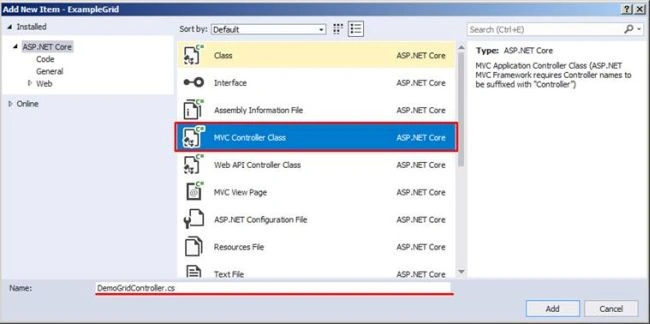
After we click on the Add button, it has created DemoGridController in the Controller folder, as shown in the below screenshot.
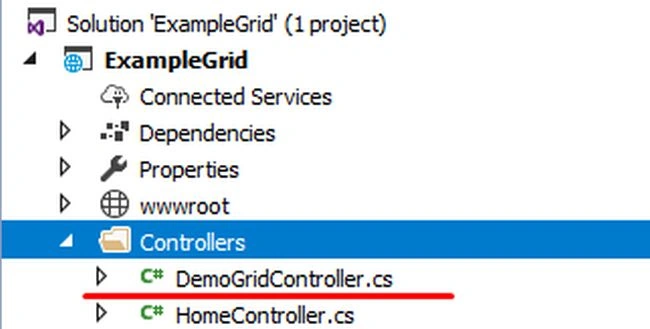
After adding DemoGridController, next, we are going to download DataTables Scripts and add it to the project.
Getting DataTables Scripts
The following Javascript library files are used in this example.
The following CSS files are used in this example.
Bootstrap v3.3.7
https://getbootstrap.com/docs/3.3/getting-started/
DataTables CSS files
https://cdn.datatables.net/1.10.15/css/dataTables.bootstrap.min.css https://cdn.datatables.net/responsive/2.1.1/css/responsive.bootstrap.min.css
Adding ShowGrid Action Method in DemoGrid Controller
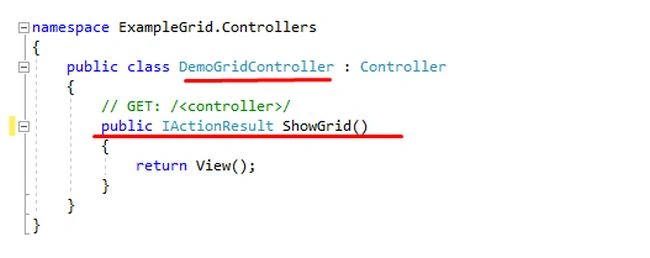
After adding the Action Method, now let's add a View with the name “ShowGrid”.
Adding ShowGrid View in DemoGrid Folder
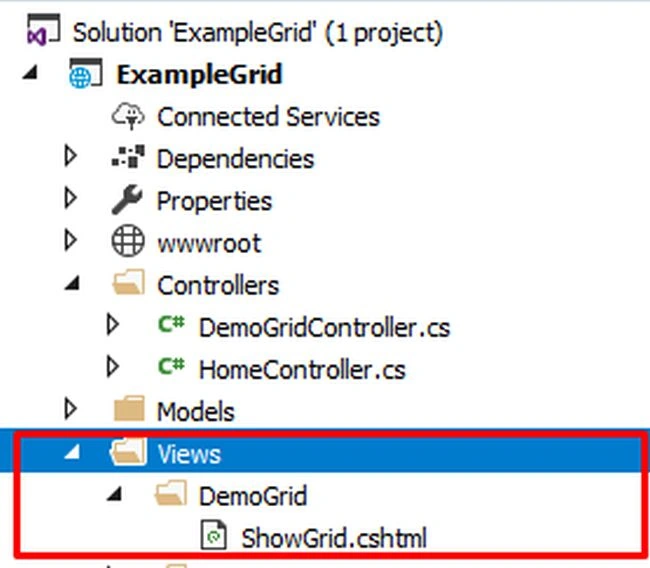
Adding DataTables Grid to ShowGrid View
In the first step, we will add Script and CSS references.
<script src="//ajax.googleapis.com/ajax/libs/jquery/1.11.1/jquery.min.js"></script>
<link href="~/lib/bootstrap/dist/css/bootstrap.css" rel="stylesheet" />
<link href="https://cdn.datatables.net/1.10.15/css/dataTables.bootstrap.min.css" rel="stylesheet" />
<link href="https://cdn.datatables.net/responsive/2.1.1/css/responsive.bootstrap.min.css" rel="stylesheet" />
<script src="https://cdn.datatables.net/1.10.15/js/jquery.dataTables.min.js"></script>
<script src="https://cdn.datatables.net/1.10.15/js/dataTables.bootstrap4.min.js "></script>
After adding Script and CSS references, next, we are going to add a Datatables Markup.
Adding DataTables Markup
This is a simple HTML Table where we are going to add column headers, (“<th>”), which will show all columns names that we want to display.
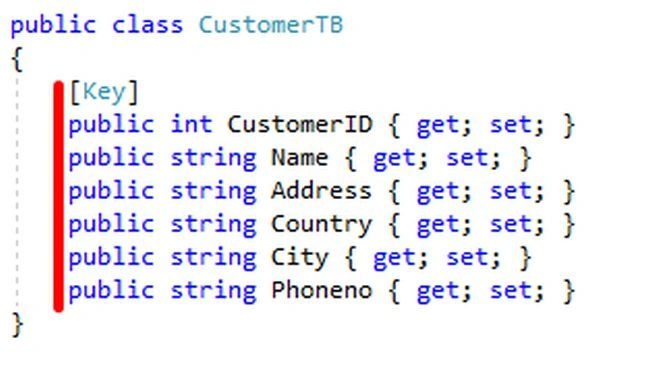
<div class="container">
    <br />
    <div style="width:90%; margin:0 auto;">
        <table id="example" class="table table-striped table-bordered dt-responsive nowrap" width="100%" cellspacing="0">
            <thead>
                <tr>
                    <th>CustomerID</th>
                    <th>Name</th>
                    <th>Address</th>
                    <th>Country</th>
                    <th>City</th>
                    <th>Phoneno</th>
                    <th>Edit</th>
                    <th>Delete</th>
                </tr>
            </thead>
        </table>
    </div>
</div>
After adding Markup, next, we are going to add a data table function to create data tables.
Adding DataTables Function to Create DataTables
Basic syntax
$('#example').dataTable({
});
DataTables Options
All definitions are taken from the https://datatables.net website.
- Processing: Enables or disables the display of a 'processing' indicator when the table is being processed (e.g. a sort).
- ServerSide: Server-side processing - where filtering, paging, and sorting calculations are all performed by a server.
- Filter: this option is used for enabling and disabling of the search box
- OrderMulti: When ordering is enabled (ordering), by default DataTables allows users to sort multiple columns by shift-clicking upon the header cell for each column. Although this can be quite useful for users, it can also increase the complexity of the order, potentially increasing the processing time of ordering the data. Therefore, this option is provided to allow this shift-click multiple-column ability
- Ajax: Ajax request is made to get data to DataTables.
- ColumnDefs: Set column definition initialization properties.
- Columns: Set column-specific initialization properties.
After completing an understanding of options or properties we are going to set it.
We are going to set the “processing” option to true to display the processing bar, after that, we are going to set the “serverSide” option to true because we are going to do paging and filtering at the serverSide.
The next option after the “serverSide” option is “filter.” We are going to use the search box; that's why we have set this property to true, “orderMulti” is also set to false because we do not want to sort multiple columns at once.
DataTables Options Snapshot

Ajax option
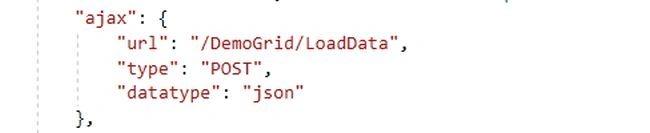
The main option is Ajax, which we are going to use for calling an Action Method for getting data to bind the DataTables Grid. The data is in JSON format. For that, we are going to pass the URL: -"/DemoGrid/LoadData”. This request is a Post request. We are going to set the data type as JSON.
Next, we are going to call the LoadData Action Method, which is under the DemoGrid Controller that I will explain in the upcoming steps.
E.g.
Columns Option
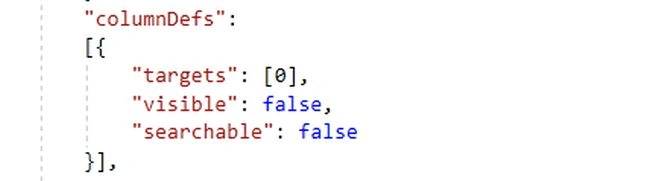
After setting Ajax, we have a “columnDefs” option that I have used for hiding the Primary key of the table (“CustomerID”) and that should also be unsearchable.
E.g.
Columns option
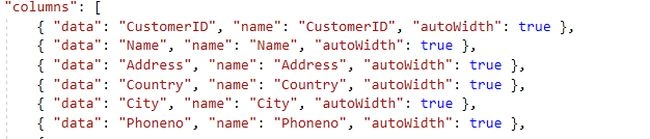
Finally, the second to last option is columns that are used for the initialization of the DataTables grid. Add the property that you need to render on the grid, which must be defined in this column's option.
E.g.
Render Buttons in columns
Finally, we need to render a button in the grid for editing and deleting data.
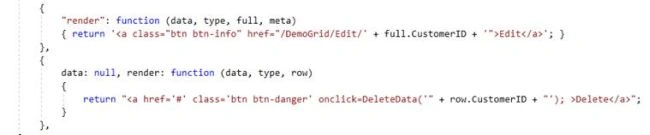
Finally, when clicking the delete button, we can call a custom function to delete data, as I have created the “DeleteData” function.
Complete the Code Snippet of ShowGrid View.
@{
    Layout = null;
}
<script src="//ajax.googleapis.com/ajax/libs/jquery/1.11.1/jquery.min.js"></script>
<link href="~/lib/bootstrap/dist/css/bootstrap.css" rel="stylesheet" />
<link href="https://cdn.datatables.net/1.10.15/css/dataTables.bootstrap.min.css" rel="stylesheet" />
<link href="https://cdn.datatables.net/responsive/2.1.1/css/responsive.bootstrap.min.css" rel="stylesheet" />
<script src="https://cdn.datatables.net/1.10.15/js/jquery.dataTables.min.js"></script>
<script src="https://cdn.datatables.net/1.10.15/js/dataTables.bootstrap4.min.js"></script>
<div class="container">
    <br />
    <div style="width:90%; margin:0 auto;">
        <table id="example" class="table table-striped table-bordered dt-responsive nowrap" width="100%" cellspacing="0">
            <thead>
                <tr>
                    <th>CustomerID</th>
                    <th>Name</th>
                    <th>Address</th>
                    <th>Country</th>
                    <th>City</th>
                    <th>Phoneno</th>
                    <th>Edit</th>
                    <th>Delete</th>
                </tr>
            </thead>
        </table>
    </div>
</div>
<script>
    $(document).ready(function() {
        $("#example").DataTable({
            "processing": true, // for show progress bar
            "serverSide": true, // for process server side
            "filter": true, // this is for disable filter (search box)
            "orderMulti": false, // for disable multiple column at once
            "ajax": {
                "url": "/DemoGrid/LoadData",
                "type": "POST",
                "datatype": "json"
            },
            "columnDefs": [{
                "targets": [0],
                "visible": false,
                "searchable": false
            }],
            "columns": [
                { "data": "CustomerID", "name": "CustomerID", "autoWidth": true },
                { "data": "Name", "name": "Name", "autoWidth": true },
                { "data": "Address", "name": "Address", "autoWidth": true },
                { "data": "Country", "name": "Country", "autoWidth": true },
                { "data": "City", "name": "City", "autoWidth": true },
                { "data": "Phoneno", "name": "Phoneno", "autoWidth": true },
                {
                    "render": function(data, type, full, meta) {
                        return '<a class="btn btn-info" href="/DemoGrid/Edit/' + full.CustomerID + '">Edit</a>';
                    }
                },
                {
                    data: null,
                    render: function(data, type, row) {
                        return "<a href='#' class='btn btn-danger' onclick=DeleteData('" + row.CustomerID + "');>Delete</a>";
                    }
                },
            ]
        });
    });
    function DeleteData(CustomerID) {
        if (confirm("Are you sure you want to delete ...?")) {
            Delete(CustomerID);
        } else {
            return false;
        }
    }
    function Delete(CustomerID) {
        var url = '@Url.Content("~/")' + "DemoGrid/Delete";
        $.post(url, { ID: CustomerID }, function(data) {
            if (data) {
                oTable = $('#example').DataTable();
                oTable.draw();
            } else {
                alert("Something Went Wrong!");
            }
        });
    }
</script>
After finishing the initialization of the DataTables grid, we are going to create a LoadData Action Method.
Adding LoadData action method to demoGrid controller
Here, we are going to Add an Action Method with the name LoadData. In this action method, we are going to get all Customer records from the database to display. Based on the parameter, we are going to sort data and do paging with data.
We are doing paging and filtering of data on the server side; that is why we are using IQueryable which will execute queries with filters on the server side.

For using OrderBy in the query, we need to install System.Linq.Dynamic package from NuGet packages.
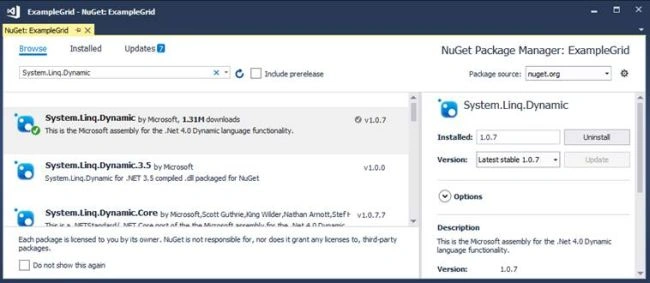
After adding the package, next, we see the complete code snippet and how to get data and do paging and filtering with it.
Complete code snippet of LoadData action method
All processes are step-by-step with comments, so it's easy to understand.
All Request. Form parameters value will get populated when the AJAX post method gets called on load.
public IActionResult LoadData()
{
    try
    {
        var draw = HttpContext.Request.Form["draw"].FirstOrDefault();
        // Skip number of Rows count
        var start = Request.Form["start"].FirstOrDefault();
        // Paging Length 10, 20
        var length = Request.Form["length"].FirstOrDefault();
        // Sort Column Name
        var sortColumn = Request.Form["columns[" + Request.Form["order[0][column]"].FirstOrDefault() + "][name]"].FirstOrDefault();
        // Sort Column Direction (asc, desc)
        var sortColumnDirection = Request.Form["order[0][dir]"].FirstOrDefault();
        // Search Value from (Search box)
        var searchValue = Request.Form["search[value]"].FirstOrDefault();
        // Paging Size (10, 20, 50, 100)
        int pageSize = length != null ? Convert.ToInt32(length) : 0;
        int skip = start != null ? Convert.ToInt32(start) : 0;
        int recordsTotal = 0;
        // getting all Customer data
        var customerData = (from tempcustomer in _context.CustomerTB
                            select tempcustomer);
        // Sorting
        if (!(string.IsNullOrEmpty(sortColumn) && string.IsNullOrEmpty(sortColumnDirection)))
        {
            customerData = customerData.OrderBy(sortColumn + " " + sortColumnDirection);
        }
        // Search
        if (!string.IsNullOrEmpty(searchValue))
        {
            customerData = customerData.Where(m => m.Name == searchValue);
        }
        // total number of rows counts
        recordsTotal = customerData.Count();
        // Paging
        var data = customerData.Skip(skip).Take(pageSize).ToList();
        // Returning Json Data
        return Json(new { draw = draw, recordsFiltered = recordsTotal, recordsTotal = recordsTotal, data = data });
    }
    catch (Exception)
    {
        throw;
    }
}
Complete code Snippet of DemoGridController
In this part, we are using constructor injection to inject DBContext dependencies. By using DBContext, we are getting all customer data from the database.
using System;
using System.Collections.Generic;
using System.Linq;
using System.Threading.Tasks;
using Microsoft.AspNetCore.Mvc;
using ExampleGrid.Models;
using System.Linq.Dynamic;
// For more information on enabling MVC for empty projects, visit https://go.microsoft.com/fwlink/?LinkID=397860
namespace ExampleGrid.Controllers
{
    public class DemoGridController : Controller
    {
        private DatabaseContext _context;
        public DemoGridController(DatabaseContext context)
        {
            _context = context;
        }
        // GET: /<controller>/
        public IActionResult ShowGrid()
        {
            return View();
        }
        public IActionResult LoadData()
        {
            try
            {
                var draw = HttpContext.Request.Form["draw"].FirstOrDefault();
                // Skipping number of Rows count
                var start = Request.Form["start"].FirstOrDefault();
                // Paging Length 10, 20
                var length = Request.Form["length"].FirstOrDefault();
                // Sort Column Name
                var sortColumn = Request.Form["columns[" + Request.Form["order[0][column]"].FirstOrDefault() + "][name]"].FirstOrDefault();
                // Sort Column Direction (asc, desc)
                var sortColumnDirection = Request.Form["order[0][dir]"].FirstOrDefault();
                // Search Value from (Search box)
                var searchValue = Request.Form["search[value]"].FirstOrDefault();
                // Paging Size (10, 20, 50, 100)
                int pageSize = length != null ? Convert.ToInt32(length) : 0;
                int skip = start != null ? Convert.ToInt32(start) : 0;
                int recordsTotal = 0;
                // Getting all Customer data
                var customerData = (from tempcustomer in _context.CustomerTB
                                    select tempcustomer);
                // Sorting
                if (!(string.IsNullOrEmpty(sortColumn) && string.IsNullOrEmpty(sortColumnDirection)))
                {
                    customerData = customerData.OrderBy(sortColumn + " " + sortColumnDirection);
                }
                // Search
                if (!string.IsNullOrEmpty(searchValue))
                {
                    customerData = customerData.Where(m => m.Name == searchValue);
                }
                // Total number of rows count
                recordsTotal = customerData.Count();
                // Paging
                var data = customerData.Skip(skip).Take(pageSize).ToList();
                // Returning Json Data
                return Json(new { draw = draw, recordsFiltered = recordsTotal, recordsTotal = recordsTotal, data = data });
            }
            catch (Exception)
            {
                throw;
            }
        }
    }
}
Save the entire Source code and run the application.
Run Application
To access the application, enter the URL - http://localhost:#####/demogrid/showgrid.
“#####” is a local host port number.
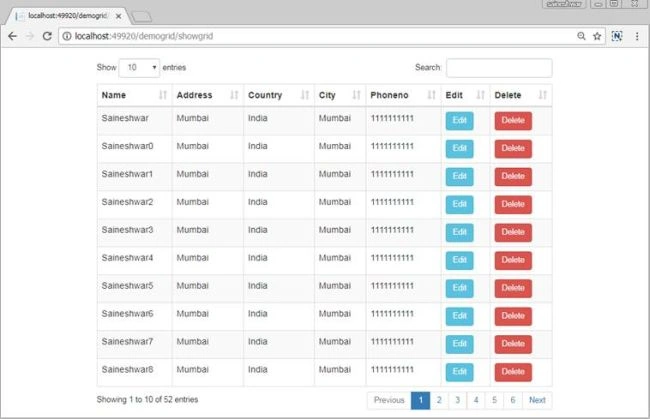
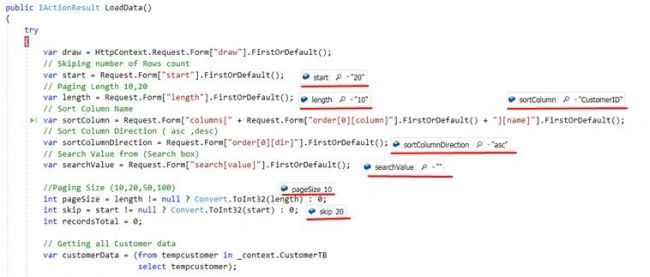
Real-time Debugging Snapshot
In this section, you can see the values that are populated when the post method is called.
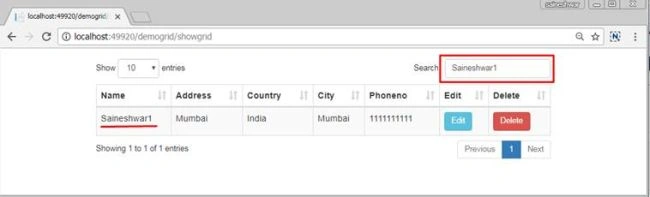
Search with DataTables grid
In this section, we have implemented a search for only the Name column. If you want to add another column, just use or condition (“||”) with it.

Adding more columns to search

Search demo
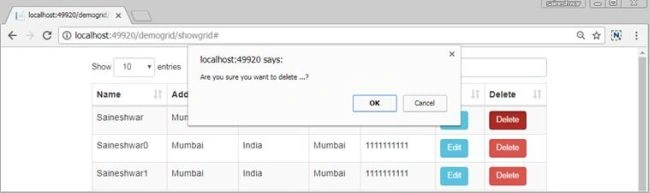
Edit and Delete with confirmation in the DataTables grid
In this section, we are focusing on 2 buttons edit and delete. Edit is used for editing records. In this part, you just need to provide a URL of the edit page with its parameter.
Below is the Syntax for Rendering Edit Button

For the delete button, we can just do the same way as Edit but for that, we need to create another page. However, if we want a line deleted, then we need to use the below syntax for rendering the button.
Below is the syntax for Rendering a Delete Button

<script>
    function DeleteData(CustomerID) {
        if (confirm("Are you sure you want to delete ...?")) {
            Delete(CustomerID);
        } else {
            return false;
        }
    }
    function Delete(CustomerID) {
        var url = '@Url.Content("~/")' + "DemoGrid/Delete";
        $.post(url, { ID: CustomerID }, function (data) {
            if (data) {
                oTable = $('#example').DataTable();
                oTable.draw();
            } else {
                alert("Something Went Wrong!");
            }
        });
    }
</script>
Finally, we have learned how to use the jQuery DataTables Grid with ASP.NET CORE MVC. I hope you enjoyed this article.


Abdul NasirPosted Jan 19, 2025, 5:14 PM
An unhandled exception occurred while processing the request.
Abdul NasirPosted Jan 19, 2025, 5:14 PM
It shows error during execution
JAINAM SWAMIPosted May 26, 2023, 10:30 AM
You DUMB saineshwar bageri your code doesn't work at all........NOOB
JAINAM SWAMIPosted May 11, 2023, 10:26 AM
It just worst saineshwar your code dosen't work dumb saineshwar
Haein JungPosted Oct 3, 2022, 6:18 AM
Thank you very much for your knowledge transfer. It's great.I'm on your knowledge of the company to consult with an estimate if we have a chance that can take advantage. Thanks once again. from Tokyo Mr. Arakawa
Inayat RehmanPosted Jul 26, 2021, 10:23 AM
Advance Version of the Project Available Here - I have added the Add and Edit Modal Dialogs to this Project: Https://drive.google.com/file/d/1BNdHVkjhSnPiRLRDPikYJI0xJ2CT3lwf/view?usp=sharing
Saeed NagaianPosted Mar 31, 2021, 5:31 PM
For run project install "System.Linq.Dynamic.Core" instead "System.Linq.Dynamic"
Halil BalciogluPosted Dec 22, 2020, 8:15 PM
Very good, How to define not only 1 table but also union of tables, for example , how to show the result of "select * from CustomerTB inner join OrderTB on CustomerTB.CustomerID=OrderTB.CustomerID"
gaamaa resosaPosted Sep 27, 2020, 1:37 PM
Very nice ! But all the fields will be exposed on browser source code. How to complete hide any database field names in browser or java script ?
Ping KingPosted Sep 12, 2020, 11:12 AM
Hi, The source code is not in ASP.NET Core MVC. I tried to run it in Core, but get error. Do you have Core version?
Jannie BlignautPosted Jul 16, 2020, 5:08 AM
Hi, can I do nested rows here that displays an MVC view in the child? And do you perhaps have such an example? c#
Ali CandanPosted Jun 25, 2020, 1:18 PM
i can not download your project. Can you refresh you project link ?
Mian BashirPosted Jun 9, 2020, 3:44 AM
//Search if (!string.IsNullOrEmpty(searchValue)) { customerData = customerData.Where(m => m.Name.Contains(searchValue) || m.Phoneno.Contains(searchValue) || m.City.Contains(searchValue)); }
Ivan ClimovPosted May 19, 2020, 7:00 AM
You have updated the article `May 06, 2020`.When I read the article, the update date was `September 13, 2017`. Could you clarify: what changes have been made?
neha khandelwalPosted Apr 27, 2020, 10:29 AM
How we van pass that.
neha khandelwalPosted Apr 27, 2020, 10:28 AM
I am stuck at colom level filtering not able to get the value of columns[i][search][value] in code.
neha khandelwalPosted Apr 24, 2020, 6:20 AM
Hi there thanks for this usefull link.it helped others alot but scince i am using .net core 3.1 razor pages which is different from MVC . so on ajax post it is not working well tried on get but then it is again showing this kind of error "DataTables warning: table id=example - Requested unknown parameter 'ApplicationName' for row 0, column 1. For more information about this error, please see http://datatables.net/tn/4". and didnot find why it is coming again and again.appriciate earliest help possible.thanks.
neha khandelwalPosted Apr 23, 2020, 5:21 AM
Kindly any one can show the html code as my Load method is not getting called.
neha khandelwalPosted Apr 23, 2020, 5:20 AM
I am getting error in loading the grid data, table is gets changed to example_wapper.
sarath ChandraPosted Mar 2, 2020, 11:36 PM
Datatable pagination in not applying on bootStrap Model popup,how to refresh datatable in asp.net mvc core after binding data through ajax call
Ivan ClimovPosted Feb 10, 2020, 11:25 AM
The article does not display pictures.
Fatih Selim EryılmazPosted Dec 16, 2019, 7:07 AM
Thank you very much
xDygsonPosted Dec 7, 2019, 5:15 AM
Hello, I have problem with displaying table, there are only titles from table, but all data from database are missing(I'm using database hosted in web).
robinson loretoPosted Nov 15, 2019, 2:07 PM
Hello Friend how are you ? I try to do that example project on Razor Pages, and Ajax doesn't bring me data? What is the conversion of the JSON Object? I am using Asp net core 3.0. Do I need to add a valid token to bring me the data with Ajax? Thank you !
Rajeev RanjanPosted Sep 30, 2019, 9:51 AM
Install System.Linq.Dynamic.Core for ASP.Net Core application instead of System.Linq.Dynamic to resolve HttpContext.Request.Form["draw"] error.
OSCAR ALFAROPosted Sep 24, 2019, 9:21 PM
Error in HttpContext.Request.Form["draw"].FirstOrDefault(); Message: "Incorrect Content-Type:"
OSCAR ALFAROPosted Sep 24, 2019, 9:20 PM
Error in HttpContext.Request.Form["draw"].FirstOrDefault();
Aslee GonzalezPosted May 17, 2019, 3:41 PM
HttpContext.Request.Form is null
Ashish KaundalPosted May 13, 2019, 4:44 AM
Row delete does not working please give the appropriate solution for this
bubba brownPosted Apr 2, 2019, 1:37 PM
This application is not really complete without the appropriate CRUD views. Is there an update to this at all?
Sohil AhmedPosted Mar 29, 2019, 4:42 AM
Nice tutorial but how can I fetch more data along with more textboxes apart from the grid.
DavePosted Nov 21, 2018, 11:04 AM
The provided download code sample is in .net 4.6 using .net core libraries. I am having trouble porting it over to a pure .net core mvc application.
Andrew Wang)Posted Oct 25, 2018, 10:36 AM
HI, Very interesting but I encounter the "start error CS0103: The name 'start' does not exist in the current context", and can not find out the FORM "Form["draw"]" from the download source code. Thanks.
Bushra KhanPosted Oct 8, 2018, 11:19 AM
Thanks. Well written and explained.
Sebastian BrebuPosted Oct 5, 2018, 5:51 AM
I've found a logical bug. You might want to use || instead of && in here, as it's a negation: //Sorting if (!(string.IsNullOrEmpty(sortColumn) || string.IsNullOrEmpty(sortColumnDirection)))
Sebastian BrebuPosted Oct 5, 2018, 5:43 AM
Update from the future: since we're talking about .net Core here, I had to use System.Linq.Dynamic.Core in order for OrderBy to work.
Robert CampbellPosted Jul 30, 2018, 9:16 PM
Thanks, this filled in various helpful details for me. I see that your demo app has no implementation of the 'Edit' view, which is invoked when the DemoGridController Edit method returns View("Edit"). Also no mention of this feature in the article, other than providing a button to call the controller. It would be helpful to know more about this.
demi shoPosted Jun 14, 2018, 8:02 AM
Hi, I'm getting an error "Datatables warning: table id=example -Ajax error, for more information about this error, please see http://datatables.net/tn/7"
Jahan AlemPosted Apr 19, 2018, 4:20 PM
Hi, this code doesn't work! I've used this code to my project var url ='@Url.Content("~/")' + "DemoGrid/Delete"; Did you use a library?
Dan UmstattdPosted Apr 19, 2018, 2:57 PM
I am having an issue where the url it is going to is incorrect. Using Chrome debug tools it ends up hitting the following url. I have specified the url just like shown above but with my controller and method specified. Any thoughts? http://localhost:65106/[object%20Object]?sEcho=1&iColumns=5&sColumns=%2C%2C%2C%2C&iDisplayStart=0&iDisplayLength=10&mDataProp_0=&sSearch_0=&bRegex_0=false&bSearchable_0=false&bSortable_0=false&mDataProp_1=Column1&sSearch_1=&bRegex_1=false&bSearchable_1=true&bSortable_1=true&iSortingCols=1&_=1524167418222
Jalaj VarshneyPosted Apr 12, 2018, 6:33 AM
I wants to know about many other functionalities of jquery datatables like Insert update edit so please help thanks
Jalaj VarshneyPosted Apr 12, 2018, 6:31 AM
Hi Saineshwar Bageri your article is really very useful for me.
Jahan AlemPosted Apr 5, 2018, 9:26 AM
Is there a way to determine which column(s) be searchable dynamically? and after typing 3 characters search be active?
onais ahmerPosted Apr 5, 2018, 8:23 AM
Hey .. do you work on UI-grid.info grid ??
Jahan AlemPosted Apr 4, 2018, 12:45 PM
I've used ASP.NET Core 2. I installed System.Linq.Dynamic in my project. When I run the project I get this error: FileNotFoundException: Could not load file or assembly 'System.Data.Entity, Version=4.0.0.0, Culture=neutral, PublicKeyToken=b77a5c561934e089'. The system cannot find the file specified. How can I solve it? Is there any replace library for it?
Jahan AlemPosted Apr 2, 2018, 4:47 PM
In DemoGridController I got this error (exception): ": 'The connection was not closed. The connection's current state is connecting.'" how can I fix it?
Plaza vPosted Apr 2, 2018, 9:20 AM
Can't get any param using HttpContext.Request.Form
Piyush AgarwalPosted Mar 9, 2018, 5:26 AM
Thanks for sharing this article... Really usefull for the community....
bubba brownPosted Feb 16, 2018, 11:53 AM
I get : InvalidOperationException: The view 'Edit' was not found. The following locations were searched:/Views/DemoGrid/Edit.cshtml /Views/Shared/Edit.cshtml
ROHIT SINGHPosted Feb 15, 2018, 12:52 PM
We need to sort string type date(MMM yyyy) format column from server side Just like https://datatables.net/plug-ins/sorting/stringMonthYear
hassan mirzaiePosted Feb 13, 2018, 7:02 PM
Error is :"DataTables warning: table id=example - Requested unknown parameter 'Id' for row 0, column 0. For more information about this error, please see http://datatables.net/tn/4"
hassan mirzaiePosted Feb 13, 2018, 5:40 PM
Not working for me.and not showing Amounts for me and just create row!!!
U ThuPosted Dec 18, 2017, 9:44 AM
Good article.Hello teacher please one question datable grid in crud button not using ajax and mvc default crud work.
Chris JensonPosted Dec 6, 2017, 11:28 PM
Thanks for the post. I'm using most of your code and trying to implement it with my own MVC application. When I view my Index view (which I'm using instead of ShowGrid), the table headers display, but not the rows of data below the headers. I get this error in my browser console: Uncaught TypeError: $(...).DataTable is not a function. That error directs me to my Index view where you've defined this: <script> $(document).ready(function () { $("#example").DataTable({ ......Do I need to use something else other than #example? Perhaps my project isn't loading the js libraries correctly? Great walkthrough btw.
Ricardo medinaPosted Dec 6, 2017, 9:17 AM
Thanks for the code. Works great, except: search only working on the first page results. It doesn't search all records. Any suggestions on how to fix this?
Amanullah AmanPosted Oct 17, 2017, 2:57 AM
Not working for me. It shows "An unhandled exception occurred while processing the request. FileNotFoundException: Could not load file or assembly 'System.Data.Entity, Version=4.0.0.0, Culture=neutral, PublicKeyToken=b77a5c561934e089'. The system cannot find the file specified. System.Linq.Dynamic.ExpressionParser..cctor() TypeInitializationException: The type initializer for 'System.Linq.Dynamic.ExpressionParser' threw an exception. System.Linq.Dynamic.ExpressionParser..ctor(ParameterExpression[] parameters, string expression, Object[] values)"