

In this article we will see how to use Knockout.js in SharePoint 2013. You do not need server-side coding nor Visual Studio nor the SharePoint designer to build this user interface (UI). Only knowledge of knockout.js is required. Before going into details, I am pasting the screenshot of how the UI will look once this sample is built.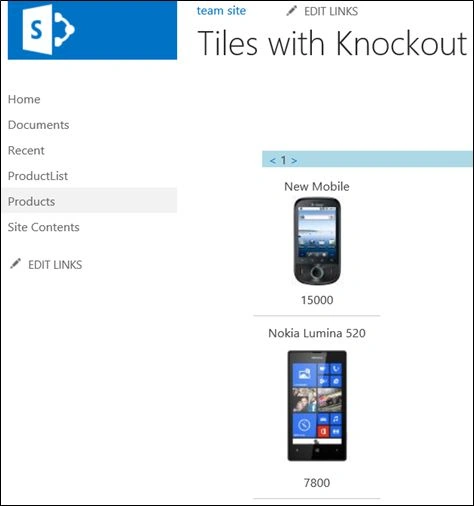
We will need to refer to 3 js libraries. I have uploaded them in the document library but as a best practice create a different JavaScript library for them, "jquery-2.0.3.min.js", "knockout-3.0.0rc.js" and "ko.sp-1.0.min.Ex.js".
"ko.sp-1.0.min.Ex.js" can be downloaded from kosp.codeplex.com and has binders for knockout with SharePoint. Some SharePoint data types such as images and hyperlinks need special processing to provide correct results that is handled by this library.
We will use a simple example of a product list. Build a SharePoint List, ProductList, with the following columns and add a few records in this list.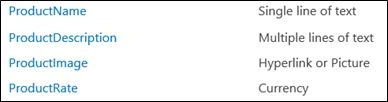
Create a Site Page and insert a Script Editor Web Part from the Media and Content category onto the page.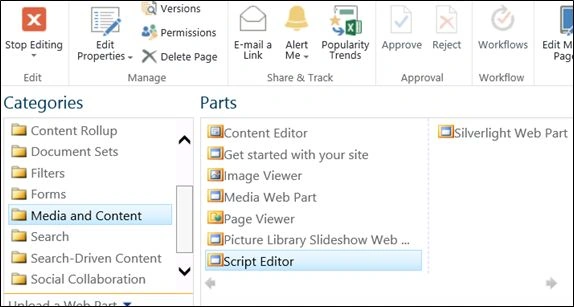
Click on "Edit Snippet" and paste in the following code:
<script src="http://win-4f44sec6iug:34480/sites/ts/Style Library/jquery-2.0.3.min.js"></script>
<script src="http://win-4f44sec6iug:34480/sites/ts/Style Library/knockout-3.0.0rc.js"></script>
<script src="http://win-4f44sec6iug:34480/sites/ts/Style Library/ko.sp-1.0.min.Ex.js"></script>
<div style="background-color: lightblue; margin: 10px">
<a href="#" data-bind="click: previous"><</a> <span data-bind="text: $root.pageNumber()+1">
</span><a href="#" data-bind="click: next">></a></div>
<table align="center" width="100%">
<div data-bind="template: { name: 'allProducts-template', foreach: currentPage }">
</div>
<script type="text/html" id="allProducts-template">
<tr><td align = "center">
<div data-bind="text:ProductName" ></div></td></tr>
<tr><td align = "center"><div><img data-bind="spSrc:ProductImage" /></div>
</td></tr>
<tr><td align = "center"><div data-bind="text:ProductRate"></div></td></tr>
<tr><td><hr /></td></tr>
ERU ERUPosted Jan 14, 2014, 10:54 AM
How would I create a 6 x 6 grid using knockout.js? And then also add filter-as-you-type so that the list of products can be filtered?
Veena SardaPosted Oct 9, 2013, 8:41 AM
Thank you. It is heartening to see encouraging comments from you.
Mahesh ChandPosted Oct 9, 2013, 8:27 AM
Very interesting Veena. Knowckout is being spreadout to Sharepoint now :)