<![endif][if gte mso 9]>
<![endif]-->
Using a ListView Control in a Windows Forms Application
Adding a column to a ListView
listView2.Columns.Add("Here your column name", here width with integer value);
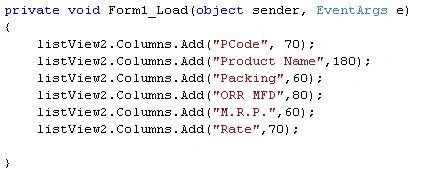
You can simply add a column to a ListView by these steps
select ListView control and right click>properties>columns
Now we are going to bind our ListView Control
We have 6 columns to bind, binding using a ListView sub item.
public void listViewFill()
{
try
{
SqlConnection con= new SqlConnection("data source=.\\sqlexpress;database=main;integrated
security=true;" );
listView2.Items.Clear();
SqlDataAdapter adp = new SqlDataAdapter("SELECT P_NAME, P_PACKING, F_ORMFD, F_MRP, F_STRATE FROM PMS", con);
DataTable dt = new DataTable();
adp.Fill(dt);
for (int i = 0; i < dt.Rows.Count; i++)
{
DataRow dr = dt.Rows[i];
ListViewItem listitem = new ListViewItem(dr[0].ToString());
listitem.SubItems.Add("| " + dr[1].ToString().PadLeft(3));
listitem.SubItems.Add("| " + dr[2].ToString());
listitem.SubItems.Add("| " + dr[3].ToString());
listitem.SubItems.Add("| " + dr[4].ToString());
listitem.SubItems.Add("| " + dr[5].ToString());
listView2.Items.Add(listitem);
}
}
catch (Exception ms) { }}
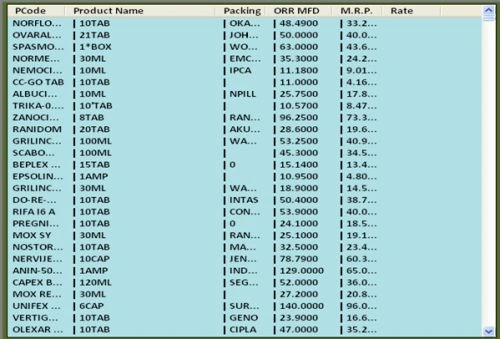
Font and color>>>>
listView2.BackColor = System.Drawing.Color.PowderBlue;
listView2.Font = new Font("Arial", 10.2f);
DataGridView column>>>>
public void GridColumn()
{
dataGridView1.Columns.Add("", "PCode");
dataGridView1.Columns.Add("", "Product Name");
dataGridView1.Columns.Add("", "Packing");
dataGridView1.Columns.Add("", "ORR MFD");
dataGridView1.Columns.Add("", "M.R.P.");
dataGridView1.Columns.Add("", "Rate");
}
Gridview Design Font, Color >>>>
public void GridDesign()
{
this.dataGridView1.DefaultCellStyle.Font = new Font("Calibri", 11, FontStyle.Regular);
dataGridView1.ColumnHeadersDefaultCellStyle.Font = new Font("Calibri", 11.25f, FontStyle.Bold);
DataGridViewCellStyle fooCellStyle = new DataGridViewCellStyle();
DataGridViewHeaderCell f = new DataGridViewHeaderCell();
dataGridView1.ColumnHeadersDefaultCellStyle.BackColor = Color.LightBlue;
dataGridView1.ColumnHeadersDefaultCellStyle.ForeColor = Color.Black;
dataGridView1.DefaultCellStyle.ForeColor = Color.Black;
dataGridView1.EnableHeadersVisualStyles = false;
}
DatagridView Column Width>>>>
public void GridColWidth()
{
dataGridView1.Columns[0].Width = 248;
dataGridView1.Columns[1].Width = 70;
dataGridView1.Columns[2].Width = 60;
dataGridView1.Columns[3].Width = 60;
dataGridView1.Columns[4].Width = 60;
dataGridView1.Columns[5].Width = 85;
}
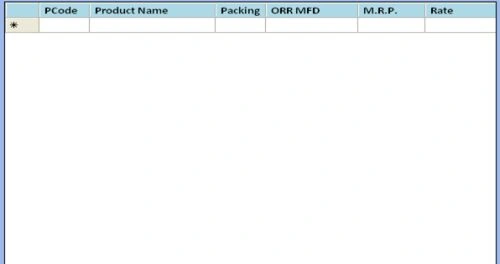
Fill a DataGridView on a ListView Item Selection Change Event>>>
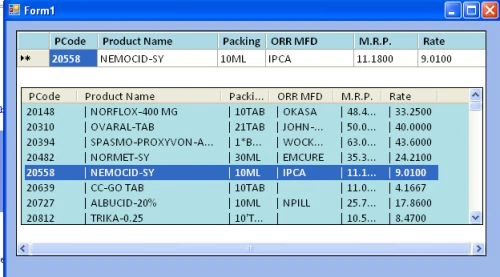
By using a ListView ItemSelection_Event we are filling a DataGridView cell.
Hide the ListView contorl on form load. Then when the first DataGridiView cell is clicked show the ListView.
private void dataGridView1_CellEnter(object sender, DataGridViewCellEventArgs e)
{
if (e.ColumnIndex == 0) // datagridview first cell enter event
{
listViewFill();//fill listview bind method
listView2.Show();//showing listview
}
}
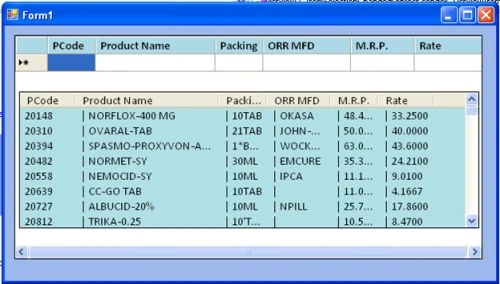
Fill a DataGridView on a ListView Item Selection event>>
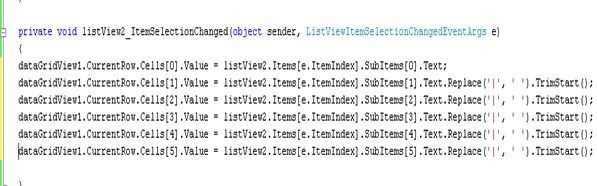
In the above code I am using .Replace('|',' ').TrimStart(); because when the ListView is bound we add a '|' sign to make our ListView attractive so when the DataGridView is filled we remove the '|' sign and extra and replace it with and space and then use the TrimStart() method to remove the space.


Abhilash Raj R SPosted Nov 14, 2016, 9:14 AM
I tried my own database its not working
Narasimha Rao KarivedaPosted Apr 28, 2014, 10:49 PM
can we apply paging to ListView in vb.net 2005 win forms