

Objective of the Module
- Introduction
- ArrayList
- Hashtable
- BitArray
Introduction
.NET offers a variety of collections, such as ArrayList, Hashtable, queues, Dictionaries. Collections are abstractions of data algorithms. An ArrayList is an abstract dynamic array, a Hashtable collection abstracts a lookup table, a Queues collection abstracts queues and so on. In addition to that, collections implement the ICollection, IEnumerable and IClonable interfaces. The detailed specification for each collection is found under the System.Collection namespace.
ArrayList Collection
An ArrayList is a dynamic array and implements the IList interface. Each element is accessible using the indexing operator. While the traditional array has a fixed number of elements, in the case of Array List, elements can be added or removed at run time.
We can create an object of ArrayList using a general type of syntax as follows;
ArrayList obj = new ArrayList();
Here you can use the new keyword to create an instance of the ArrayList object. You don't need to specify the size. Once you have an empty ArrayList object, you can use the Add() method to add elements to it,as in:
obj.Add("item1");
obj.Add("2");
obj.Add("Delhi");
Each new item in the ArrayList is added to the end of the list, so it has the largest index number. If you wanted to add an item in the middle of the list, then you can use "Insert()" with a numeric argument as follows:
Obj.Insert(2,"item2");
You can also remove members of the ArrayList using either Remove() or RemoveAt() methods as in the following:
Obj.Remove("item1");
Obj.RemoveAt(3);
Benefits of ArrayLists
- Insert Elements: An ArrayList starts with a collection containing no elements. You can add them in any position as you choose them.
- Automatic Resizing: you do not need to specify the array size; as you add elements, the array automatically ensures there is enough memory for the array.
- Flexibility When Removing Elements: you can remove any element from an Arraylist very easily.
Limitations of ArrayLists
The flexibility of ArrayList comes at a cost of performance. Since memory allocation is a very expensive business, the fixed number of elements of the simple array makes it much faster to work with.
Note: ArrayLists are slower and more resource-intensive than a conventional array.
Simple ArrayList Example
The following example shows an array list with an #ff0000 size. Elements are added dynamically as required. We are adding elements using the "Add()" method as well as using the "Insert()" method at a specific location. Later we are displaying all the elements by iterating through the list.
using System;
using System.Collections;

namespace CollectionApp
{
    class Program
    {
        static void Main(string[] args)
        {
            //Defining an ArrayList
            ArrayList obj = new ArrayList();

            //Adding elements
            obj.Add("India");
            obj.Add("USA");
            obj.Add("Russia");
            obj.Add("300");

            //Adding elements to specific position
            obj.Insert(2, "Japan");

            //Accessing elements
            for (int i = 0; i < obj.Count;i++ )
            {
                Console.WriteLine("At Index["+i+"]= "+obj[i].ToString());
            }

            Console.WriteLine("____________");
            Console.WriteLine("Press any key");
            Console.ReadKey();
        }
    }
}
After building and running this program, the output of the program is as in the following;
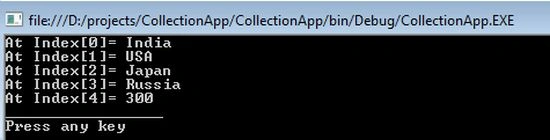
Figure 1.1 - Array List
Hashtables
In some respects, Hashtable objects are quite similar to an ArrayList object except that it is not required to use a numerical index. Instead, we can use a texture key that can be numeric.
You can create a Hashtable object by using the same syntax as an ArrayList as in the following:
Hashtable obj = new Hashtable();
Once it is created, you must specify the key/value pairs. Remember that the key is like an index for the entry and the value is the data we are storing. We store each element using the "Add()" method with the following syntax;
Obj["in"] = "india";
Obj["en"] = "England";
Obj["us"] = "USA";
A Hashtable with numbers or dates for the keys are written as in the following;
Obj[Convert.ToDateTime("21/12/2012")] = "The Judgment day";
Note: you need to convert DateTime index values when they are used as an index for a Hashtable.
To read elements, you just need to specify the key and the value is returned. The following code puts the value "india" into a variable named Country:
string Country = Convert.ToString(obj["in"]);
Benefits of Hashtable
- Insert Elements: you can add as many pairs of key/value elements as required. You do not have to specify the size ahead of time.
- Non-numeric index: you can use text, number and dates as your key (index).
- Faster Lookup: the hashtable collection caters very fast lookup of elements.
- Flexibility when Removing elements: you can remove any element from an Arraylist very easily
Limitations of Hashtable
- Key must be unique: The Hashtable stipulates the key uniqueness requirement that is very cumbersome to manipulate.
- No useful sorting: Sorting is not done by using keys or values. The items in the Hashtable are sorted internally to make it easy to find objects very quickly.
- Performance: Although the lookup is very quick in a Hashtable, the CLR must do quite a lot of work to maintain them that is very resource-intensive.
Simple Hashtable Example


Dinesh GabhanePosted Nov 8, 2019, 1:35 AM
Nice info, Thanks
manoj kumarPosted Dec 16, 2018, 12:21 AM
Nice explain sir....
Sr KarthigaPosted May 6, 2016, 9:21 PM
good one sir
Chandu KumawatPosted Nov 26, 2015, 7:41 AM
good one
kalyan kumarPosted Oct 23, 2015, 6:43 AM
Nice info sir
Pankaj NandurkarPosted Aug 5, 2015, 9:27 AM
Superbhaa sir
Sai RamPosted Mar 4, 2015, 6:24 AM
ghgfh
Hamid KhanPosted Feb 1, 2015, 10:57 PM
[email protected]
Hamid KhanPosted Feb 1, 2015, 10:57 PM
Generic is type safe, Code re-usability, Performance is better, so in which situation we should use Non-Generic Collection, While we have Generic, Please explain it
Hamid KhanPosted Feb 1, 2015, 10:54 PM
Thanks, Please Explain some non-Generic collection with comparision
Anil KumarPosted Sep 5, 2014, 12:56 AM
There is a typo mistake, Please replace "Limitations of ArrayLists" with "Limitations of Hashtable" in Hashtable section
Guest UserPosted Sep 4, 2014, 7:46 AM
thanks vidya for sharing!
Anil KumarPosted Mar 1, 2013, 5:34 AM
very informative,I liked it. tnx for sharing
Mahesh ChandPosted Mar 1, 2013, 12:58 AM
Good read. Every coder must read. I liked Limitations and Benefits part. The most abused object in .NET is Dictionary. Coders use Dictionary to store 10 items. That is just abuse and it is very costly.