

With the release of Dynamics CRM 2016, new client side methods introduced that we can use to make user experience more interactive while enter data in CRM forms. Following are the methods:
- getValue
- Keypress
- Autocomplete
getValue Method:
This method is used to get the latest value of the field. Earlier this method was only available in attribute collection, which provides value of the field only after Onchange event fired. Whereas when it is used with control collection, we can capture value as soon as users starts entering value in field, so it means if we have any requirement to validate data entry then we can use this method to make it more interactive. We can use this method like below:
- Xrm.Page.getControl(field name).getValue();
Let’s take one example that we want to restrict user to enter only number between 0-9 under phone field in account entity, so we can simply use below code to do that:
- function OnTelephone1KeyPress()
- {
- var phoneValue = Xrm.Page.getControl("telephone1").getValue().toString().replace(/[^0-9]/g, "");
- Xrm.Page.getAttribute("telephone1").setValue(phoneValue);
- }
Above code will get character from telephone1 field as soon as user enters it and will replace character with null if it is not under 0 to 9 range. But we need to use above code with keypress events, so let’s understand use of keypress event first to complete our code.
Keypress Method: Below three keypress methods are added to work with controls:
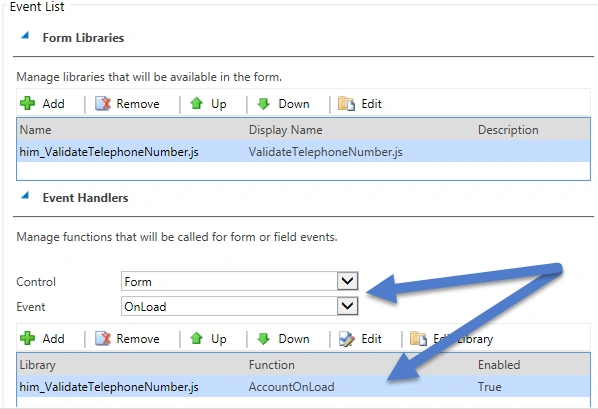
- addOnKeyPress: This method is used to associate method to KeyPress event of text or number, so it will fire when user will press any key. We can use this method like below:
- Xrm.Page.getControl(field name).addOnKeyPress(name of function);
Sam MoorePosted Mar 24, 2016, 8:34 AM
Hi Mahender, Great Post. When I create an account, and the onload event fires I get the following error "Object doesnt support property or method 'addOnKeyPress'. Any suggestions? I'm testing on a trial version of CRM 2016 online.
Mahender PalPosted Dec 17, 2015, 8:35 AM
Code is already there in the article Santhakumar
Santhakumar MunuswamyPosted Dec 17, 2015, 5:15 AM
Thanks for sharing. Could you possible share your code..?