

Introduction
Analyzing data often requires grouping and summarizing it to uncover trends and patterns. In this article, we’ll look at two powerful functions, ROLLUP and CUBE, in Microsoft Fabric’s Spark environment and show how they can be used to explore the NYC Taxi dataset. We’ll walk you through simple PySpark examples and explain when to use each function based on your needs.
Microsoft Fabric makes working with big data using Spark straightforward. With functions like ROLLUP and CUBE, you can quickly summarize key metrics, turning complex datasets into insights that drive better decisions.
Obtaining the NYC Taxi data
To follow along, you'll need the NYC Taxi dataset, which is available in Azure Open Datasets. This dataset provides comprehensive information about taxi trips in New York City, including pickup dates, payment types, and fare amounts. Using Azure Open Datasets makes accessing and preparing the data quick and seamless within Microsoft Fabric.
Step 1. Access the NYC Taxi dataset. We are going to save the 2018 data in the 'mycTripYellow' table.
from pyspark.sql.functions import *

# Azure storage access info
blob_account_name = "azureopendatastorage"
blob_container_name = "nyctlc"
blob_relative_path = "yellow"
blob_sas_token = r""

# Allow SPARK to read from Blob remotely
wasbs_path = 'wasbs://%s@%s.blob.core.windows.net/%s' % (
    blob_container_name, blob_account_name, blob_relative_path)
spark.conf.set(
    'fs.azure.sas.%s.%s.blob.core.windows.net' % (blob_container_name, blob_account_name),
    blob_sas_token
)
print('Remote blob path: ' + wasbs_path)

# SPARK read parquet, note that it won't load any data yet by now
srcDf = spark.read.parquet(wasbs_path)

# Only want data in 2018 - Q4
taxiDf = srcDf.filter((col('puYear') == 2018) & (col('puMonth').between(10, 12)))
Step 2. Create the Payment Type reference table 'nycTripPaymentType'. This table is used to retrieve the payment description.
ptData = [
    (0, "Flex Fare trip"),
    (1, "Credit card"),
    (2, "Cash"),
    (3, "No charge"),
    (4, "Dispute"),
    (5, "Unknown"),
    (6, "Voided trip")
]

ptCols = ["PaymentTypeID", "Description"]

paymentTypeDf = spark.createDataFrame(ptData, schema=ptCols)
Step 3. Join the two datasets together.
taxiJoinDf = taxiDf.join(
    paymentTypeDf, taxiDf["paymentType"] == paymentTypeDf["PaymentTypeID"], how="inner"
) \
    .select("Description", "puYear", "puMonth", "fareAmount") \
    .withColumnRenamed("Description", "paymentTypeDesc")

display(taxiJoinDf.limit(10))
Now, we have the data ready for ROLLUP and CUBE functions.
Using ROLLUP to summarize data
ROLLUP is a smarter version of Group By. While Group By gives us aggregations based on the specified columns, ROLLUP goes one step further by adding a sub-total at each specified column level and a grand total to the overall result.
Imagine you're a store owner analyzing our monthly revenue.
- You want to know the revenue for each payment type (Cash, Credit card) for each month.
- You also want the revenue for the month.
- Then, you want the grand total for Q4.
In the query below, we are using the puMonth and paymentTypeDesc to analyze the monthly revenue using the ROLLUP function. To override the default number formatting, we are enforcing the result to display 2 decimal places.
rollupDf = taxiJoinDf.rollup("puMonth", "paymentTypeDesc") \
    .agg(sum("fareAmount").alias("totalRevenue"))

rollupFormatDf = rollupDf.withColumn("totalRevenue", format_number("totalRevenue", 2))

display(rollupFormatDf.orderBy(asc_nulls_last("puMonth"), asc_nulls_last("paymentTypeDesc")))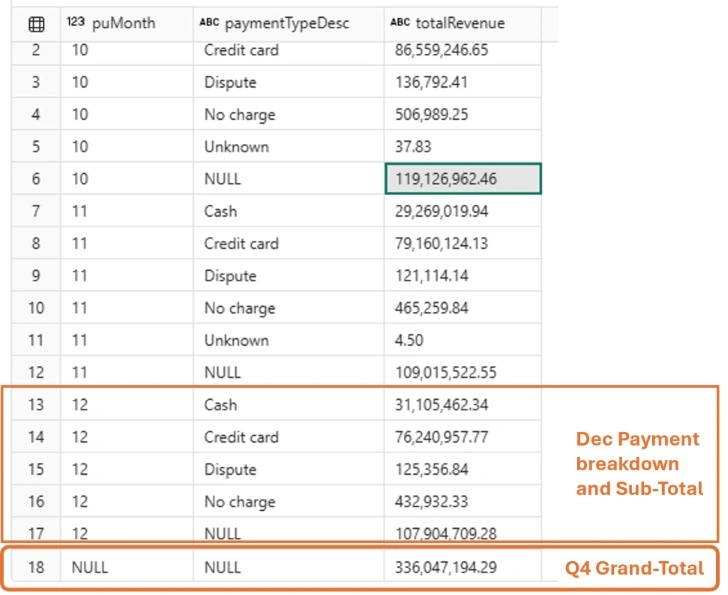
Join the conversation! Your thoughts help the community grow.