

Introduction
In this article, we will learn about Snippets in the CSS Editor.
A Snippet is a "piece of something" but in .Net we use a Snippet to create a small region of reusable code. It's used to minimize the amount of repetitious code that is common to other functions.
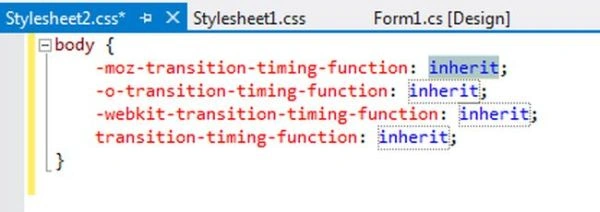
When we use a Snippet in CSS then it helps us to create cross-browser styles very easily and quickly.
Step 1
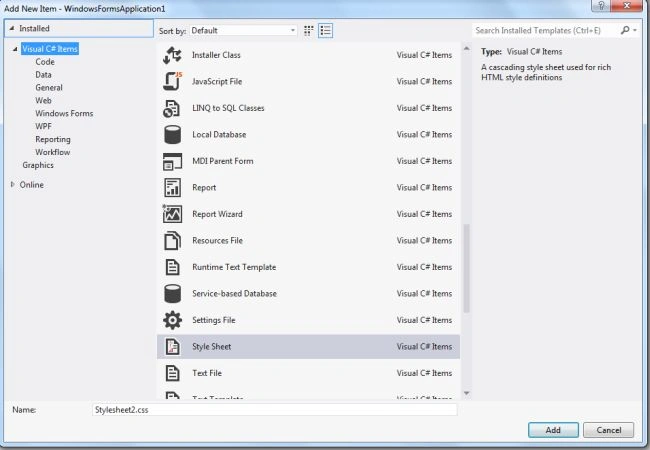
Add the CSS Style Sheet to your C# Windows application.
Step 2
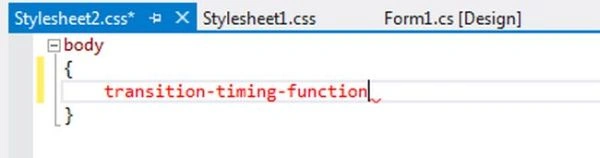
Type the property that you want to add, for example, I had typed in "transition-typing-function" and as I typed your property I pressed the Tab button and the CSS inserted the following Snippet automatically.
Step 3
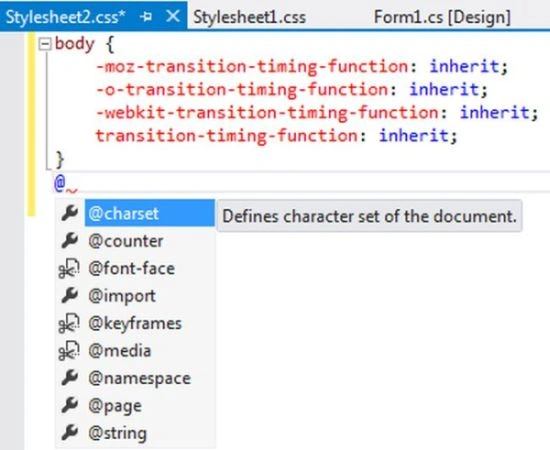
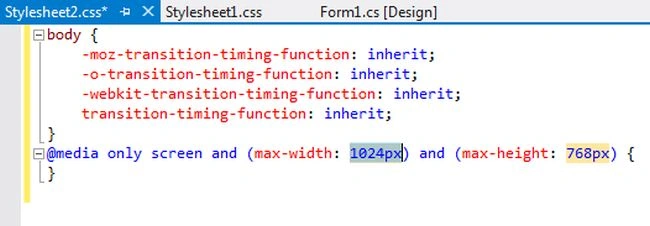
CSS Snippets also support advanced scenarios (like CSS3 media queries) by typing the @ symbol, which shows the Intellisense list.
Step 4
As you select any of the properties just press the tab button and the CSS editor will insert it's Snippet automatically.
Join the conversation! Your thoughts help the community grow.