

What is WebForms Core?
WebForms Core is a new web development technology that gives you the power to build modern applications without the need for front-end frameworks like Vue, React, or Angular. It provides native module import, direct JavaScript execution, and DOM event handling, allowing developers to build dynamic, efficient applications by focusing only on server-side coding. WebForms Core is a complete, integrated server-side solution that also covers the client side, eliminating the need for third-party tools.
WebForms Core 2 in PHP
WebForms Core version 2 has been recently released and is now available for PHP, in addition to other languages. The framework allows developers to implement DOM events, data handling, and server-side interactions in a simple and powerful way. In this article, we will explore how to use WebForms Core in PHP with a practical example.
How to use WebForms Core?
Two steps are required:
1- On the client side : Add the WebFormsJS script to your HTML page.
<script type="module" src="/script/web-forms.js"></script>Get the WebFormsJS script from the following link:
https://github.com/webforms-core/Web_forms/blob/elanat_framework/web-forms.js
2- On the server side: Import the WebForms class for your programming language.
Get the WebForms class associated with the server programming language from the following link:
https://github.com/webforms-core/Web_forms_classes
Custom Event in WebForms Core
Custom Events in WebForms Core are a feature that allows you to define specific behaviors and conditions for DOM elements. With this feature, you can dynamically create events such as a field value changing, text or number reaching a certain condition, or even data comparisons, and then connect them to server-side handlers. This approach allows for intelligent and controllable user interactions with the UI, without the need for complex JavaScript or PHP coding.
Getting Started
To get started, simply import the main WebForms file into your project:
include "WebForms.php";

use WebFormsCore\WebForms;
use WebFormsCore\InputPlace;
use WebFormsCore\Fetch;
Defining Events and Handlers
In this example, three paths are defined for handling events:
path-of-handling → Check the value entered by the user in the text field
path-of-handling2 → Check the price value and display a message
increase_value → Increase the price value dynamically
Sample Code:
if (isset($_GET["path-of-handling"])) {
    nameBox_nameMatched();
    return;
}

if (isset($_GET["path-of-handling2"])) {
    price_npriceHigh();
    return;
}

if (isset($_GET["increase_value"])) {
    increase_value();
    return;
}
Implementing Functions
Each route has a dedicated function that performs the desired operation using the WebForms class:
function nameBox_nameMatched() {
    $form = new WebForms();
    $form->setBackgroundColor(InputPlace::tag("body"), "lightgreen");
    echo $form->response();
    exit();
}

function price_npriceHigh() {
    $form = new WebForms();
    $form->message(Fetch::getText("price"));
    echo $form->response();
    exit();
}

function increase_value() {
    $form = new WebForms();
    $form->increase("price", 1);
    $form->setCacheNoTime();
    echo $form->response();
    exit();
}
HTML section
In the user interface section, a text input, a price display, and a button to increase the value are defined:
<!DOCTYPE html>
<html>
<head>
  <title>Using WebForms Core</title>
  <script type="module" src="/script/web-forms.js"></script>
</head>
<body>
    <input id="nameBox" type="text" placeholder="Type 'hello'">
    <div id="price">95</div>
    <button>+</button>
</body>
</html>
Binding events to the DOM
Finally, using WebForms methods, events are attached to DOM elements:
$form = new WebForms();

$form->setGetEvent("<button>", "onclick", "?increase_value");

$form->createCustomDOMEvent("nameBox", "nameMatched", "value", "", "equal", "hello", "", true, 200);
$form->setGetEventListener("nameBox", "nameMatched", "?path-of-handling");

$form->createCustomDOMEvent("price", "priceHigh", "text", "", "greater", "100", "", true, 200);
$form->setGetEventListener("price", "priceHigh", "?path-of-handling2");

echo $form->exportToHtmlComment();
Result
HTML before event

HTML after event
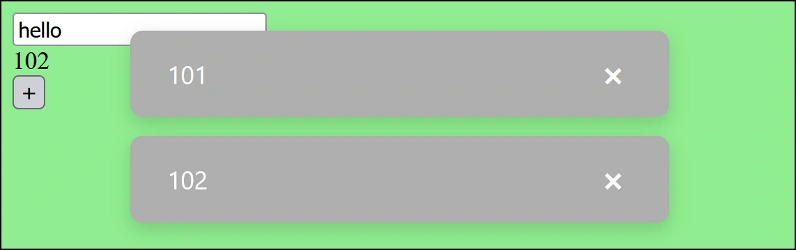
As you can see, when the word hello is typed in the text field, the background color turns green. Similarly, each time the tag text is increased to more than 100 , a message is displayed with the tag text value.
Explanation of CreateCustomDOMEvent method arguments
InputPlace
Specifies the DOM where the event will be applied. For example price or nameBox .
EventName: The name of the custom event to be created. This name is what is dispatched as an Event in the browser and you can define a Listener for it.
Watch
Specifies what of the element to watch:
attribute → a specific attribute of the element
style → a specific style of the element
text → the text content of the element
children → the number or changes of the element's children
value → the value of inputs (input, textarea, select)
Key: Only used when Watch is equal to attribute or style . Specifies which attribute or style to check (e.g. color or class ).
Compare
The type of comparison to perform. Options include:
greater , less , equal , notequal
includes , startswith , endswith , matches (for strings and regex)
changed (any change from the previous value)
inrange (for numeric values in a range)
lengthgreater , lengthless , lengthequal (for string length or number of children)
Value: The value to use in the comparison. For example 100 to check if the price is greater than 100.
Range: Only used when Compare is inrange . A range of numeric values separated by commas, such as 50,100 .
Immediate (optional, default false): If true, the event is checked and fired immediately after definition. If false, it is checked only on changes.
Delay (optional, default 0): The time delay (in milliseconds) to fire the event after the condition is met. If 0, the event is fired immediately.
Conclusion
WebForms Core version 2 in PHP makes it easy to manage custom DOM events, manipulate data, and create dynamic interactions. This technology allows developers to build modern, efficient web applications while focusing solely on server-side coding. One of the key features of this version is the createCustomDOMEvent method, which allows you to define custom DOM events on the server side without having to write JavaScript code; you just specify the conditions and comparisons, and WebForms Core automatically generates and executes the necessary code on the client side.
Join the conversation! Your thoughts help the community grow.