

In this article, you'll see how to download and upload files through HTTP.
Uploading and Downloading Files
The System.Net.WebClient class provides functionality to upload data to or download data from the Internet or intranet or a local file system. The WebClient class provides many ways to download and upload data. The following table describes WebClient class methods and properties briefly.
| Member | Type | Description |
| BaseURI | Property | Current base URL address |
| Headers | Property | Headers in the form of name and value pair associated with the request. |
| QueryStrings | Property | Queries in the form of name and value pair associated with the request. |
| ResponseHeaders | Property | Headers in the form of name and value pair associated with the response. |
| DownloadData | Method | Download data from a URI and returns data as a byte array. |
| DownloadFile | Method | Download data from a URI and saves as a local file. |
| OpenRead | Method | Opens and reads a URI in stream form. |
| OpenWrite | Method | Opens a stream to write data to a URI. |
| UploadData | Method | Uploads data buffer to a URI. |
| UploadFile | Method | Uploads a local file to the given URI. |
| UploadValues | Method | Uploads name and value collection. |
Using WebClient Class
Downloading Data
The WebClient provides three different methods to download data either from the Internet, intranet, or local file system.
WebClient constructor doesn't take any arguments. In the following code, URL is the file name you want to download such as https://www.c-sharpcorner.com/index.asp. You can download any type of files using these methods such as image files, html and so on.
- string URL = textBox1.Text;
- WebClient client = new WebClient();
- byte [] bytedata = client.DownloadData(URL);
- client.DownloadFile(URL, "C:\\temp.asp");
- Stream data = client.OpenRead(URL);
- // Address of URL
- string URL = textBox1.Text;
- try
- {
- // Get HTML data
- WebClient client = new WebClient();
- Stream data = client.OpenRead(URL);
- StreamReader reader = new StreamReader(data);
- string str = "";
- str = reader.ReadLine();
- while( str != null)
- {
- Console.WriteLine(str);
- str = reader.ReadLine();
- }
- data.Close();
- }
- catch(WebException exp)
- {
- MessageBox.Show(exp.Message, "Exception");
- }
Upload Data
The WebClient class provides four different ways to uploading data to a resource.
The OpenWrite method sends a data stream to the resource. It's reverse operation of OpenRead method. You pass URI as first parameter of OpenWrite.
- OpenWrite(string);
- UploadData(string, byte[]);
- client.UploadData("http://www.mindcracker.com/testfile.bmp", data);
- UploadFile(string string);
- client.UploadFile("http://www.mindcracker.com/tst.gif", @"c:\mcb.gif");
- //Or:
- client.UploadFile("http://www.mindcracker.com/test.htm", @"c:\test.htm");
- UploadValues(string, NameValueCollection);
Using WebRequest and WebResponse Classes
Although you can use WebClient class to upload and download data but there are more things involved in uploading and downloading data. What if you don't have right to upload to the server you are uploading to? Did you see us passing userid and passwords for the server somewhere? We didn't think so. So if you don't have permission to write to the server, you get this error.
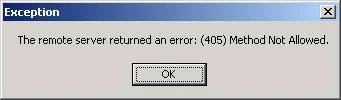
So what we do now? That's where boundary of the WebClient class ends. And that's where the WebRequest and WebResponse classes come in the existence.
The WebRequest Class
The WebRequest is an abstract base class. So you actually don't use it directly. You use it through it derived classes - HttpWebRequest and FileWebRequest.
You use Create method of WebRequest to create an instance of WebRequest. GetResponseStream returns data stream. The following sample example downloads data stream from a web page.
Sample Code
- using System;
- using System.Net;
- using System.IO;
- namespace WebRequestSamp
- {
- /// <summary>
- /// Summary description for Class1.
- /// </summary>
- class Class1
- {
- static void Main(string[] args)
- {
- WebRequest request = WebRequest.Create(https://www.c-sharpcorner.com/index.asp);
- WebResponse response = request.GetResponse();
- StreamReader reader = new StreamReader(response.GetResponseStream());
- string str = reader.ReadLine();
- while(str != null)
- {
- Console.WriteLine(str);
- str = reader.ReadLine();
- }
- }
- }
- }
HttpWebRequest and HttpWebResponse classes works in same way too. Here is one sample example.
Using HttpWebRequest and HttpWebResponse Classes
- HttpWebRequest request = (HttpWebRequest)WebRequest.Create (https://www.microsoft.com );
- HttpWebResponse response = (HttpWebResponse)request.GetResponse();
- String ver = response.ProtocolVersion.ToString();
- StreamReader reader = new StreamReader(response.GetResponseStream() );
- string str = reader.ReadLine();
- while(str != null)
- {
- Console.WriteLine(str);
- str = reader.ReadLine();
- }
Raju PaladiyaPosted Feb 13, 2020, 3:24 AM
Worked awesomely
Rinkesh DuaPosted Jul 7, 2017, 8:42 AM
Hye, suppose I uploaded a excel file to http://localhost:portnumber/example.aspx page and it returned with status:ok. Which means it is uploaded, So the question is where it is uploaded or where should I find the uploaded file and same thing for the web server?
Ali AsadPosted Nov 29, 2015, 6:49 AM
try { HttpWebRequest request = (HttpWebRequest)WebRequest.Create("address"); ASCIIEncoding encoding = new ASCIIEncoding(); string Postdata = "commandType=123&[email protected]&password=ali"; byte[] data = Encoding.UTF8.GetBytes(Postdata); request.Method = "POST"; request.ContentType = "application/json; charset=utf-8"; request.ContentLength = data.Length; using (var stream = request.GetRequestStream()) { stream.Write(data, 0, data.Length); stream.Close(); } var response = (HttpWebResponse)request.GetResponse(); var responseString = new StreamReader(response.GetResponseStream()).ReadToEnd(); response.Close(); } catch (Exception ex) { Response.Redirect("ErrorPage.aspx"); throw ex; }
Sam HobbseditedPosted Nov 23, 2010, 8:35 PMEdited Jan 16, 2013, 4:01 AM
Anyone using http://www.c-sharpcorner.com/index.asp as a sample to download, use <A href="">http://www.c-sharpcorner.com</A> instead.
Ashutosh TripathiPosted Oct 5, 2010, 6:04 AM
Hello sir .... I am trying to validate URL in a application for win mobile . Following is the code .. try { //MessageBox.Show(_url.ToString()); HttpWebResponse response = (HttpWebResponse)webrequest.GetResponse(); MessageBox.Show("this url is valid"); // jus to display validation url } catch (Exception ex) { MessageBox.Show(ex.ToString()); TextUrl = ""; url.Focus(); } its not working.. throwing an exception.. but same code i tried for a simple windows form application.. there it worked... :(
Kumar VaibhavPosted Feb 18, 2010, 11:22 AM
Hi Mahesh, I am trying to connect a exchange server to retrieve mail using C# which is SSL secure and I am getting "[System.Net.WebException] = {"The underlying connection was closed: Could not establish trust relationship for the SSL/TLS secure channel."}"error.Please help me with the solutions
aamir zadaPosted Oct 9, 2009, 5:27 AM
hi sir i m getting the same page again and again i have send the __eventtarget and __eventargumnet value as describe in javascript:_autopostback(controlname,'Page$2'), along with all other data but it still get the same page. can you please help me or give me a refrence of a book or anyother thing discuss these topic in depth thank you
Brian MarkeyPosted Aug 30, 2009, 1:24 PM
I am writing a small application to connect to a remote server and obtain information in XML. As a starting point I am using the WeatherTracker example in Microsoft's "Build a Program Now!" book for Visual C# 2008. Unfortunately, the example returns the error, "Unable to connect to remote server". When I ctrl-click on the link in the editor, the appropriate XML is obtained from the server (i.e. the URL is valid). So, why does it NOT work when called within the code? Here's a code nippet: string feedUrl = "http://weather.service.msn.com/data.aspx?src=vista&wealocations=wc:USWA0367"; XmlTextReader reader = new XmlTextReader(feedUrl); bool firstForecastDone = false; string skyImagesRelativeUrl = "Images/"; int MaxTemp, MinTemp, CurrentTemp, FeelsLike, Humidity, SkyCode; try { while (reader.Read()) . . . Suggestions would be much appreciated Brian
Former memberPosted May 11, 2009, 11:17 AM
Let me know one thing . If i want to receive some string from another application, what is the code i have to had in my asp .net page ? The protocol i want to use is the HTTP , i dont know what function i must use . Please Help me
ashish pandeyPosted May 2, 2009, 3:33 AM
i am using webrequest class for reading data from another site,there is paging on site with 1,2,3 input button ,i am getting first page result,but i am unable to get the next page result ,i want to find the button control and get it click through programitically. please help me
abhi manavPosted Sep 17, 2007, 11:11 PM
Im developing an API which would download a CSV file from a server. I hope i can download it using the HttpWebRequest class. in the create method where i pass the URI, i will pass the link to the server , do i need to specify he filename also in the URI. Please advice me! Thanks in advance.
malini mrPosted Jun 28, 2007, 1:28 AM
hello sir, i am doing my project proxy server in c#.net and i am having a module for site and ip blocking.i am not able to make it a success. so, can u pls provide me the code for site/ip blocking thank u
Raja SPosted May 10, 2007, 8:35 AM
Hi.. Suppose i have two values like SSN and ID i want to post it at website(URL) and get response is reply message from curresponding website,then what code we write to send and get the response using httpwebrequest/response. Plz guide me.. with regards Raja.S
Rajkumar kumareditedPosted Apr 20, 2007, 2:45 AMEdited Apr 20, 2007, 2:47 AM
Hi.. Suppose i have two value like val="10" and val2="20", i want to post it at xyz.com and get response is sum of these value,then what code we write to send and get the response using httpwebrequest/response. Plz guide me.. with regards Ranjan Gupta New Delhi India (09873507465 )
rashmiPosted Apr 10, 2006, 8:00 AM
I m getting Error 405 while uploading file using web client. Can uploading be done throuh web request oobject. How can it be done, Please guide me . Thanks in advance, Rashmi