
Introduction : Ajax (Asynchronous JavaScript and XML) is a new web development technique use for the interactive website. AJAX helps us develop web applications and retrieve a small amount of data from a web server. AJAX consist of different types of technology.
- JavaScript
- XML
- Asynchronous Call to the server
WebService : Web Services can convert your applications into Web-applications.Web Services are published, found, and used through the Web.Web services communicate using open protocols.
- The basic Web services platform is XML + HTTP
- XML provides a language which can be used between different platforms and programming languages and still express complex messages and functions
- The HTTP protocol is the most used Internet protocol
Web services platform elements:
- SOAP (Simple Object Access Protocol)
- UDDI (Universal Description, Discovery and Integration)
- WSDL (Web Services Description Language)
Web services are a set of tools that can be used in a number of ways.
- Remote Procedure call(RPC)
- Service-Oriented Architecture(SOA)
- Representational State Transfer(RST)
Step 1 : Open Visual Studio 2010.
- Go to File->New->WebSite
- Select ASP.NET Empty WebSite
Step 2 : Go to Solution Explorer and right-click.
- Select Add->New Item
- Select WebForm
- Default.aspx page open

Step 3 : Go to Solution Explorer and right-click.
- Select Add->New Item
- Select WebService file
- WebService.asmx option open
WebService :

Step 4 : Now go to the
web.config option and define the ScriptHandler property.
ScriptHandler :
<configuration>
<system.web>
<compilation
debug="true"
targetFramework="4.0"
/>
<httpHandlers>
<remove
verb="*"
path="*.asmx"/>
<add
verb="*"
path="*.asmx"
type="System.Web.Script.Services.ScriptHandlerFactory"
validate="false"/>
</httpHandlers>
</system.web>
</configuration>
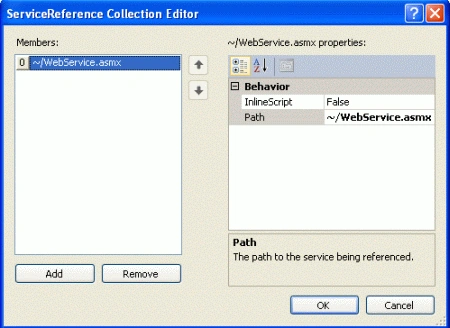
Step 5 : Now go to the Default.aspx page
and drag ScriptManager control from Toolbox.
- Go to design option and click in Script Manager control
- Select property option
- Define Services
Step 6 : Create new
button to call the JavaSciprt function
and a label to display the
returned value.
<div
style="background-color:
#99CCFF">
<asp:Button
ID ="button1"
runat="server"
Text="mcnsever"
onclick="button1_Click"></asp:Button>
<asp:Label
ID="lblOutput" runat="server"
Text="Label"></asp:Label>
Step 7 : Define the
JavaScript code to call the Web Service.


Vikas MishraPosted Dec 19, 2011, 11:35 AM
Hi Davin you have done very good work ,keep it up.....