

Long running tasks in any application make the application or software non-responsive. So to keep the user updated about the running task and also keep the application responsive during long running tasks we can use different kinds of loading bar options like,
- Progress Bar
- Ring Bar
Let's discuss XAML Progress Ring in UWP Apps.
- What is progress ring?
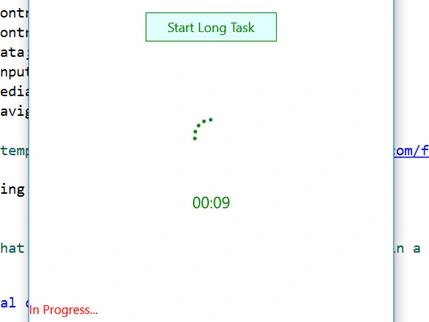
Xaml progress ring represents a controls that indicates that an operation is ongoing. Its shape is a ring shape spinner that shows an animation when a long running task occurs. - Getting started with a Simple Example
Open visual studio and make a blank UWP Project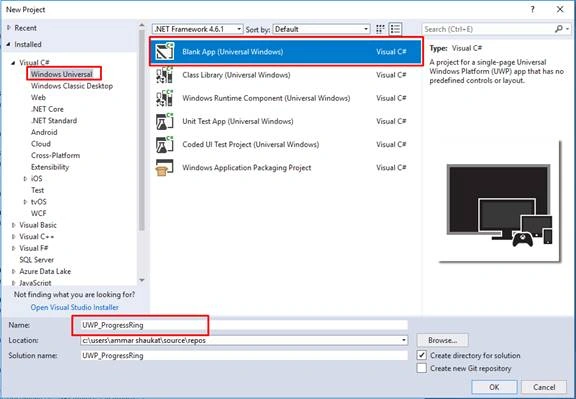
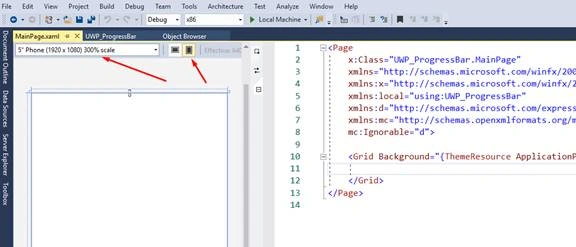
- Once you click ok , you'll see and empty application like this,
- We need 4 controls to Implement Progress Ring Control in this app.
- Button
- Progress Ring
- 2 Text block
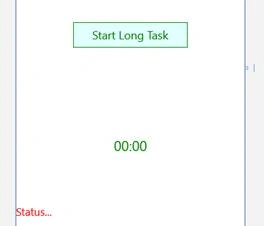
- Button to start a lengthy task , 1 label to show time and other to show status
- Make a grid and place these controls accordingly . Here I'm using Static Resources in XAML to set the design for xaml controls. If you don't know how to work with Static Resources in XAML you can check it here.
- <Page x:Class="UWP_ProgressRing.MainPage" xmlns="http://schemas.microsoft.com/winfx/2006/xaml/presentation" xmlns:x="http://schemas.microsoft.com/winfx/2006/xaml" xmlns:local="using:UWP_ProgressRing" xmlns:d="http://schemas.microsoft.com/expression/blend/2008" xmlns:mc="http://schemas.openxmlformats.org/markup-compatibility/2006" mc:Ignorable="d">
- <Page.Resources>
- <Style TargetType="Button">
- <Setter Property="Width" Value="180"></Setter><Setter Property="Height" Value="40"></Setter><Setter Property="HorizontalAlignment" Value="Center"></Setter><Setter Property="FontSize" Value="18"></Setter><Setter Property="Foreground" Value="Green"></Setter><Setter Property="Background" Value="LightCyan"></Setter><Setter Property="BorderBrush" Value="Green"></Setter><Setter Property="BorderThickness" Value="1"></Setter>
- </Style>
- <Style TargetType="ProgressRing">
- <Setter Property="Height" Value="50"></Setter><Setter Property="Width" Value="50"></Setter><Setter Property="Foreground" Value="Green"></Setter>
- </Style>
- <Style TargetType="TextBlock">
- <Setter Property="HorizontalAlignment" Value="Center"></Setter><Setter Property="Foreground" Value="Green"></Setter><Setter Property="FontSize" Value="22"></Setter>
- </Style>
- </Page.Resources>
- <Grid Background="{ThemeResource ApplicationPageBackgroundThemeBrush}">
- <Grid.RowDefinitions>
- <RowDefinition></RowDefinition>
- <RowDefinition></RowDefinition>
- <RowDefinition></RowDefinition>
- <RowDefinition></RowDefinition>
- <RowDefinition></RowDefinition>
- <RowDefinition></RowDefinition>
- </Grid.RowDefinitions>
- <Button x:Name="btn_StartLongTask" Grid.Row="2" Click="btn_StartLongTask_ClickAsync">Start Long Task</Button>
- <ProgressRing x:Name="pr_ProgressRing1" Grid.Row="3"></ProgressRing>
- <TextBlock x:Name="lbl_CountDown" Grid.Row="4" VerticalAlignment="Top">00:00</TextBlock>
- <TextBlock x:Name="lbl_TaskStatus" Grid.Row="5" VerticalAlignment="Top" HorizontalAlignment="Left" Foreground="Red" FontSize="17">Status...</TextBlock>
- </Grid>
- </Page>
Pavithra SundaramPosted Apr 30, 2019, 11:34 PM
Nice article. Yet,Please help me with another problem.. I have various button click events in my application and the page becomes unresponsive.Hence, i tried doing it with progress bar. The thing i need is "Once the page gets loaded, progress bar needs to disappear". Pleaseeee hep with this :(
Srikanth ReddyPosted Aug 16, 2018, 2:24 PM
How to show progressive ring asynchronously on button click (like search button press)?