

Introduction
One important aspect of every enterprise application is the validation of business rules. In this article, I will show how to add business rules to Linq to SQL data model default set of schemas. When we define a LINQ to SQL data model, we will automatically have a default set of schema based validation constraints added to our data model classes. For example, if you try to set a null value for a required column, then the LINQ to SQL data model will raise an error to ensure our database integrity is maintained. Although, it's very common to add additional business rules and application-level validation to our data model classes, and this is the case that I will explain in my article.
Getting started with the solution
For this example, we're going to use the Department entity whose instances' state will be stored in the dbo.Department table in an SQL Server database. The schema for this table is shown in the Listing 1.
CREATE TABLE [dbo].[Department](
[DeptID] [int]
NOT NULL,
[DeptName]
[varchar](50) NOT NULL,
[Location]
[varchar](50) NOT NULL,
CONSTRAINT [PK_Department] PRIMARY
KEY CLUSTERED
(
[DeptID] ASC
)WITH (IGNORE_DUP_KEY
= OFF) ON [PRIMARY]
) ON [PRIMARY]
GO
Listing 1
Now, let's see where to implement the business rules of the enterprise application. Adding the business rules in the UI layer of our application means that the rule will be specific to only that one place, and this will not be automatically enforced when we add another UI to update the departments. So, the solution is to place the business logic validation in the SQL data model classes.
In order to illustrate this example, we're going to create a Web site solution in Visual Studio.NET 2008 and then add a Linq to SQL artifact inside it. Finally, drag and drop the Department table inside the Linq to SQL designer (see Figure 1).
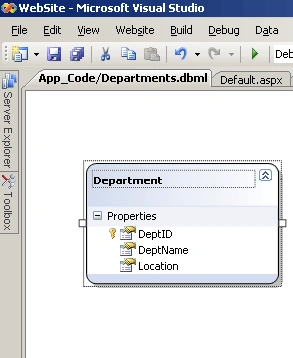
Figure 1
If you look inside the generated code for the Linq to SQL designer, all classes are defined as partial and you can see the code generated for the Department class. So in order to call validation methods that implement the custom validation logic, we have to override the OnValidate method of the Department partial class.
Now inside the OnValidate method, we have to code the validation logic. Let's suppose in our example that we don't want to have departments from NY. So, the validation code is shown in the Listing 2.
using System;
using System.Data;
using System.Configuration;
using System.Linq;
using System.Web;
using System.Web.Security;
using System.Web.UI;
using System.Web.UI.HtmlControls;
using System.Web.UI.WebControls;
using System.Web.UI.WebControls.WebParts;
using System.Xml.Linq;
/// <summary>
/// Summary description for Department
/// </summary>
public partial class Department
Manish SinghPosted Nov 21, 2011, 4:06 PM
Thanks John Charles Olamendi it's really helpful.
sukumar thotaPosted Jun 1, 2010, 11:32 AM
I have custom validation in my datacontext that if a username is already existing, it won't let another user save with the same name. That works fine when I add a new user but I am having a problem updating the same user as it validates again and finds the user existing so it throws an exception. Please let me know how can I apply validation for only certain actions like only when I add but not on update. I am using the submitchanges() method and I don't know where can I differentiate whether it's an update or adding new record. Please help me . Thanks.