

Introduction
SharePoint's dynamic features extend beyond basic document storage, offering robust tools such as version history and document control. This detailed exploration aims to unravel the benefits, implementation intricacies, and best practices associated with version history and document control in SharePoint, showcasing how these functionalities elevate collaborative efforts while ensuring regulatory compliance.
Version History in SharePoint
Overview: Version history transforms SharePoint into a time machine for documents, capturing every modification. The benefits extend beyond a simple record; they empower organizations with insights into the evolution of their content.
Benefits of Version History
- Audit Trail: A comprehensive audit trail is invaluable for regulatory compliance and internal reviews.
- Error Recovery: Easily recover from unintended changes or errors with the ability to revert to previous versions.
- Collaborative Transparency: Enhance collaborative transparency by visualizing the progression of shared documents.
Implementation of Version History
- Configurable Settings: SharePoint's flexibility allows organizations to configure versioning settings based on their unique needs.
- Granular Control: Choose between major and minor versions, tailoring version control to the significance of document changes.
Best Practices
- Regularly Review Versions: Establish a routine for reviewing versions to ensure the accuracy and relevance of stored information.
- Educate Users: Promote user awareness about versioning benefits and encourage responsible version management.
Enabling Versioning Settings in SharePoint List
- Navigate to the desired list.
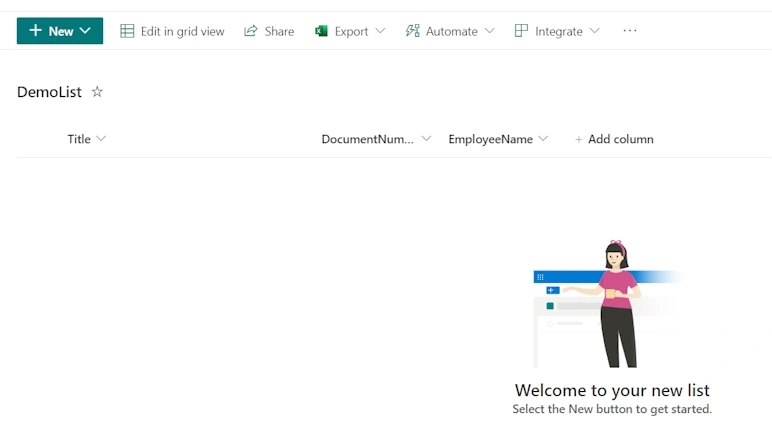
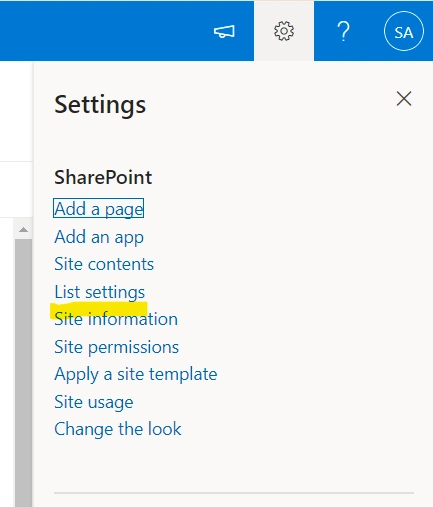
- Access the list settings.
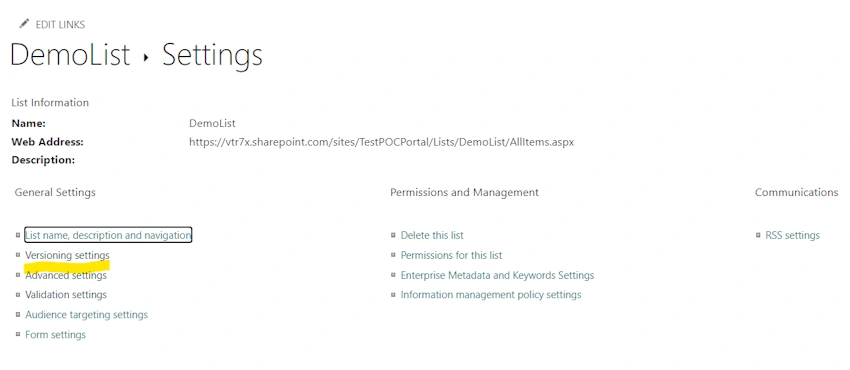
- Select "Versioning settings."
- Choose "Yes" under "Create a version each time you edit an item in this list."
- Specify the desired number of versions to be created for each item under "Keep the following number of versions."
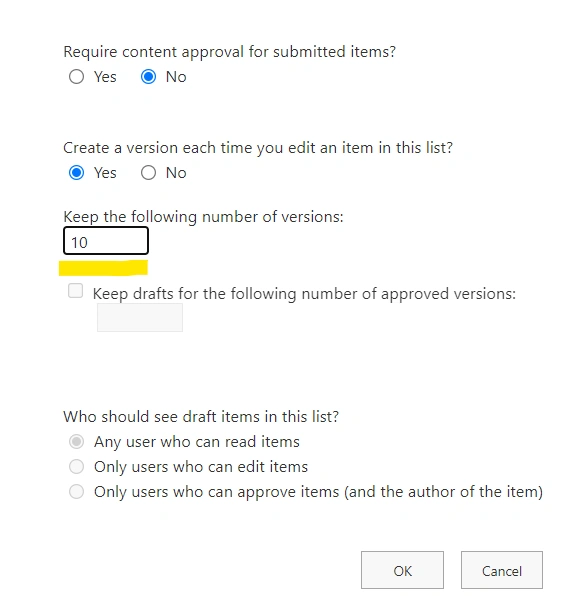
Optionally, enter the preferred number for "Keep drafts for the following number of approved versions" based on your requirements.
Document Control in SharePoint
Document Check-Out and Check-In: Document control features, such as check-out and check-in, provide a structured approach to collaborative content creation, minimizing conflicts and enhancing control over the editing process.
Benefits of Document Control
- Editing Coordination: Prevent conflicting edits by ensuring only one user can edit a document at a time.
- Content Consistency: Facilitate consistent and coherent document updates through controlled check-in processes.
- Access Management: Control access during document editing phases to maintain data integrity.
Implementation of Document Control
- User Training: Train users on the importance of checking out and in, emphasizing the impact on collaboration and version history.
- Co-authoring Enhancement: Leverage document control to enhance co-authoring experiences, fostering seamless collaboration.
Best Practices
- Approval Workflows: Implement approval workflows for critical documents, ensuring a systematic review process before publication.
- Automated Notifications: Use automated notifications to inform users when documents are available for editing or require approval.
Benefits of Version History and Document Control:
- Enhanced Collaboration: Foster a culture of collaboration by providing a structured environment for content creation and modification.
- Regulatory Compliance: Meet regulatory requirements effortlessly with an organized audit trail and controlled document workflows.
- Error Reduction: Minimize the risk of errors and conflicts through systematic document check-out and check-in procedures.
- Improved Productivity: Boost productivity by streamlining collaboration and ensuring that users work on the latest, approved versions of documents.
- Transparent Document Lifecycle: Gain transparency into the document lifecycle, from creation to approval, enhancing overall document management.
Conclusion
Incorporating version history and document control in SharePoint is not merely a technical aspect; it's a strategic move towards optimized collaboration, data integrity, and regulatory compliance. Organizations that harness these features effectively unlock a realm of benefits, positioning SharePoint as a pivotal tool for modern document management.
Join the conversation! Your thoughts help the community grow.