

In this article we will be seeing how to configure versioning settings for SharePoint list using powershell.
Go to SharePoint site => Shared Documents => Library Settings => Versioning Settings => you can configure the versioning settings for the document library.
You could see four sections
- Content Approval
- Document Version History
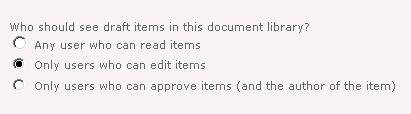
- Draft Item Security
- Require Check out
Content Approval:
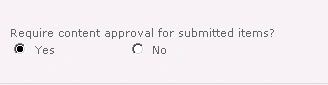
C# code snippet:
using (SPSite site = new SPSite("http://servername:1111/"))
{
using (SPWeb web =
site.RootWeb)
{
SPList list = web.Lists["Shared Documents"];
list.EnableModeration
= true;
list.Update();
}
}
Powershell Script:
$siteURL="http://servername:1111/"
$listName="Shared Documents"
$site=Get-SPSite $siteURL
$web=$site.RootWeb
$list=$web.Lists[$listName]
$list.EnableModeration = $true
$list.Update()
Document Version History:
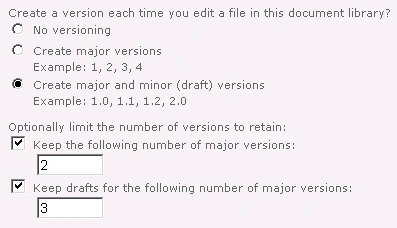
C# code snippet:
using (SPSite site = new SPSite("http://servername:1111/"))
{
using (SPWeb web =
site.RootWeb)
{
SPList list = web.Lists["Shared Documents"];
list.EnableVersioning
= true;
list.EnableMinorVersions
= true;
list.MajorWithMinorVersionsLimit
= 3;
list.MajorVersionLimit
= 2;
list.Update();
}
}
Powershell Script:
$siteURL="http://servername:1111/"
$listName="Shared Documents"

Mthabisi KhumaloPosted Sep 21, 2012, 9:06 AM
very helpful