
Introduction
Before moving further, let us look at the previous articles of the series
- Voice of a Developer: JavaScript Data Types - Part One
- Voice of a Developer: JavaScript Objects - Part Two
- Voice of a Developer: JavaScript Engines - Part Three
- Voice of a Developer: JavaScript Common Mistakes - Part Four
- Voice of a Developer: Editors - Part Five
- Voice of a Developer: VSCode - Part Six
- Voice of a Developer: Debugging Capabilities of VSCode - Part Seven
- Voice of a Developer: JavaScript OOP - Part Eight
- Voice of a Developer: JavaScript Useful Reserved Keywords - Part Nine
- Voice of a Developer: JavaScript Functions - Part Ten
- Voice of a Developer: JavaScript Functions Invocations - Part Eleven
- Voice of a Developer: JavaScript Anonymous Functions - Part Twelve
- Voice of a Developer: JavaScript Pure And Impure Function - Part Thirteen
- Voice of a Developer: JavaScript Closures - Part Fourteen
- Voice of a Developer: JavaScript Currying - Part Fifteen
- Voice of a Developer: JavaScript Chaining - Part Sixteen
- Voice of a Developer: JavaScript Array Methods - Part Seventeen
- Voice of a Developer: JavaScript ECMAScript 6 - Part Eighteen
- Voice of a Developer: JavaScript ECMAScript 6 Features v1 - Part Nineteen
- Voice of a Developer: JavaScript ECMAScript 6 Features v2 - Part Twenty
- Voice of a Developer: JavaScript Web Workers - Part Twenty One
- Voice of a Developer: JavaScript JSLint v1 - Part Twenty-Two
- Voice of a Developer: JavaScript JSLint v2 - Part Twenty Three
- Voice of a Developer: XMLHttpRequest API - Part Twenty Four
- Voice of a Developer: Web Storage API - Part Twenty-Five
- Voice of a Developer: Application Cache API - Part Twenty-Six
- Voice of a Developer: Javascript WebSocket - Part Twenty-Seven
- Voice of a Developer: Parse JSON - Part Twenty-Eight
- Voice of a Developer: Save Coding Time With Lodash.js - Part Twenty Nine
- Voice of a Developer: ChakraCore JavaScript Engine by Microsoft - Part Thirty
- Voice of a Developer: JavaScript Web App Performance Best Practices - Part 31
- Voice of a Developer: ECMAScript Promises - Part Thirty-Two
- Voice of a Developer: Browser Runtime - Part Thirty-Three
- Voice of A Developer: JavaScript Unit Test - Part Thirty-Four
JavaScript
Javascript is the language of the Web. This series of articles will talk about my observations learned during my decade of software development experience with JavaScript.
In computer systems, coupling refers to the degree of direct knowledge that one component/class has of another. In a way, it is the degree of interdependence between the software modules. Our Application quality metrics depend upon the degree of interdependence components.
Primarily, there are two types of coupling, i.e., loose and tight.
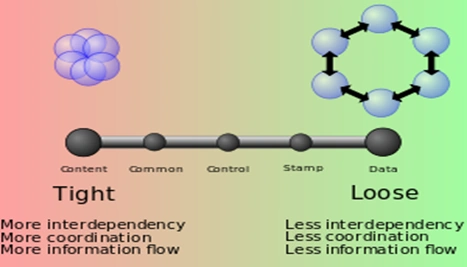 Loose coupling is a better design, as it promotes single-responsibility and separation of the concerns principle. A loosely coupled module can be consumed and tested independently of other modules. In OOPS programming languages, interface is a powerful tool to use decoupling. Classes communicate via interface rather than other concrete classes.
In general, tight coupling is bad and not preferred because the modules are dependent on each other. If you want to change one module then it is not easy if it is tightly coupled with the other modules.
An Application is modular, when it is composed of decoupled pieces stored in the modules. As developers, we shall aspire for loose coupling. Hence, our Application will be easy to maintain, update code, and make changes.
If you remember, I mentioned in ES6 v2 (article 20), that we have a module available where we can export and import JavaScript functions. The popular concept in loading the module is AMD.
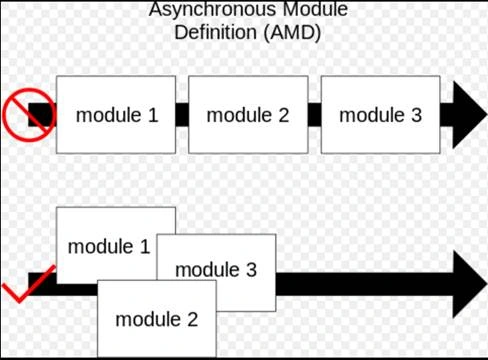
The overall goal for the AMD format is to provide a solution for the modular JavaScript, that the developers can use today. It loads the module and dependencies asynchronously. There are many advantages associated with AMD and these are:
Loose coupling is a better design, as it promotes single-responsibility and separation of the concerns principle. A loosely coupled module can be consumed and tested independently of other modules. In OOPS programming languages, interface is a powerful tool to use decoupling. Classes communicate via interface rather than other concrete classes.
In general, tight coupling is bad and not preferred because the modules are dependent on each other. If you want to change one module then it is not easy if it is tightly coupled with the other modules.
An Application is modular, when it is composed of decoupled pieces stored in the modules. As developers, we shall aspire for loose coupling. Hence, our Application will be easy to maintain, update code, and make changes.
If you remember, I mentioned in ES6 v2 (article 20), that we have a module available where we can export and import JavaScript functions. The popular concept in loading the module is AMD.
The overall goal for the AMD format is to provide a solution for the modular JavaScript, that the developers can use today. It loads the module and dependencies asynchronously. There are many advantages associated with AMD and these are:
What is coupling?
Types of coupling
Source: Wikipedia
What is modularity?
Module writing in JavaScript
Asynchronous Module Definition (AMD)
- Improved performance loads files when require/needed.
- Define dependencies: Allow the developers to define dependencies that must load before a module is executed.
- This pattern is useful, where synchronous loading of the modules incurs performance issues.
Source: Wikipedia
Key concepts with the Modules
- Id is an optional string literal.
- Dependencies is an array which defines dependencies required by the module. These dependencies must be resolved prior to the execution of the next factory function. It is also optional to say if this module is not dependent on any other module. It loads the dependencies asynchronously.
- The factory Mandatory argument is executed only once.
Sample
- define
- ([
- 'require',
- 'dependency'
- ], function(require, factory)
- {
- 'use strict';
- });
Require function
- require(['calc', 'math'], function(calc, math)
- {
- // you code
- calc.getData();
- math.calculate();
- });
Play with RequireJS
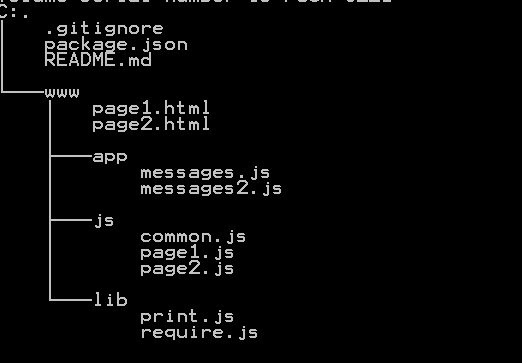
Project explanation
Load JavaScript files
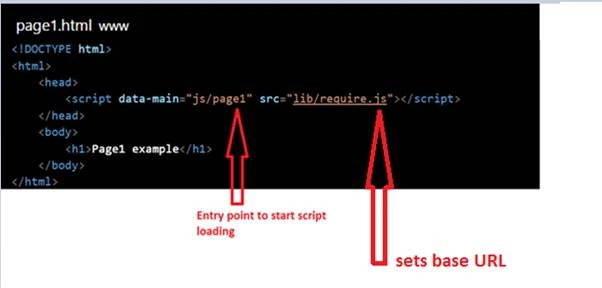
- Script the script tag to load JavaScript
- data-main entry point attribute which refers to load a javascript file
- src base URL for require.js file
In our directory structure, you can see three files,
- common.js
- page1.js
- page2.js
Now data-main attribute will load js/page1.js.
Note- RequireJS assumes that file ends with .js. Both js/page1 & js/page1.js work fine.
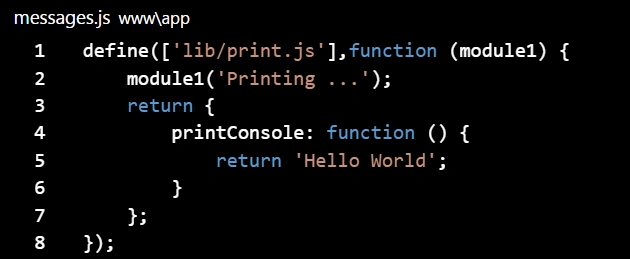
There is a module that we created messages.js in and defined a dependency in lib/print.js file. The purpose of the messages is to include dependency and return a callback function.
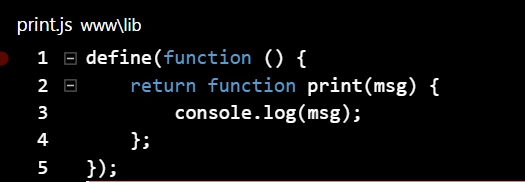
 print.js file returns a callback print function.
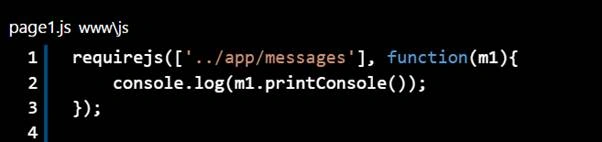
 Page1.js- This page1.js has a dependency on App/messages and uses require() form, that just uses the string name of the module to fetch it.
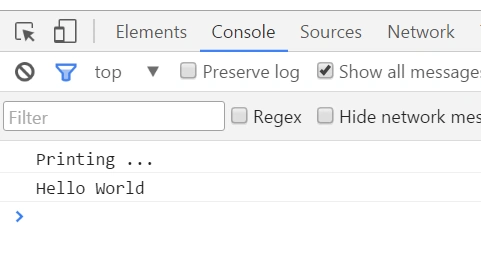
 Run www/page1.html in your Browser and review Network & Console Developer (F12).
Console
Run www/page1.html in your Browser and review Network & Console Developer (F12).
Console
 Network tab
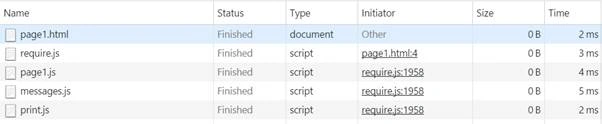
 You can also try www/page2.html and check the Console & Network tab to see page2.html related files only.
Console
You can also try www/page2.html and check the Console & Network tab to see page2.html related files only.
Console
 Network
 Please share your feedback/comments.
Define module
Calling module
Debasis SahaPosted Jun 17, 2016, 12:48 AM
Nice one..
Asad AliPosted Jun 16, 2016, 6:00 AM
good one
RajaPosted Jun 16, 2016, 3:04 AM
Nice Share....
Guest UserPosted Jun 10, 2016, 4:30 AM
Thanks guys!
Atul RawatPosted Jun 9, 2016, 7:04 AM
nice article sumit sir
Vignesh ManiPosted Jun 9, 2016, 5:18 AM
Nice
Santhakumar MunuswamyPosted Jun 9, 2016, 12:27 AM
Thank you for nice share
Sonu ChaudharyPosted Jun 8, 2016, 2:51 PM
good one ..
Guest UserPosted Jun 8, 2016, 10:30 AM
However most of the images are from code which I uploaded at GIT repo: https://github.com/sumitjolly/create-template
Guest UserPosted Jun 8, 2016, 10:29 AM
Hi Ibrahim Ersoy . apologies if images are not clear .. i can check with c-sharpcorner team
Ibrahim ErsoyPosted Jun 8, 2016, 9:33 AM
Nice article,Sumit! Though there are problems with images.please re-upload the images