
Introduction
JavaScript is a language of the Web. This series of articles will talk about my observations learned during my decade of software development experience with JavaScript.
Before moving further let us look at the previous articles of the series:
- Voice of a Developer: JavaScript Data Types - Part One
- Voice of a Developer: JavaScript Objects - Part Two
- Voice of a Developer: JavaScript Engines - Part Three
- Voice of a Developer: JavaScript Common Mistakes - Part Four
- Voice of a Developer: Editors - Part Five
- Voice of a Developer: VSCode - Part Six
- Voice of a Developer: Debugging Capabilities of VSCode - Part Seven
- Voice of a Developer: Part Eight - JavaScript OOP
JavaScript has many useful reserved keywords. I will walk you through the usage and benefits of these keywords
When we work on large applications then we work with many objects. We are familiar with problems like a memory leak, the performance of the application is not good, and similar issues arise at a later stage. I always recommend that we know how much memory we are consuming in our application. Ex- Chrome provides a quick way to look into memory usage,
Delete keyword

- var automobile = {
- engine: true,
- fuel: true,
- tyres: 2
- };
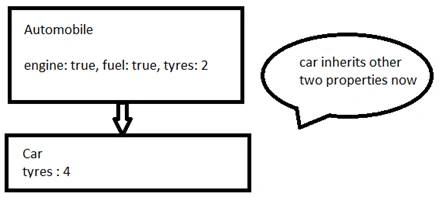
- var car = Object.create(automobile); //car is instanceof automobile
- console.log(car.tyres); // 2 it inherits from parent class
- //as we know car has own tyres then we can create own property of car object
- car.tyres = 4; // will make own tyre property of car object
- //now we want to delete property tires from the car
- delete car.tyres ; //will return true
Q: We have deleted tyres from car object, what will happen if we print car.tyres?
The output of below statement will be 2 because it refer to tyres property in automobile object,
- console.log(car.tyres); // print 2
- To delete tyres completely remove from automobile object
- delete automobile.tyres; //true
- console.log(automobile.tyres); // print undefined
This keyword
We know to create multiple objects we can use Object Constructor function. We’ll use this keyword to create property which belong to function,
- function Automobile(engine, fuel, tyres) {
- this.engine = engine;
- this.fuel = fuel;
- this.tyres = tyres;
- }
- var car = new Automobile(true, true, 4);
- var bike = new Automobile(true, true, 2);
Second example, this refers to the parent object in the body of the function,
- var counter = {
- val: 0,
- increment: function() {
- this.val += 1;
- }
- };
- counter.increment();
- console.log(counter.val); // 1
- counter['increment']();
- console.log(counter.val); // 2
New operator
Example
- function F1(val) {
- this.val = val;
- }
- var f = new F1("Foo");
- console.log(f.val); // Foo
- console.log(this.val); // ReferenceError: val is not defined. Because val is associated with function object
- If we call f without new then this will refer to the global object(which is ex Windows)
- function F1(val) {
- this.val = val;
- }
- var f = F1("Foo");
- console.log(this.val); // Foo
Summary
Rules are simple just we need awareness on how to use delete, this, and new. Please share comments and feedback.
Read more articles on JavaScript
Lokesh KumarPosted Jul 16, 2016, 4:52 AM
Very helpful Article thanks for sharing
Amit DavePosted May 3, 2016, 6:55 AM
Nice article!
Guest UserPosted May 3, 2016, 12:14 AM
Thanks a lot guys
Manju lata YadavPosted May 2, 2016, 11:59 PM
Nice analylis...
Debasis SahaPosted May 2, 2016, 1:47 PM
Good One..
Sonu ChaudharyPosted May 2, 2016, 5:54 AM
Thanks for sharing
Kuppurasu NagarajPosted May 1, 2016, 12:48 PM
Nice Sharing..
Vignesh ManiPosted May 1, 2016, 9:12 AM
Nice