

Introduction
Today, in this article let's play around with one of the interesting and most useful concepts in Azure.
Question: What is WCF service role using Azure on client?
In simple terms "It enables use of a WCF service role with Azure and deployment of it across client context accessibility".
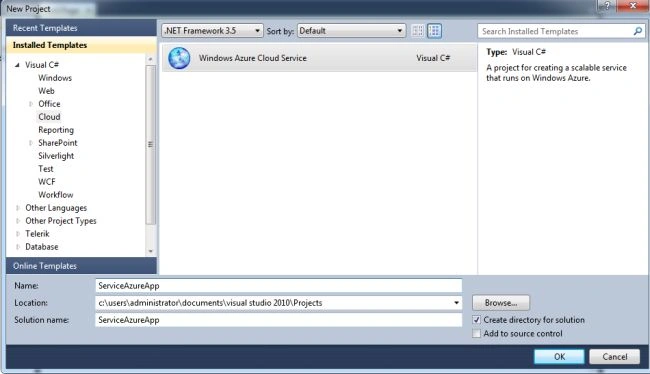
Step 1: Open Visual Studio 2010 and select Windows Azure Cloud Service application; see:
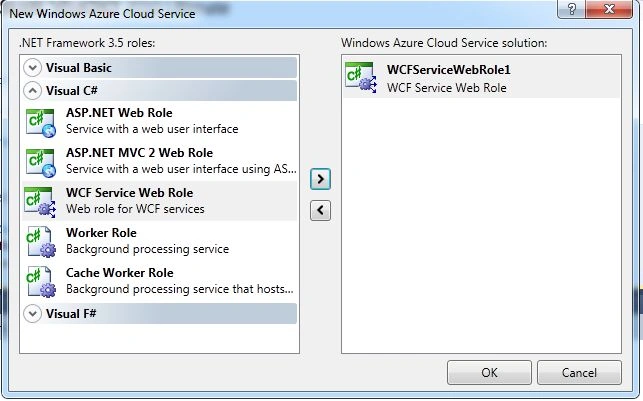
Step 2: Select WCF service web role and click on the ok - button.
Step 3: The complete code of IService1.cs looks like this:
using System;
using System.Collections.Generic;
using System.Linq;
using System.Runtime.Serialization;
using System.ServiceModel;
using System.ServiceModel.Web;
using System.Text;
namespace WCFServiceWebRole1
{
// NOTE: You can use the "Rename" command on the "Refactor" menu to change the interface name "IService1" in both code and config file together.
[ServiceContract]
public interface IService1
{
[OperationContract]double Add(double a, double b);
[OperationContract]double Sub(double a, double b);
[OperationContract]double Mul(double a, double b);
[OperationContract]double Div(double a, double b);
}
}
Step 4: The complete code of Service1.svc.cs looks like this:
using System;
using System.Collections.Generic;
using System.Linq;
using System.Runtime.Serialization;
using System.ServiceModel;
using System.ServiceModel.Web;
using System.Text;
namespace WCFServiceWebRole1
{
// NOTE: You can use the "Rename" command on the "Refactor" menu to change the class name "Service1" in code, svc and config file together.
public class Service1 : IService1
{
public double Add(double a, double b)
{
return a + b;
}
public double Sub(double a, double b)
{return a - b;
}
public double Mul(double a, double b)
{
return a * b;
}
public double Div(double a, double b)
{return a / b;
}
}
}
Step 5: The complete code of web.config looks like this:
<?xml version="1.0"?>
<configuration>
<configSections></configSections>
<!-- To collect diagnostic traces, uncomment the section below or merge with existing system.diagnostics section.To persist the traces to storage, update the DiagnosticsConnectionString setting with your storage credentials.To avoid performance degradation, remember to disable tracing on production deployments.<system.diagnostics> <sharedListeners><add name="AzureLocalStorage" type="WCFServiceWebRole1.AzureLocalStorageTraceListener, WCFServiceWebRole1"/></sharedListeners><sources><source name="System.ServiceModel" switchValue="Verbose, ActivityTracing"><listeners><add name="AzureLocalStorage"/></listeners></source><source name="System.ServiceModel.MessageLogging" switchValue="Verbose"><listeners><add name="AzureLocalStorage"/></listeners></source></sources> </system.diagnostics> -->
<system.diagnostics>
<trace>
<listeners>
<add type="Microsoft.WindowsAzure.Diagnostics.DiagnosticMonitorTraceListener, Microsoft.WindowsAzure.Diagnostics, Version=1.7.0.0, Culture=neutral, PublicKeyToken=31bf3856ad364e35"name="AzureDiagnostics">
<filter type="" />
</add>
</listeners>
</trace>
</system.diagnostics>
<system.web>
<compilation debug="true" targetFramework="4.0" />
</system.web>
<system.serviceModel>
<behaviors>
<serviceBehaviors>
<behavior>
<!-- To avoid disclosing metadata information, set the value below to false and remove the metadata endpoint above before deployment -->
<serviceMetadata httpGetEnabled="true"/>
<!-- To receive exception details in faults for debugging purposes, set the value below to true. Set to false before deployment to avoid disclosing exception information -->
<serviceDebug includeExceptionDetailInFaults="false"/>
</behavior>
</serviceBehaviors>
</behaviors>
<serviceHostingEnvironment multipleSiteBindingsEnabled="true" />
</system.serviceModel>
<system.webServer>
<modules runAllManagedModulesForAllRequests="true"/>
<!--To browse web app root directory during debugging, set the value below to true.Set to false before deployment to avoid disclosing web app folder information.-->
<directoryBrowse enabled="true"/>
</system.webServer>
</configuration>
Step 6: Adding new client application to the solution:

Step 7: Add new service reference to the project. In the context the service reference link looks like this:
http://127.0.0.1:81/Service1.svc
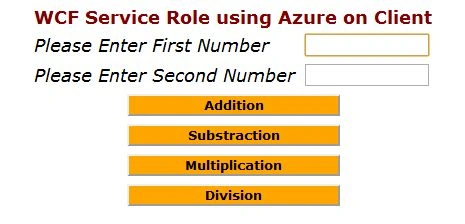
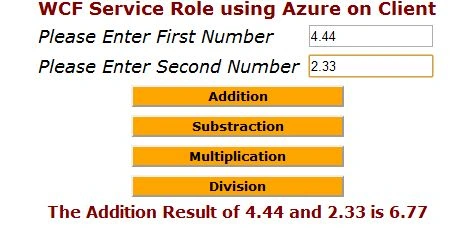
Step 8: The complete code of webform1.aspx looks like this:
<%@ Page Language="C#" AutoEventWireup="true" CodeBehind="WebForm1.aspx.cs" Inherits="AzureClientWCFApp.WebForm1" %>
<!DOCTYPE html PUBLIC "-//W3C//DTD XHTML 1.0 Transitional//EN" "http://www.w3.org/TR/xhtml1/DTD/xhtml1-transitional.dtd">
<html xmlns="http://www.w3.org/1999/xhtml">
<head id="Head1" runat="server">
<title></title>
Gowtham RajamanickamPosted Apr 20, 2015, 3:21 PM
good one...