

Importance of Web API documentation
Web API documentation is really very helpful when two different team (Back end and Front end) are working on project and not sitting together so in that scenario you will send your API information through mail or call. What kind of parameter request contain. If you are making any changes in your web API every time you have to inform through mail or call.
So solution of above problem is generate web API documentation web page.
When you create a web API, it is often useful to create web API document web page, so that other developers will know how to call your API. You could create all the documentation manually, but it is better to autogenerate as much as possible.
So let us start with demo.
Step 1: In this step we will create empty web API project. So open Visual Studio press CTRL + SHIFT + N as in the following image,
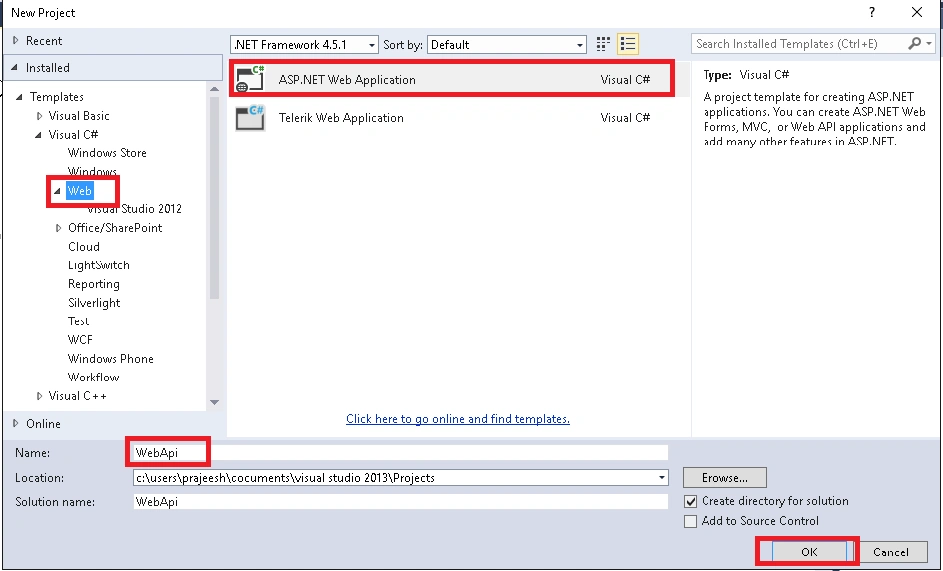
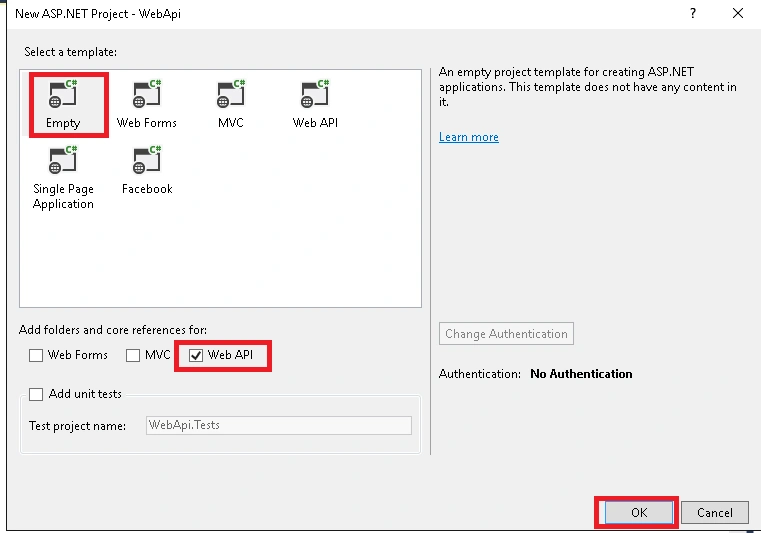
Step 2: Go to model folder add a class name as Student and it looks like this,
- using System;
- using System.Collections.Generic;
- using System.Linq;
- using System.Web;
- namespace WebApi.Models
- {
- public class Student
- {
- public int Id
- {
- get;
- set;
- }
- [Required]
- public string name
- {
- get;
- set;
- }
- public string city
- {
- get;
- set;
- }
- }
- }
Build the project.
Add the Entity Framework into project form Nuget Package Manger and open Package Manager Console (ALT+SHIFT +N + Enter). Then type
install-package EntityFramework
and press Enter key.
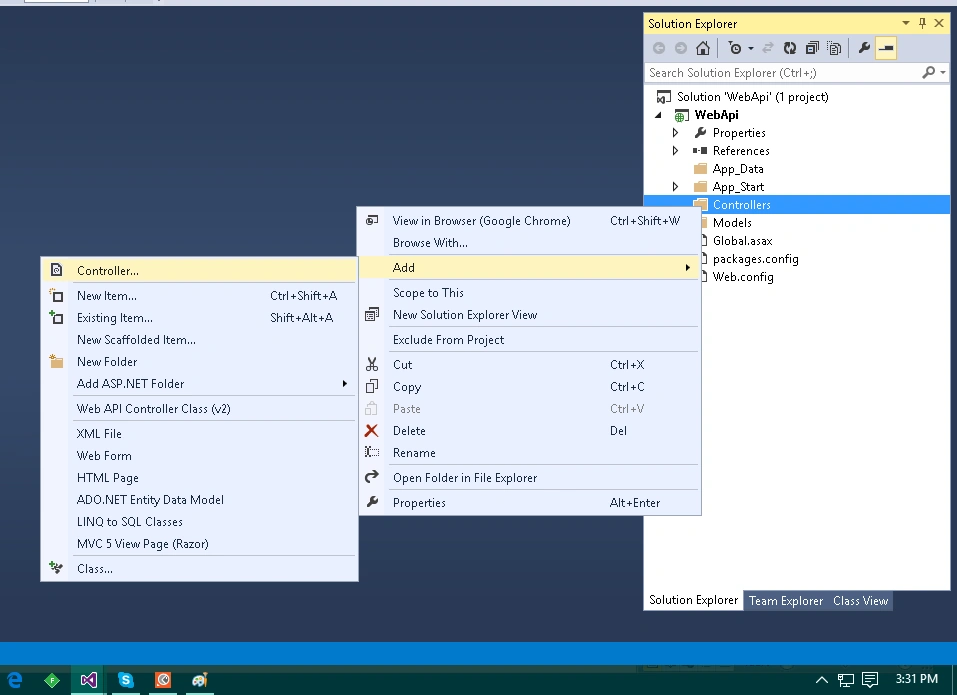
Step 3: Go to controller folder right click on it as in the following image,
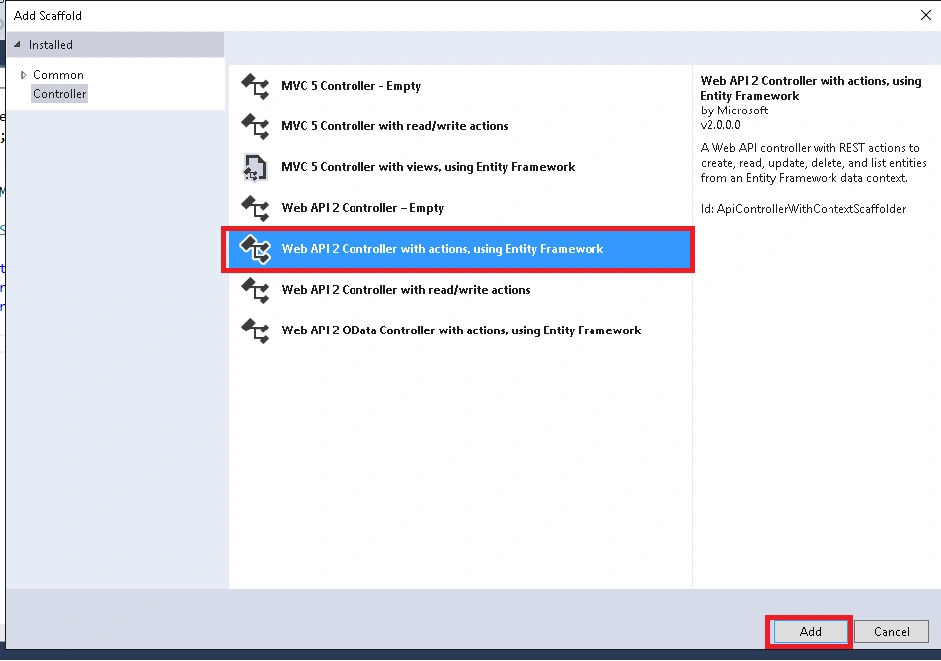
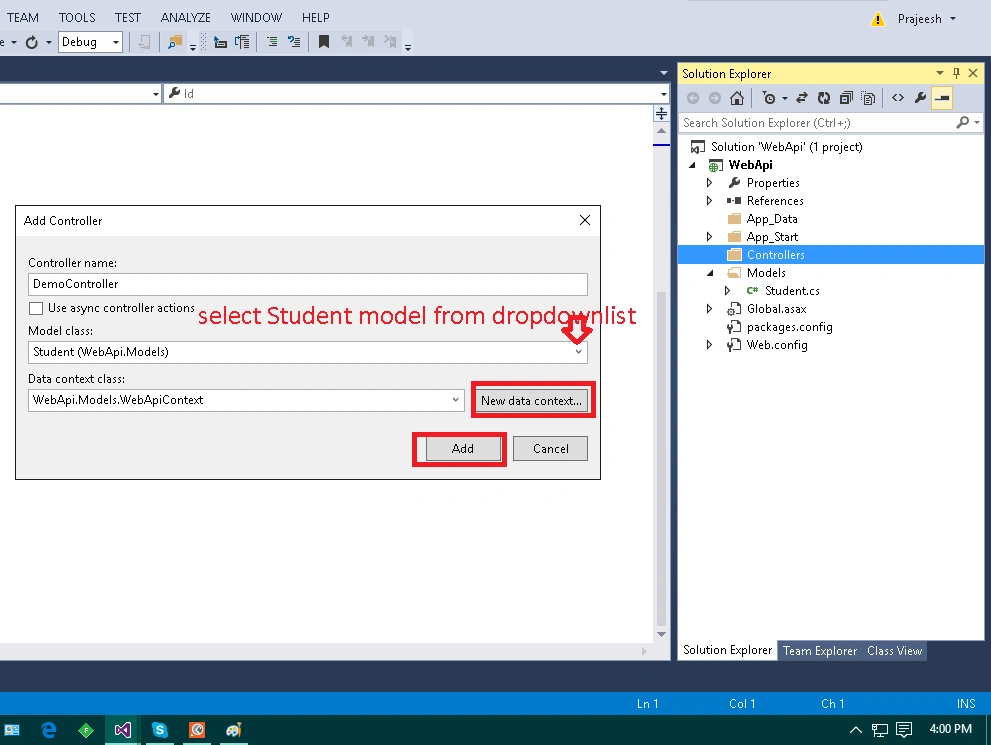
Select the Student model class from dropdownlist and add a new Data Context and then click on add. This will generate the following code snippet,
- using System;
- using System.Collections.Generic;
- using System.Data;
- using System.Data.Entity;
- using System.Data.Entity.Infrastructure;
- using System.Linq;
- using System.Net;
- using System.Net.Http;
- using System.Web.Http;
- using System.Web.Http.Description;
- using WebApi.Models;
- namespace WebApi.Controllers
- {
- public class DemoController: ApiController
- {
- private WebApiContext db = new WebApiContext();
- // GET api/Demo
- public IQueryable < Student > GetStudents()
- {
- return db.Students;
- }
- // GET api/Demo/5
- [ResponseType(typeof(Student))]
- public IHttpActionResult GetStudent(int id)
- {
- Student student = db.Students.Find(id);
- if (student == null) {
- return NotFound();
- }
- return Ok(student);
- }
- // PUT api/Demo/5
- public IHttpActionResult PutStudent(int id, Student student)
- {
- if (!ModelState.IsValid)
- {
- return BadRequest(ModelState);
- }
- if (id != student.Id)
- {
- return BadRequest();
- }
- db.Entry(student).State = EntityState.Modified;
- try {
- db.SaveChanges();
- } catch (DbUpdateConcurrencyException)
- {
- if (!StudentExists(id))
- {
- return NotFound();
- } else
- {
- throw;
- }
- }
- return StatusCode(HttpStatusCode.NoContent);
- }
- // POST api/Demo
- [ResponseType(typeof(Student))]
- public IHttpActionResult PostStudent(Student student)
- {
- if (!ModelState.IsValid)
- {
- return BadRequest(ModelState);
- }
- db.Students.Add(student);
- db.SaveChanges();
- return CreatedAtRoute("DefaultApi", new
- {
- id = student.Id
- }, student);
- }
- // DELETE api/Demo/5
- [ResponseType(typeof(Student))]
- public IHttpActionResult DeleteStudent(int id)
- {
- Student student = db.Students.Find(id);
- if (student == null)
- {
- return NotFound();
- }
- db.Students.Remove(student);
- db.SaveChanges();
- return Ok(student);
- }
- protected override void Dispose(bool disposing)
- {
- if (disposing)
- {
- db.Dispose();
- }
- base.Dispose(disposing);
- }
- private bool StudentExists(int id)
- {
- return db.Students.Count(e => e.Id == id) > 0;
- }
- }
- }
Step 4: In this step we will create web API document page.
Open Package Manager Console (CTRL +SHIFT + N +Enter) and type the following command in console,
install-package Microsoft.AspNet.WebApi.HelpPage
Above command installs the necessary assemblies and adds the MVC views for the help pages (located in the Areas/HelpPage folder). Now open the Global.asax file and register. Add the following code to the Application_Start method if it not there already,
- using System;
- using System.Collections.Generic;
- using System.Linq;
- using System.Web;
- using System.Web.Http;
- using System.Web.Mvc;
- using System.Web.Routing;
- namespace WebApi
- {
- public class WebApiApplication: System.Web.HttpApplication
- {
- protected void Application_Start()
- {
- // Add this code, if not present.
- AreaRegistration.RegisterAllAreas();
- GlobalConfiguration.Configure(WebApiConfig.Register);
- }
- }
- }
- now open the file Areas / HelpPage / App_Start / HelpPageConfig.cs and go to Register method uncomment the following line:
- //Uncomment the following to use the documentation from XML documentation file.
- config.SetDocumentationProvider(new XmlDocumentationProvider(HttpContext.Current.Server.MapPath("~/App_Data/XmlDocument.xml")));
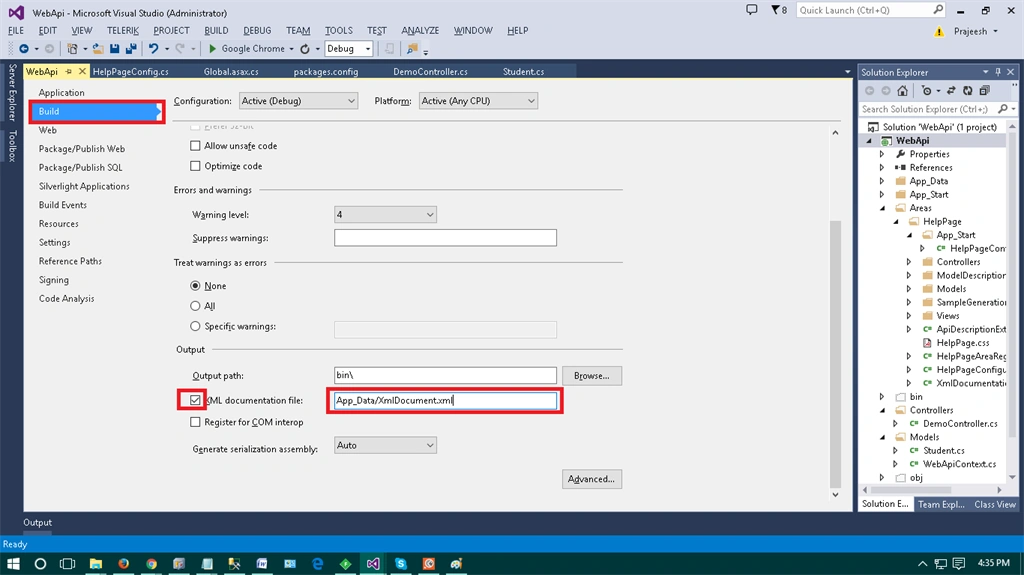
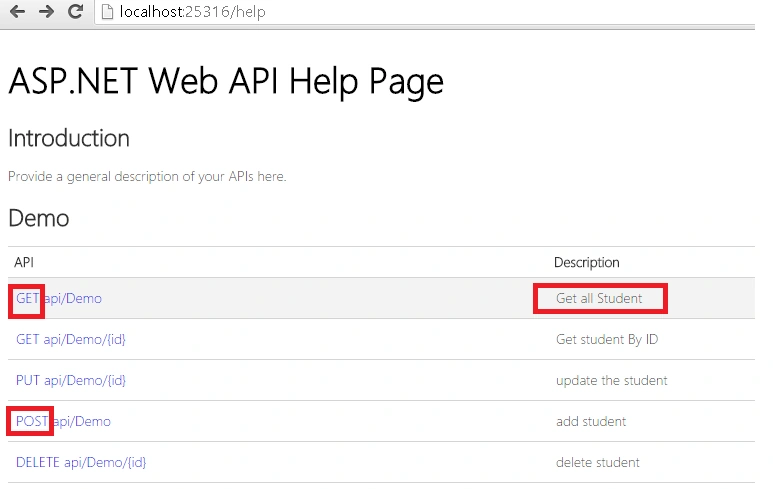
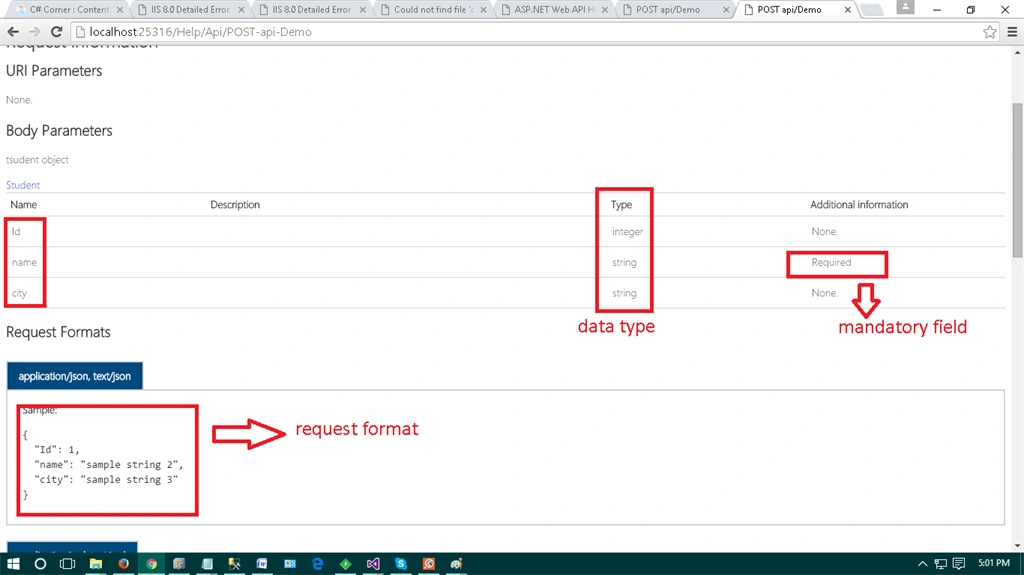
Now enable XML documentation. In Solution Explorer, right-click the project and select Properties. Select the Build page.
Ravi PatelPosted Dec 28, 2015, 6:58 AM
Thanks Santhakumar sir
Santhakumar MunuswamyPosted Dec 28, 2015, 6:28 AM
Thanks for nice article
Ravi PatelPosted Dec 28, 2015, 2:30 AM
Thanks Humayun Kabir
Humayun Kabir MamunPosted Dec 28, 2015, 1:37 AM
Nice...
Ravi PatelPosted Dec 28, 2015, 12:09 AM
thanks
Ankur MistryPosted Dec 27, 2015, 10:42 AM
Nice share