
Introduction
Ajax (Asynchronous JavaScript and XML) is a new web development technique used for an interactive website. With the help of AJAX we can develop web applications and retrieve small amounts of data from a web server. AJAX consists of a different type of technology.
- JavaScript
- XML
- Asynchronous Call to the server
WebService
A Web Service is an application that is designed to interact directly with other applications over the internet. A WebService is the same as the Web application that can be accessed over the internet such as the Internet, and executed on a remote system hosting from requested services. The Web services are components on a Web server that a client application can call by making HTTP requests across the Web.
Lets see an AutoCompleteExtender Control example in which I am using WebService.
AutoCompleteExtender Control
The AutoCompleteExtenders can be applied to a variety of ASP.Net controls and can be applied to existing controls in existing applications. The extender controls and their class ExtenderControl inherits from the Control base class. With the help of this control to extend DropDownList behaviour with auto complete feature.
Here I am using
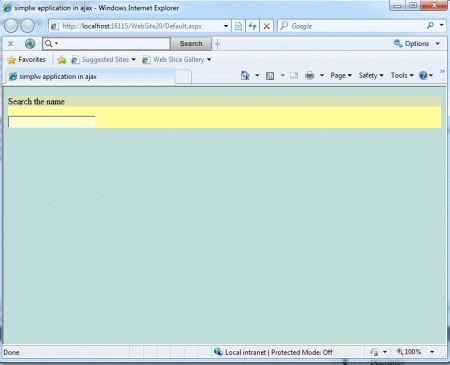
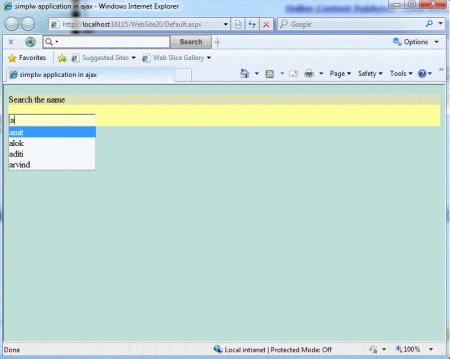
AutoCompleteExtender control in web application where user will write any
alphabet of the name and it will show all name which
will match with entered alphabet in Textbox like drop - down list. I am also
using web service to get record from database. here are some list of property of
AutoCompleteExtender Control which will be
used.
Property
- TargetControlID
- ServiceMetod
- MinimumPrefixLength
- EnableCaching
- CompletionSetCount
Step 1 : Open Visual Studio 2010.
- Go to File->New->WebSite
- Select ASP.NET Empty WebSite
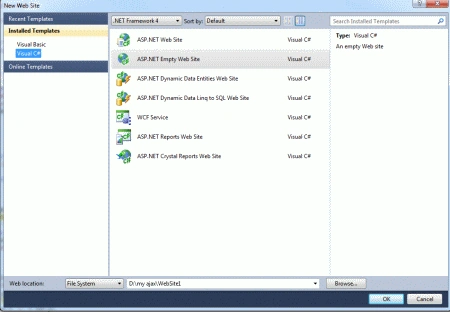
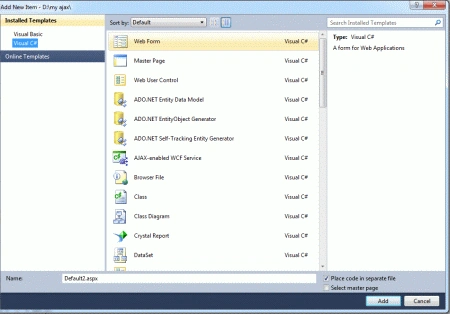
Step 2 : Go to Solution Explorer and right-click.
- Select Add->New Item
- Select WebForm
- Default.aspx page open
Step 3 : Go to Default.aspx page and click on the [Design] option and drag control from Toolbox.
- Drag Panel, ScriptManager, TextBox
CreateTable
Step 4 : Go to the sqlserver and click on NewQueryOption and create table.
create table raj
(
firstname varchar(50),
lastname varchar(50),
age varchar(50),
)
GO
Step 5 : Now add value in the table.
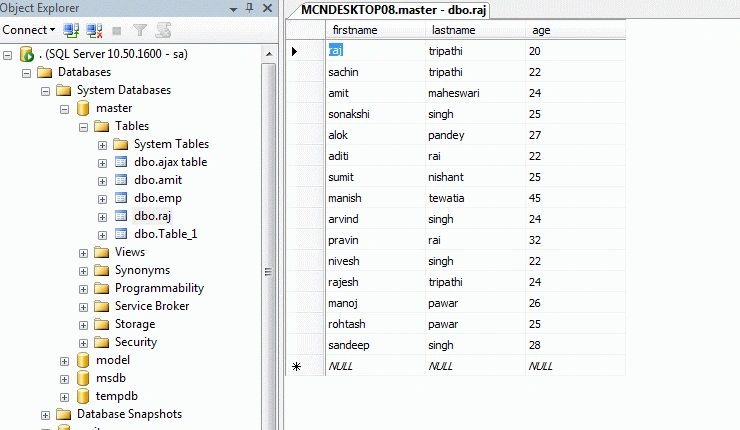
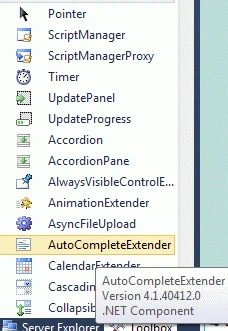
Step 6 : Go to Default.aspx[Design]option and drag AutoCompleteExtenbder control from Toolbox.
Step 7 : Go to Default.aspx[Source]option and define the property CompletionSetCount, MinimumPrefixLength.
Code :
<asp:AutoCompleteExtender ID="AutoCompleteExtender1" runat="server" TargetControlID ="TextBox1" ServiceMethod="getinfo" MinimumPrefixLength="1" EnableCaching="true" CompletionSetCount="1" CompletionInterval="1000">
</asp:AutoCompleteExtender>
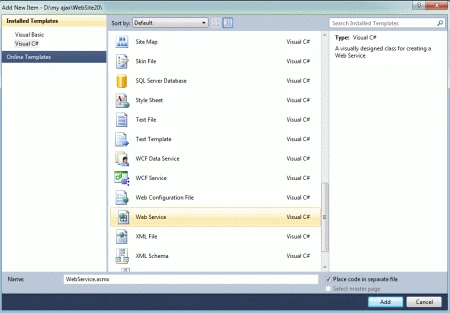
Step 8 : Go to Solution Explorer and right-click on App-Folder.
- Go to ADD->AddNewItem
- Select WebService
- WebService.cs window open
Connection String
Step 9 : Go to WebService(WebService.cs) option and define connection string for the particular data from the Database.
Code :
SqlConnection conn = new SqlConnection(ConfigurationManager.ConnectionStrings["s"].ToString());
conn.Open();
SqlCommand cmd = new SqlCommand("select*from raj where firstname like @Name+'%'" , conn);
cmd.Parameters.AddWithValue("@Name", prefixText);
SqlDataAdapter da = new SqlDataAdapter(cmd);
DataTable dt = new DataTable();
da.Fill(dt);
Web.Config file
Step 10 : Go to the Solution Explorer and click on the web.config file option and define a connection String for the data value.
Code :
<?xml version="1.0"?>
<!--
For more information on how to configure your ASP.NET application, please visit
http://go.microsoft.com/fwlink/?LinkId=169433
-->
<configuration>
<connectionStrings>
<add name="s" connectionString="database=master;server=.;user=sa;password=wintellect"/>
</connectionStrings>
<system.web>
<compilation debug="true" targetFramework="4.0">
<assemblies>
<add assembly="System.Design, Version=4.0.0.0, Culture=neutral, PublicKeyToken=B03F5F7F11D50A3A"/>
<add assembly="System.Web.Extensions.Design, Version=4.0.0.0, Culture=neutral, PublicKeyToken=31BF3856AD364E35"/>
<add assembly="System.Windows.Forms, Version=4.0.0.0, Culture=neutral, PublicKeyToken=B77A5C561934E089"/>
</assemblies>
</compilation>
</system.web>
<system.serviceModel>
<behaviors>
<serviceBehaviors>
<behavior name="">
<serviceMetadata httpGetEnabled="true" />
<serviceDebug includeExceptionDetailInFaults="false" />
</behavior>
</serviceBehaviors>
</behaviors>
<serviceHostingEnvironment multipleSiteBindingsEnabled="true" />
</system.serviceModel>
</configuration>
Join the conversation! Your thoughts help the community grow.