

A web service is a web application that is basically a class consisting of methods that could be used by other applications on the “http://” protocol. It also follows a code-behind architecture like the ASP.NET web pages, although it does not have a user interface.
It's an alternate option of C# Remoting Architecture, in Remoting we can communicate from a server to a client on tcp:// channel but there should be .NET framework installed on both ends, on the server and also on the client side because the server returns an object in Plane Old CLR Object (POCO) format that is only understandable by CLR.
A web service class can be a collection of web methods with return types that can serializable directly as XML or JSON.
Create a simple WebService Application in Visual Studio using the following procedure.
Step 1: Open Visual Studio then go to File -> New -> Web Site.
Step 2: Select HTTP Web Location and write a name for "ASP.NET Empty Web Site".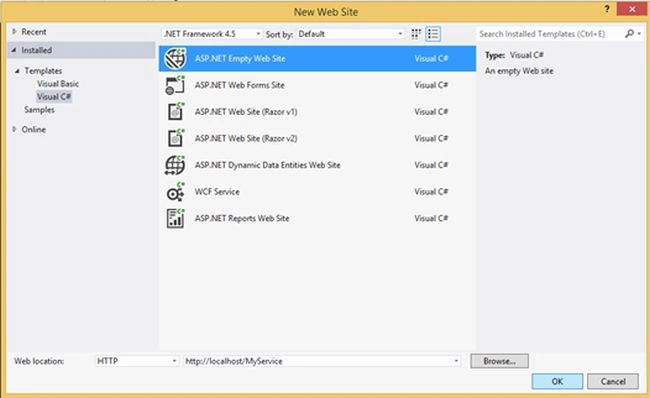
Step 3: Go To Solution Explorer and right-click the project then select Add New Time -> Web Service.
Step 4: Write a name for the Web Service file and then it will add a file for the web site with “.asmx “ (Active Server Method Extension) extension and also add a code file (.cs/.vb) .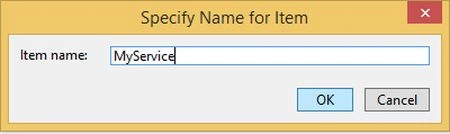
Then add a web Service .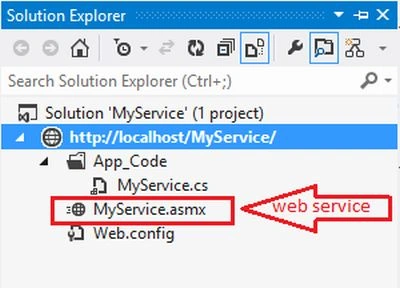
Step 5: Delete the .cs File from App_Code and add a new class file to create a Code Behind file from .asmx file to host a web service class.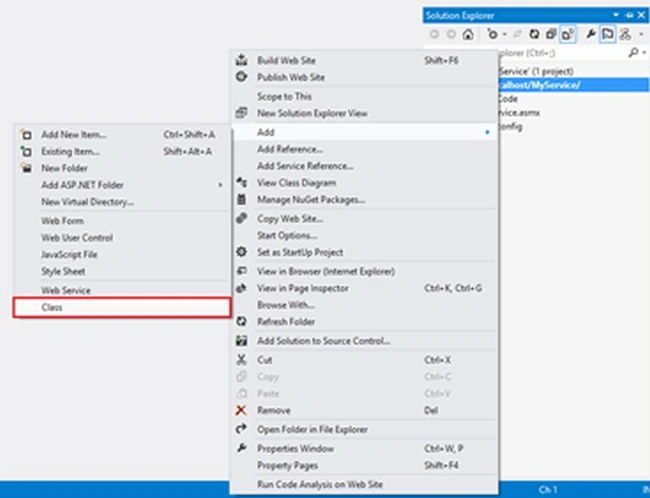
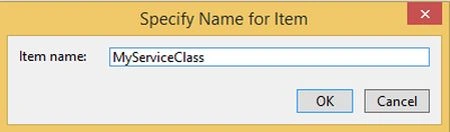
Step 6:
Use “using System.Web.Services; “ first to use the [WebService] and [WebMethod] attributes.
[WebService]: This attribute defines the class that we need to host by “.asmx” file and a client-side proxy class is necessary to create the same structure of this class.
[WebMethod]: This attribute defines the method that we can call from the client side by the URL of my WebService class and it also serializes the return value of the method in the format of XML or JSON.
Step 7: Finally edit your “.asmx “ file To define the the object of the WebService class with a property like:
- Language: Language Property can be define by C#/VB in Which language we are going to create my CodeBehind file .cs/.vb.
- CodeBehind: The CodeBehind property can be defined by the address of that .cs/.vb file that we have hosted in the App_Code folder.
- Class: Class is a property that we need to define by the name of that class that exists in the Code Behind file and declared by the attribute [WebService].

Step 8: Now build your WebService application and right-click on “.asmx” and view in the browser.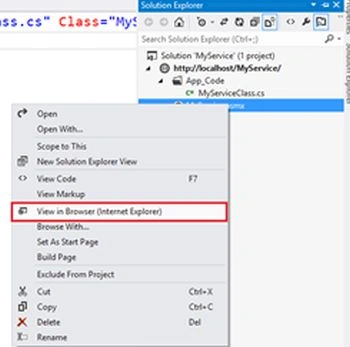
Then the following output will be in the browser.
There will be a list of all the methods declared by the attributes [WebMethod] in the [webService] class. We can test all the [WebMethod] attributes on the local system where my Web Service Application is hosted by the click on the method name.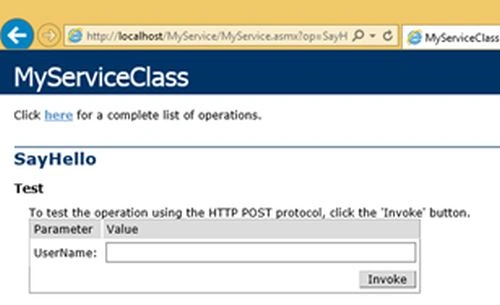
Pass all the formal parameter values into the TextBox and click to test the return value of this method in the format of XML by default. If you want to return JSON data we will learn about that in the next article.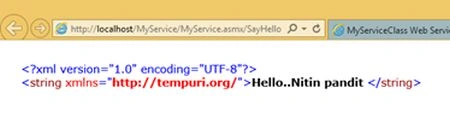
Michael ZomparelliPosted Feb 22, 2017, 7:23 PM
A 2014 article that is promoting an asmx web service! Why would you do this? WCF has replaced asmx. You need to stay up to date on the technology.
Naveen DasdaPosted Dec 12, 2016, 4:51 AM
Where are the other parts of this article?
Ammar ShaukatPosted Mar 25, 2016, 6:21 AM
Asfend Yar meet me in Microsoft . I'll help you out.
Asfend YarPosted Mar 6, 2016, 2:12 PM
and what is the solution if i want to access this from different laptop or computer ???
Sr KarthigaPosted Feb 19, 2016, 6:00 AM
Nice Explanation
Manish SharmaPosted Jan 6, 2016, 5:07 AM
very helpfull article .....
Rupali ShindePosted Oct 15, 2015, 12:30 AM
good
Nitin PanditPosted Jul 27, 2015, 5:39 AM
thanks and i'll on wcf :)
Sudhir SinghPosted Jul 27, 2015, 3:31 AM
Please Write a article for angular JS...
Sudhir SinghPosted Jul 27, 2015, 3:27 AM
Please Write a articles for WCF which is demanded by the organisations..
Sudhir SinghPosted Jul 27, 2015, 3:25 AM
You are giving very good articles in well details coded which is very helpful to Understand...
Peter ClarkPosted Jul 1, 2015, 5:00 AM
Please help me , After making web service how can use that service
Upendra Pratap ShahiPosted May 8, 2015, 1:39 AM
nice article sir...
Upendra Pratap ShahiPosted May 8, 2015, 1:27 AM
why we delete MyService.cs..
Humayun Kabir MamunPosted Jan 2, 2015, 6:45 AM
Nice One...
Jitendra KumarPosted Dec 23, 2014, 6:13 AM
Good one..
Vithal WadjePosted Dec 23, 2014, 2:31 AM
good start keep it up
Dinesh BeniwalPosted Dec 23, 2014, 2:02 AM
Good start Nitin.
Joginder BangerPosted Dec 23, 2014, 1:49 AM
sir I aspect some big article about latest technology.