

Web user controls
Web user controls are derived from System.Web.UI.UserControl namespace. These controls once created, can be added to the aspx page either at design time or programmatically during run time. But they lack the design time support of setting the properties created along with the control. They cannot run on their own and they need to stand on another platform like an aspx page. Even if we try to load it on a web browser, IIS will not serve the files of the type .ascx.
- Create a new ASP .Net web application using Visual Studio.Net.
-
Add a Web User Control to the project. Name it as WebUserControl1.ascx.
-
Add a Panel Control on the user control form
-
Add a hyperlink,a TextBox and a button Add a property to the User Control as follows.
- <%@ Control Language="C#" AutoEventWireup="true" CodeBehind="WebUserControl1.ascx.cs" Inherits="WebApplication3.WebUserControl1" %>
- <style type="text/css">
- .style1
- {
- width: 100%;
- }
- .style2
- {
- width: 927px;
- }
- </style>
- <table class="style1">
- <tr>
- <td bgcolor="#990000" class="style2">
- <asp:HyperLink ID="HyperLink1" runat="server" Font-Bold="True"
- ForeColor="White" NavigateUrl="~/Home.aspx">Home</asp:HyperLink>
- </td>
- <td>
- </td>
- </tr>
- <tr>
- <td class="style2">
- <br />
- </td>
- <td>
- </td>
- </tr>
- </table>
- <asp:Panel ID="Panel1" runat="server">
- <asp:TextBox ID="TextBox1" runat="server"></asp:TextBox>
- <br />
- <br />
- <asp:Button ID="Button1" runat="server" Text="Button" />
- </asp:Panel>
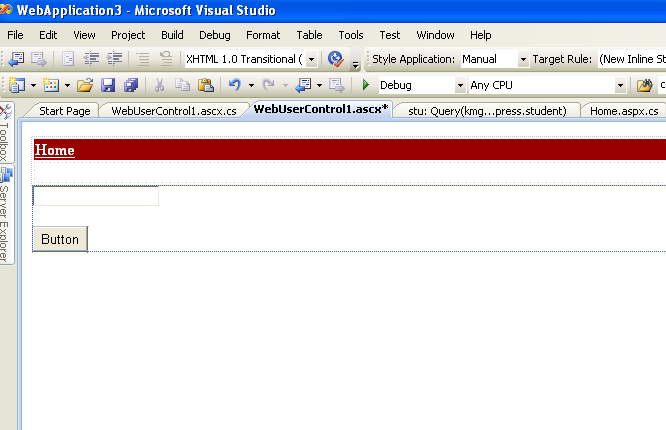
- Write the following code in WebUserControl1.ascx.cs file
- using System;
- using System.Collections;
- using System.Configuration;
- using System.Data;
- using System.Linq;
- using System.Web;
- using System.Web.Security;
- using System.Web.UI;
- using System.Web.UI.HtmlControls;
- using System.Web.UI.WebControls;
- using System.Web.UI.WebControls.WebParts;
- using System.Xml.Linq;
- using System.Drawing;
- namespace WebApplication3
- {
- public partial class WebUserControl1 : System.Web.UI.UserControl }
- {
- protected void Page_Load(object sender, EventArgs e)
- {
- Panel1.BackColor = backColor;
- }
- protected Color backColor;
- public Color BackColor
- {
- get
- {
- return backColor;
- }
- set
- {
- backColor = value;
- }
- }
- }
- }
-
The above can be used set the Background color of the control. Add the following code to the Page_Load event of the control.
Now Add another web form as Home.aspx.- protected void Page_Load(object sender, EventArgs e)
- {
- Panel1.BackColor = backColor;
- }
-
Drag and drop the WebUserControl1.ascx into the Web form. This will put the following entries in the aspx page
- <%@ Register src="WebUserControl1.ascx" tagname="WebUserControl1" tagprefix="uc1" %>
-
This entry will be found inside the <form> .. </form> tag.
- <uc1:WebUserControl1 ID="WebUserControl11" runat="server" />
-
Build the application.
-
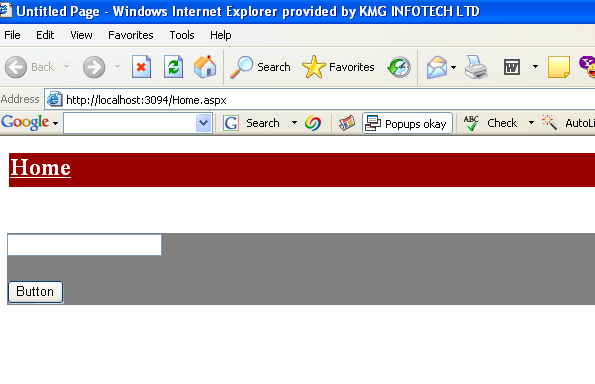
Select and view the TestPage.aspx in the browser. This will show the page with the control loaded with it.
- Now if we need we can change the background color to Gray, by adding the property in the control as follows.
Now if the application is built, the home.aspx will show our user control with a gray background.- <uc1:WebUserControl1 ID="WebUserControl11" runat="server" BackColor=Gray/>
Advantages of a Web User Control
The biggest advantage of the Web User controls is that they can be created as a site template and used through out the site. For example they can be made to contain the Menu/Link structure of a site and can be used at all the other aspx pages.
This means the following :
- If the website introduces a new site-wide link within the current layout/structure, it is enough if we put it on the user control once. All pages will be updated once if the web user control is used in them.
- If there is any link to be corrected, it can be done once at the server side.
-
The .ascx files can either be used as a simple alternative to the plain HTML or they can also be used to respond to events: This means even custom code can be created against them and put in the code behind files.
Drawbacks / Disadvantages
Though the User controls offer a flexibility of having a site wide modifications, if the whole structure of the site changes, the HTML/aspx code of all the pages should be modified. But as long as the site maintains a same layout, then Web User controls are the number one choice for maintaining the generic layout of the site.
Another disadvantage is It can not be just be simply referenced for using in a different project. If we want to use this User Control in a different project, we have to copy the file and modify the namespace to the host namespace name.
Mayur GujrathiPosted Nov 28, 2011, 1:46 AM
How to Drag and drop the WebUserControl1.ascx into the Web form???
John RAjPosted Jul 7, 2010, 12:17 AM
if we use more control The page performance is affect why?
Rajendra TripathyPosted Feb 25, 2010, 9:45 AM
Hi Rekha.. This is really helpfu.. Thanks. Raj.
moni moniPosted Aug 12, 2009, 2:23 AM
<%@ Page Language="VB" AutoEventWireup="false" CodeFile="Frontpage.aspx.vb" Inherits="_Default" %> // i got a error in page tag - 'withevents variable header conflicts with property header in the base class 'page' <%@ Register Assembly="System.Web.Extensions, Version=1.0.61025.0, Culture=neutral, PublicKeyToken=31bf3856ad364e35" Namespace="System.Web.UI" TagPrefix="asp" %> <%@ Register TagPrefix="UC1" Tagname="Header" src="Header.ascx"%> anyone help me. thanks in advance
Rahul Kumar SaxenaPosted Jul 20, 2009, 1:17 AM
Nice .. keep it up
Former memberPosted Jul 18, 2009, 4:01 AM
Hi Rekha :) Congrats for your 1st article. Keep it up . try to be more explanative ... but 1st article shows your good work :)