

In ASP.NET, we use GridView for fetching the data and showing the output. Also, we implement CRUD operationss using GridView. We can do the same implementation in ASP.NET MVC using WebGrid.
Link For More References
Description
I will show you how to fetch the data dynamically from the database and bind to the WebGrid control, using the stored procedure in MVC 4.0. In this blog, today, I will show you how to write code in ASP.NET MVC for implementation of WebGrid Control using Static Data. In later sessions, I will show you the process of using GridView Dynamically, that means using the SQL Server data source.
Link To Source Code
Important Code Sections To Follow

Code ref of GridviewController.cs,
Code ref of GridviewController.cs,
- using System;
- using System.Collections.Generic;
- using System.Linq;
- using System.Web;
- using System.Web.Mvc;
- using System.Data;
- using SatyaWebGridCustomPagingLinks.Models;
- using System.Web.Helpers;
- namespace SatyaWebGridCustomPagingLinks.Controllers
- {
- public class GridviewController : Controller
- {
- //
- // GET: /Gridview/
- public ActionResult Index(int? page)
- {
- List<modeldata> lmd = new List<modeldata>();
- //creating list of model.
- DataSet ds = new DataSet();
- Connection.Connection con = new Connection.Connection();
- //The connection namespace as we mentioned earlier .
- //namespace Gridsample.Connection.
- // connection to getdata.
- ds = con.mydata();
- // fill dataset
- foreach (DataRow dr in ds.Tables[0].Rows)
- // loop for adding add from dataset to list<modeldata>
- {
- lmd.Add(new modeldata
- {
- // adding data from dataset row in to list<modeldata>
- SM_StudentID = Convert.ToInt64(dr["SM_StudentID"]),
- SM_Name = dr["SM_Name"].ToString()
- });
- }
- return View(lmd.ToList());
- }
- public ActionResult EfficientWay()
- {
- return View();
- }
- [HttpGet]
- public JsonResult EfficientPaging(int? page)
- {
- List<modeldata> lmd = new List<modeldata>();
- //creating list of model.
- DataSet ds = new DataSet();
- Connection.Connection con = new Connection.Connection();
- //The connection namespace as we mentioned earlier .
- //namespace Gridsample.Connection.
- // connection to getdata.
- ds = con.mydata();
- // fill dataset
- foreach (DataRow dr in ds.Tables[0].Rows)
- // loop for adding add from dataset to list<modeldata>
- {
- lmd.Add(new modeldata
- {
- // adding data from dataset row in to list<modeldata>
- SM_StudentID = Convert.ToInt64(dr["SM_StudentID"]),
- SM_Name = dr["SM_Name"].ToString()
- });
- }
- int skip = page.HasValue ? page.Value - 1 : 0;
- var data = lmd.OrderBy(o => o.SM_StudentID).Skip(skip * 5).Take(5).ToList();
- var grid = new WebGrid(data);
- var htmlString = grid.GetHtml(tableStyle: "webGrid",
- headerStyle: "header",
- alternatingRowStyle: "alt",
- htmlAttributes: new { id = "DataTable" });
- return Json(new
- {
- Data = htmlString.ToHtmlString(),
- Count = lmd.Count() / 5
- }, JsonRequestBehavior.AllowGet);
- }
- }
- }
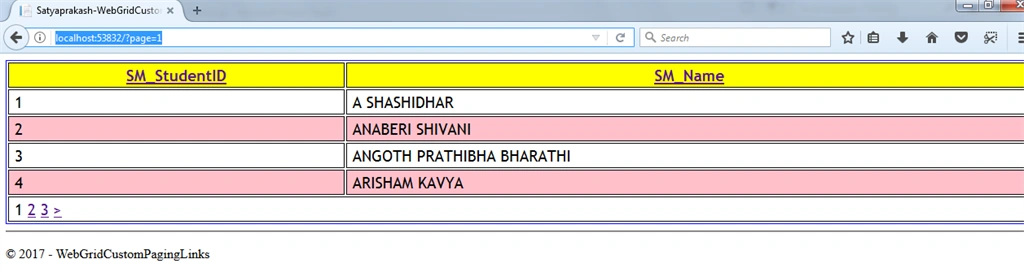
The grid.Pager method sets the paging for the WebGrid. The problem is when you page through the data, all the data is returned. If you try to limit the data being returned, the problem you’ll encounter because you’re only returning a subset of the data is the WebGrid thinks there’s only that amount of data to display, so the paging links will disappear! Not good! So to show you what this looks like, I’m going to only return the first 5 records for the WebGrid, because I only want to display 5 records per page. Here’s my updated action method.
Join the conversation! Your thoughts help the community grow.