Introduction
Reporting is the main feature currently in any software application. In webform development, we choose a GridView or Repeater. In classic ASP we develop HTML table elements. In ASP.NET MVC, the new concept begins WebGrid. WebGrid is lightweight for showing data in report format. As you know, MVC is all about Model View Controller, in this article we will learn how to create a WebGrid and search data and show it in a WebGrid with Entity Framework.
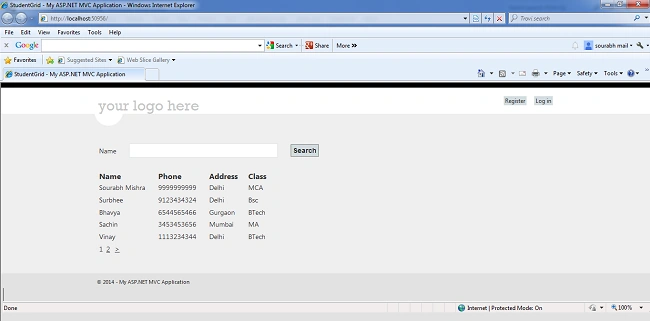
How to Create a WebGrid
First of all, we want to show some data in a grid. So we have a StudentMaster table.
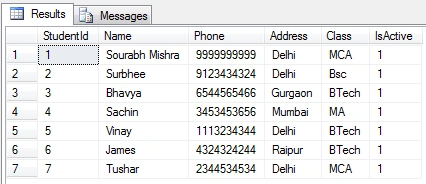
And based on the preceding table, we need to create a Model, so let's create StudentModel.cs.
StudentModel.cs
- public class StudentModel
- {
- public int StudentId { get; set; }
- public string Name { get; set; }
- public string Phone { get; set; }
- public string Address { get; set; }
- public string Class { get; set; }
- }
- Now create a school.edmx file
- Select Add New Item then select ADO.Net Entity Model
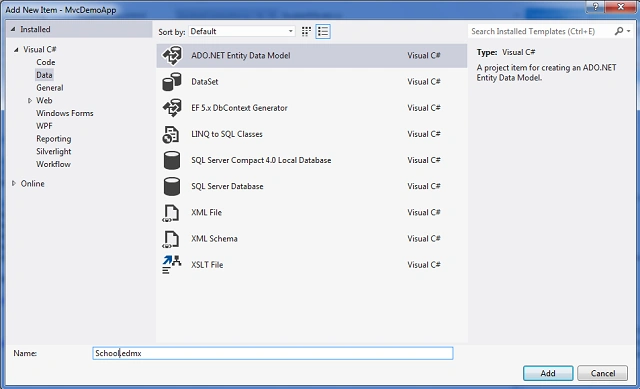
- Click the Add button.
- Now click Next in the wizard and then Finish.
- Add a new Controller
StudentController.cs
- using MvcDemoApplication.Models;
- using System;
- using System.Collections.Generic;
- using System.Linq;
- using System.Web;
- using System.Web.Mvc;
- using System.Web.UI.WebControls;
- using System.IO;
- using System.Web.UI;
-
- namespace MvcDemoApplication.Controllers
- {
- public class StudentController : Controller
- {
-
-
- SchoolEntities1 schoolEntity = new SchoolEntities1();
- public ActionResult StudentGrid()
- {
- List<StudentModel> lstStudentModel = new List<StudentModel>();
- List<StudentMaster> lstStudentMasters = schoolEntity.StudentMasters.Where(x => x.IsActive == true).ToList();
- lstStudentMasters.ForEach(x =>
- {
- StudentModel stuModel = new StudentModel();
- stuModel.Name = x.Name;
- stuModel.Phone = x.Phone;
- stuModel.Address = x.Address;
- stuModel.Class = x.Class;
- lstStudentModel.Add(stuModel);
- });
- return View(lstStudentModel);
- }
-
- [HttpPost]
- public ActionResult StudentGrid(string studentName)
- {
- List<StudentModel> lstStudentModel = new List<StudentModel>();
- List<StudentMaster> lstStudentMasters = schoolEntity.StudentMasters.Where(x => x.Name.Contains(studentName)).ToList();
- lstStudentMasters.ForEach(x =>
- {
- StudentModel stuModel = new StudentModel();
- stuModel.Name = x.Name;
- stuModel.Phone = x.Phone;
- stuModel.Address = x.Address;
- stuModel.Class = x.Class;
- lstStudentModel.Add(stuModel);
- });
- if (lstStudentModel.Count > 0)
- {
- return View(lstStudentModel);
- }
- else
- {
- return Json("No Record Found");
- }
- }
- }
- }
- Add the View StudentGrid.cshtml
- @{
- ViewBag.Title = "StudentGrid";
- }
- <script type="text/javascript">
-
- $(document).ready(function () {
- $('#bttnSearch').click(function () {
- var stuName = $('#txtName').attr('value');
- $.ajax({
- type: "post",
- url: "/Student/StudentGrid",
- data: { studentName: $('#txtName').attr('value') },
- datatype: "json",
- traditional: true,
- success: function (data) {
-
- if (data == "No Record Found") {
- alert('No Record Found');
- }
- else {
- $('#gridContent').html(data);
- $('#txtName').val(stuName);
- }
- }
- });
- });
- });
- </script>
-
- <div id="grid">
- <table width="100%">
- <tr>
- <td>
- <table>
- <tr>
- <td>
- Name
- </td>
- <td>
- <input type="text" id="txtName" />
- </td>
- <td>
- <input type="button" id="bttnSearch" value="Search" />
- </td>
- </tr>
- </table>
- </td>
- </tr>
- <tr>
- <td>
-
- @{
- var grid = new WebGrid(Model, canPage: true, rowsPerPage: 5,
- selectionFieldName: "selectedRow", ajaxUpdateContainerId: "gridContent");
- grid.Pager(WebGridPagerModes.All);}
-
-
- @grid.GetHtml(tableStyle: "webGrid",
- headerStyle: "header",
- alternatingRowStyle: "alt",
- selectedRowStyle: "select",
- columns: grid.Columns(
- grid.Column("Name", " Name"),
- grid.Column("Phone", "Phone"),
- grid.Column("Address", "Address"),
- grid.Column("Class", "Class")
- ))
-
- </td>
- </tr>
- </table>
- </div>
Understanding the Code
StudentModel.cs
- public class StudentModel
- {
- public int StudentId { get; set; }
- public string Name { get; set; }
- public string Phone { get; set; }
- public string Address { get; set; }
- public string Class { get; set; }
- }
As you saw code above, we have a studentmaster table and based on that table we create 5 properties for StudentModel.
StudentController.cs
- SchoolEntities1 schoolEntity = new SchoolEntities1();
- public ActionResult StudentGrid()
- {
- List<studentmodel> lstStudentModel = new List<studentmodel>();
- List<studentmaster>
- lstStudentMasters = schoolEntity.StudentMasters.Where(x => x.IsActive == true).ToList();
- lstStudentMasters.ForEach(x =>
- {
- StudentModel stuModel = new StudentModel();
- stuModel.Name = x.Name;
- stuModel.Phone = x.Phone;
- stuModel.Address = x.Address;
- stuModel.Class = x.Class;
- lstStudentModel.Add(stuModel);
- });
- return View(lstStudentModel);
- }
In the code above at the top line you can see that we added the line SchoolEntities1 schoolEntity = new SchoolEntities1();
That means, here we will create an object of SchoolEntities, that we create in the SchoolEntity.edmx file. This object has details of all tables, View and Stored Procedures of your database. In this article we are only using the StudentMaster table, for fetching the data.
- public ActionResult StudentGrid()
- {
- List<StudentModel> lstStudentModel = new List<StudentModel>();
- List<StudentMaster> lstStudentMasters = schoolEntity.StudentMasters.Where(x => x.IsActive == true).ToList();
- lstStudentMasters.ForEach(x =>
- {
- StudentModel stuModel = new StudentModel();
- stuModel.Name = x.Name;
- stuModel.Phone = x.Phone;
- stuModel.Address = x.Address;
- stuModel.Class = x.Class;
- lstStudentModel.Add(stuModel);
- });
- return View(lstStudentModel);
- }
The code above hasg a main ActionResult for the StudentGrid Page Method.
- List<StudentMaster> lstStudentMasters = schoolEntity.StudentMasters.Where(x => x.IsActive == true).ToList();
Here we have a list object of StudentMaster and based on the List of StudentMaster objects, we are fetching data from the schoolEntites1 class object.
- lstStudentMasters.ForEach(x =>
- {
- StudentModel stuModel = new StudentModel();
- stuModel.Name = x.Name;
- stuModel.Phone = x.Phone;
- stuModel.Address = x.Address;
- stuModel.Class = x.Class;
- lstStudentModel.Add(stuModel);
- });
- return View(lstStudentModel);
And based on the List object of StudentMaster, we filled in some data into the StudentModel object.
- public ActionResult StudentGrid(string studentName)
- {
- List<StudentModel> lstStudentModel = new List<StudentModel>();
- List<StudentMaster> lstStudentMasters = schoolEntity.StudentMasters.Where(x => x.Name.Contains(studentName)).ToList();
- lstStudentMasters.ForEach(x =>
- {
- StudentModel stuModel = new StudentModel();
- stuModel.Name = x.Name;
- stuModel.Phone = x.Phone;
- stuModel.Address = x.Address;
- stuModel.Class = x.Class;
- lstStudentModel.Add(stuModel);
- });
- if (lstStudentModel.Count > 0)
- {
- return View(lstStudentModel);
- }
- else
- {
- return Json("No Record Found");
- }
- }
The code above is for a [HttpPost] type of ActionResult, when the user fills in the name into the TextBox and click on the Search button. That code comes into effect.
StudentGrid.cshtml
- @{
- ViewBag.Title = "StudentGrid";
- }
- <script type="text/javascript">
- $(document).ready(function () {
- $('#bttnSearch').click(function () {
- var stuName = $('#txtName').attr('value');
- $.ajax({
- type: "post",
- url: "/Student/StudentGrid",
- data: { studentName: $('#txtName').attr('value') },
- datatype: "json",
- traditional: true,
- success: function (data) {
-
- if (data == "No Record Found") {
- alert('No Record Found');
- }
- else {
- $('#gridContent').html(data);
- $('#txtName').val(stuName);
- }
- }
- });
- });
- });
- </script>
-
- <div id="grid">
- <table width="100%">
- <tr>
- <td>
- <table>
- <tr>
- <td>
- Name
- </td>
- <td>
- <input type="text" id="txtName" />
- </td>
- <td>
- <input type="button" id="bttnSearch" value="Search" />
- </td>
- </tr>
- </table>
- </td>
- </tr>
- <tr>
- <td>
-
- @{
- var grid = new WebGrid(Model, canPage: true, rowsPerPage: 5,
- selectionFieldName: "selectedRow", ajaxUpdateContainerId: "gridContent");
- grid.Pager(WebGridPagerModes.All);
- }
-
-
- @grid.GetHtml(tableStyle: "webGrid",
- headerStyle: "header",
- alternatingRowStyle: "alt",
- selectedRowStyle: "select",
- columns: grid.Columns(
- grid.Column("Name", " Name"),
- grid.Column("Phone", "Phone"),
- grid.Column("Address", "Address"),
- grid.Column("Class", "Class")
- ))
-
- </td>
- </tr>
- </table>
- </div>
This code will show data in the WebGrid.
- @{
- var grid = new WebGrid(Model, canPage: true, rowsPerPage: 5,
- selectionFieldName: "selectedRow", ajaxUpdateContainerId: "gridContent");
- grid.Pager(WebGridPagerModes.All);}
- @grid.GetHtml(tableStyle: "webGrid",
- headerStyle: "header",
- alternatingRowStyle: "alt",
- selectedRowStyle: "select",
- columns: grid.Columns(
- grid.Column("Name", " Name"),
- grid.Column("Phone", "Phone"),
- grid.Column("Address", "Address"),
- grid.Column("Class", "Class")
- ))
You can see in the code above then we have a grid variable. In this variable, we put all the WebGrid related data. Like rowsPerPage, Paging true or not, Model details.
Here you can also that the properties of the CSS in HeaderStyle, AlternatingRowStyle, SelectedRowStyle are set.
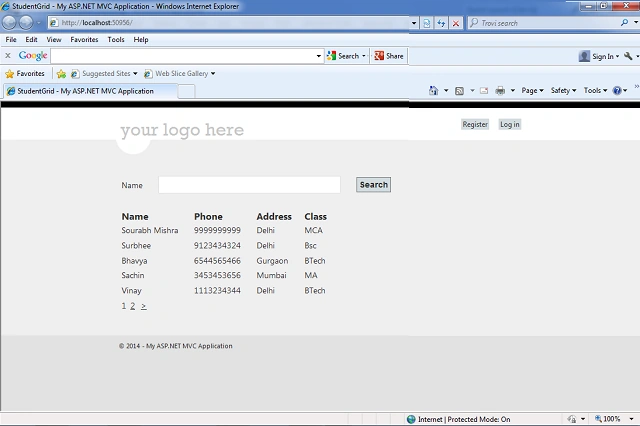
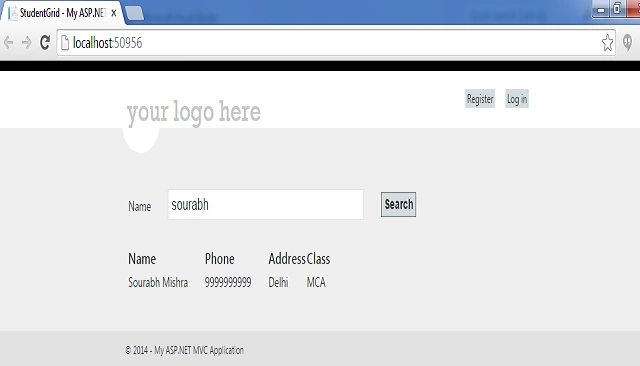
That's it, press F5 and run your code.


Rama DabburiPosted Sep 18, 2022, 9:15 AM
I wrote a generic grid based on reflection.. below is medium article https://medium.com/p/49d3b2ec80a
Chauhan BhavikPosted Sep 28, 2017, 5:00 AM
The specified type member 'IsActive' is not supported in LINQ to Entities. Only initializers, entity members, and entity navigation properties are supported.
Chauhan BhavikPosted Sep 28, 2017, 4:59 AM
IsActive is not supported in linq Entity Framework giving error how can i solve it
Joel RamosPosted Mar 14, 2016, 4:10 PM
Done.Thank you for the example, I really appreciate your help. Suggestion: I think you have to be more specifics in some steps, provide more details.
Ariel GancPosted Oct 26, 2015, 2:32 PM
Hello how are you? very good example, the problem is q I did not load the data in $ ('# gridContent') html (data).; em alguein help with this issue? Thank you
Pratham DavePosted Mar 21, 2015, 8:07 AM
ver is source code ?
Hussain AfridiPosted Nov 25, 2014, 8:27 AM
very nice tutorial 100 Stars
Sandeep VemulaPosted Nov 25, 2014, 1:11 AM
Can you provide code, am getting data in ajax method but it is not binding, r u using 2 views or single view for display and search display
Manish Kumar ChoudharyPosted Nov 24, 2014, 11:03 PM
Nice one Sourabh Mishra..