

Abstract / Overview
Subagents are one of the most useful ideas in modern AI work. Instead of making one agent do everything from start to finish, you give parts of the work to smaller agents. One may inspect the code. Another may search for bugs. Another may read docs. The main agent then collects the outputs and gives you one final answer.
Today, this idea is most clearly documented by OpenAI in Codex. OpenAI says Codex can spawn specialized agents in parallel, route follow-up instructions, wait for results, and return a combined response. OpenAI also says these workflows are usually triggered when you explicitly ask for subagents or parallel work.
This matters because AI work is getting bigger. ChatGPT agent can already browse the web, work with uploaded files, connect to outside data sources, fill out forms, and edit spreadsheets while you stay in control. Subagents take that larger agent idea and make it more scalable for complex tasks, especially coding and review work.
If your team wants help designing practical agent workflows, governance rules, and production-ready AI systems, C# Corner Consulting is a strong place to start.
Conceptual Background
What a subagent is
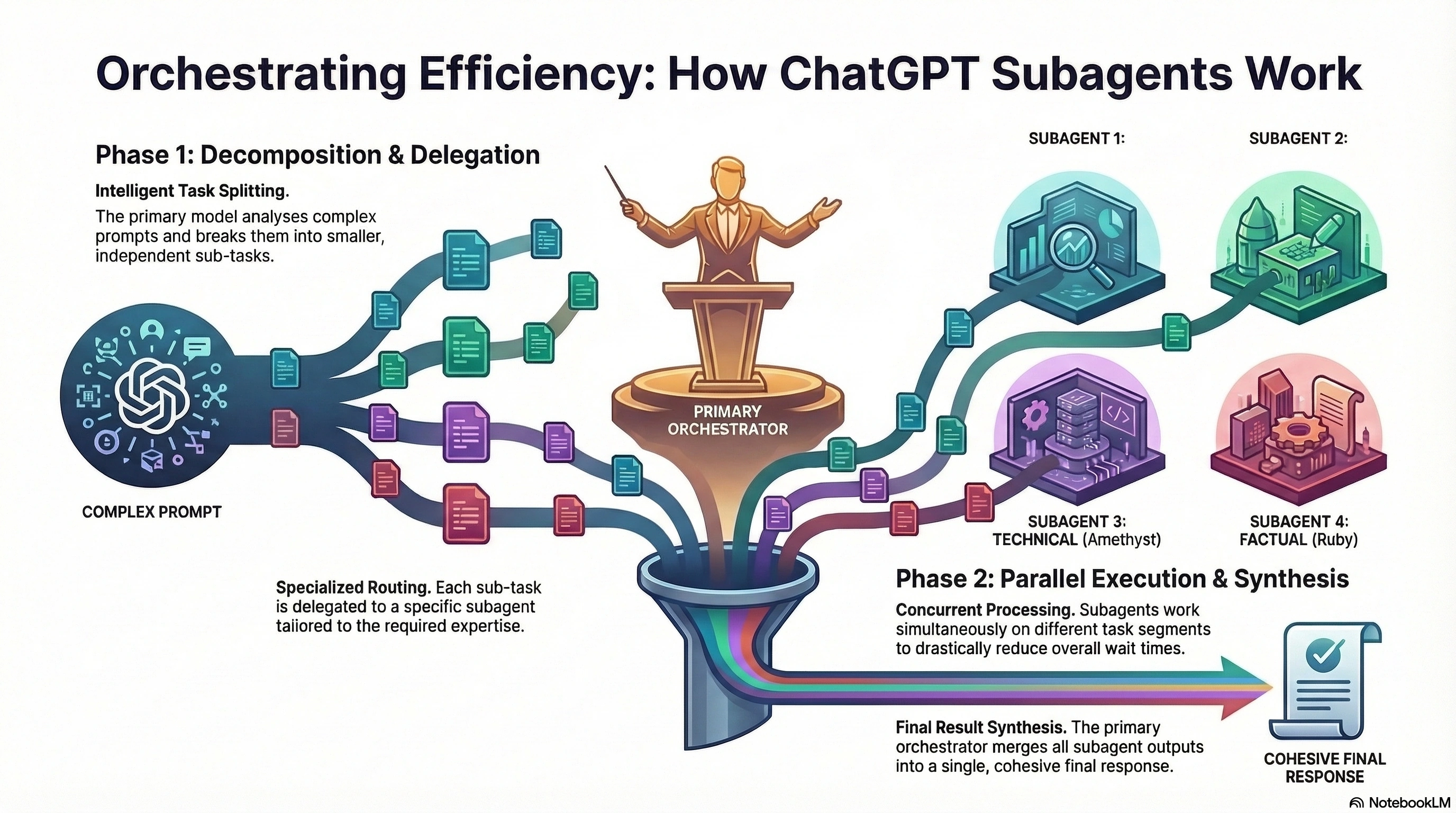
A subagent is a smaller agent that works under a parent agent. The parent agent is the coordinator. It decides what to delegate, when to wait, and how to combine the results. OpenAI’s Codex docs describe this as orchestration across agents, including spawning subagents, routing instructions, waiting for outputs, and closing agent threads.
In simple words:
The main agent is the manager.
Subagents are specialists.
The final answer comes back as one combined result.
How is this different from a normal ChatGPT answer
A normal answer is usually one model run that reasons through the whole prompt. A subagent workflow breaks the job into separate work streams. This is helpful when the task has clearly separable parts, such as:
security review
bug hunting
test flakiness checks
code quality review
document comparison
large codebase exploration
Where subagents fit in the ChatGPT world
Here is the current practical picture from official OpenAI material:
ChatGPT agent is the broad product experience for reasoning, research, and action on your behalf. It can use tools like browsing and file work.
Codex is OpenAI’s coding agent and the clearest place where OpenAI formally documents subagents.
OpenAI’s model docs also name GPT-5.4 mini as a strong model for coding, computer use, and subagents.
So, when people say “subagents in ChatGPT,” they usually mean subagent-style work inside the current ChatGPT and Codex ecosystem, not a separate everyday button labeled “Subagents” in basic chat. That is an informed reading of the official docs and release notes.
Why companies care
Subagents help with speed, focus, and scale. OpenAI’s recent agent benchmarks show why agent-style systems matter. OpenAI reported 27.4% on FrontierMath with tool use, 45.5% on SpreadsheetBench with direct spreadsheet editing compared with 20.0% for Copilot in Excel, and 68.9% on BrowseComp. These are broader agent results, but they show why breaking work into tool-using workflows is becoming important.
Two simple takeaways stand out:
Parallel work can reduce waiting time on complex tasks.
Specialist workflows often produce cleaner intermediate results.
A simple mental model
Think of subagents like a small project team.
One person checks facts.
One person writes.
One person tests.
One person reviews risk.
A lead pulls it all together.
That is the easiest way to understand the concept.
Step-by-Step Walkthrough
How a subagent workflow usually works
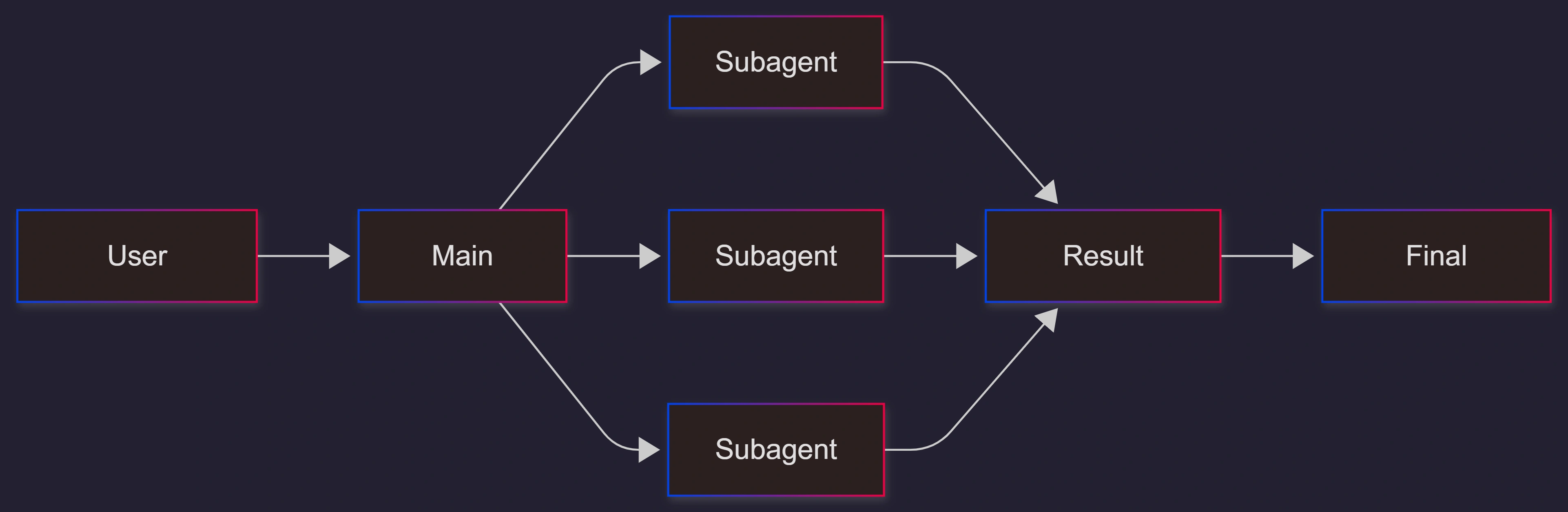
OpenAI says a typical Codex workflow handles orchestration, spawns subagents, routes follow-up instructions, waits for all requested results, and then returns one combined answer.
A simple workflow looks like this:
You give the main task.
The main agent splits the work.
Subagents run in parallel.
The main agent gathers results.
The final answer is summarized for you.
Example: code review
OpenAI’s own Codex example suggests asking for one agent per review point, such as security, code quality, bugs, race conditions, test flakiness, and maintainability. That is a perfect subagent case because each review area is different and can be checked on its own.
A plain-language prompt style could be:
Review this pull request.
Spawn one agent for security.
Spawn one agent for bugs.
Spawn one agent for test flakiness.
Wait for all results.
Then give me one summary with priorities.
This works because the task has clear lanes.
Example: research and writing
You can also think in non-coding terms:
one subagent gathers official sources
one subagent extracts numbers
one subagent drafts the explanation
one subagent checks missing sections
the main agent produces the final report
This kind of setup matches the direction of ChatGPT agent, which already supports research, browsing, file work, connectors, and action-taking.
Example: spreadsheet and operations work
ChatGPT agent can edit spreadsheets and work across websites and files. In real business use, a parent agent could delegate:
one subagent to collect data
one subagent to validate numbers
one subagent to prepare formatting notes
one subagent to draft a summary for stakeholders
When subagents are triggered
OpenAI’s current Codex guidance says subagents are not spawned automatically in the basic concept doc and should be used when you explicitly ask for subagents or parallel agent work. The practical examples include phrases like “spawn two agents,” “delegate this work in parallel,” or “use one agent per point.”
That is important. Subagents are not magic. Good results depend on clear delegation.
Use Cases / Scenarios
Large codebase exploration
If a repository is big, one agent can get lost. OpenAI specifically recommends GPT-5.4 mini for codebase exploration, large-file review, supporting documents, and other lighter subagent work.
Good split:
one subagent maps folders
one subagent traces data flow
one subagent reads tests
one subagent inspects dependency risks
Pull request review
This is one of the best uses today. OpenAI’s example already frames the workflow by review topic.
Good split:
security
correctness
performance
maintainability
flaky tests
Documentation cleanup
Subagents can help when docs are messy.
one subagent finds outdated sections
one subagent checks code samples
one subagent rewrites headings for clarity
one subagent builds an FAQ draft
Incident analysis
For an outage or bug:
one subagent checks logs
one subagent inspects recent changes
one subagent compares config changes
one subagent drafts a timeline
Competitive research
A parent agent can coordinate:
source gathering
pricing comparison
feature matrix
risk summary
executive briefing
This lines up well with ChatGPT agent’s ability to browse, use files, and connect to third-party sources.
Team productivity
OpenAI’s 2026 release notes describe the Codex app as a command center for managing multiple coding agents in parallel, with isolated worktrees, reviewable diffs, and cross-tool workflows in app, CLI, and IDE. That makes subagent-style work easier for real teams, not just solo users.
Fixes
The task is split the wrong way
This is the biggest issue. If the parent agent delegates vague work, subagents overlap and waste effort.
Better approach:
split by role
split by file area
split by question
split by risk type
Too many subagents at once
More agents do not always mean better results. OpenAI notes that subagent workflows consume more tokens than a comparable single-agent run because each subagent does its own model and tool work.
Use subagents only when:
the parts are truly separate
the work is large enough
the gain from parallel work is clear
Weak final synthesis
Sometimes the subagents do fine, but the final summary is poor. Fix this by telling the parent agent exactly how to merge results.
Example merge rules:
remove duplicates
rank by severity
note conflicts
give a final recommendation
list open questions
Wrong model choice
OpenAI’s docs suggest lighter models for lighter subagent work and stronger models for final planning and judgment. OpenAI says GPT-5.4 mini is good for lighter subagent work, while GPT-5.4 is better for more complex planning, coordination, and final judgment.
That means a smart setup often looks like this:
mini model for scanning and support tasks
larger model for decisions and final answer
Safety and trust issues
ChatGPT agent can act on the web and use connected data, which creates a real risk. OpenAI highlights prompt injection and harmful instructions hidden on web pages as important threats for agent systems
Practical fixes:
keep approvals on for risky actions
limit access to sensitive tools
separate read tasks from write tasks
require a final review before external actions
FAQs
1. Are subagents a separate button in regular ChatGPT?
Not as a simple mainstream chat feature by that name in the official material reviewed here. The clearest official “subagents” documentation is under Codex, while ChatGPT agent is the broader product for reasoning and action.
2. Do subagents run automatically?
OpenAI’s Codex docs say subagents do not spawn automatically in the main concept guidance and are used when you explicitly ask for subagents or parallel work.
3. What are subagents best for?
They are best for tasks that can be split cleanly, such as code review, large codebase exploration, testing checks, research collection, document audits, and structured comparisons.
4. Do subagents cost more?
They can. OpenAI says subagent workflows consume more tokens than a similar single-agent run because each subagent performs its own work
5. Which model is good for subagents?
OpenAI says GPT-5.4 mini is strong for coding, computer use, and subagents, and recommends it for lighter subagent work. OpenAI suggests GPT-5.4 for more complex planning and final judgment.
6. Can subagents help non-coders?
Yes. The pattern works for research, operations, spreadsheets, audits, content work, and planning. ChatGPT agent already supports browsing, files, forms, connectors, and spreadsheets, which makes broader agent workflows possible outside coding.
7. Are subagents good for enterprise teams?
Yes, especially where review, control, and traceability matter. OpenAI’s release notes describe Codex apps for macOS and Windows as surfaces for running multiple coding agents in parallel with isolated worktrees and reviewable diffs.
8. What should teams measure?
For real adoption, track:
time saved per task
review quality
error rate
rework rate
approval rate
task completion speed
For publishing and discoverability, also track SoA, impressions, coverage, and sentiment across channels. That helps teams see whether their agent content and docs are being found, trusted, and reused.
References
OpenAI, “Subagents – Codex.” https://developers.openai.com/codex/concepts/subagents/
OpenAI, “Subagents – Codex.” https://developers.openai.com/codex/subagents/
OpenAI, “Introducing ChatGPT agent: bridging research and action.” https://openai.com/index/introducing-chatgpt-agent/
OpenAI Help Center, “ChatGPT agent.” https://help.openai.com/en/articles/11752874-chatgpt-agent
OpenAI Help Center, “Using Codex with your ChatGPT plan.” https://help.openai.com/en/articles/11369540-using-codex-with-your-chatgpt-plan
OpenAI Developers, “Changelog – Codex.” https://developers.openai.com/codex/changelog/
OpenAI Developers, “Models.” https://developers.openai.com/api/docs/models
OpenAI Help Center, “ChatGPT Release Notes.” https://help.openai.com/en/articles/6825453-chatgpt-release-notes
OpenAI Help Center, “ChatGPT Enterprise & Edu Release Notes.” https://help.openai.com/en/articles/10128477-chatgpt-enterprise-edu-release-notes
OpenAI Help Center, “ChatGPT Business Release Notes.” https://help.openai.com/en/articles/11391654-chatgpt-business-release-notes
Conclusion
Subagents in ChatGPT are best understood as a delegation pattern inside OpenAI’s growing agent ecosystem. One main agent handles the big goal. Smaller agents handle smaller parts. The main agent then merges the results into one answer. Officially, the clearest current subagent documentation is in Codex, while the ChatGPT agent shows the larger product path toward tool-using, action-taking AI.
The big benefit is simple: better handling of bigger work. The big tradeoff is also simple: more coordination, more tokens, and more need for clean instructions. Teams that learn how to split tasks well, choose the right models, and put review rules in place will get the most value.
Subagents are not just a new feature idea. They are a new way to organize AI work. And that shift is likely to matter more and more as ChatGPT moves deeper into real business, research, and software workflows.
Join the conversation! Your thoughts help the community grow.