

Introduction
In this article, we will discuss the amazing technology called Blazor. Personally, after working on this amazing technology, development work became so much more productive and interesting. In this article, we will cover the overall features of Blazor such as:
- What is Blazor
- Why should we use Blazor
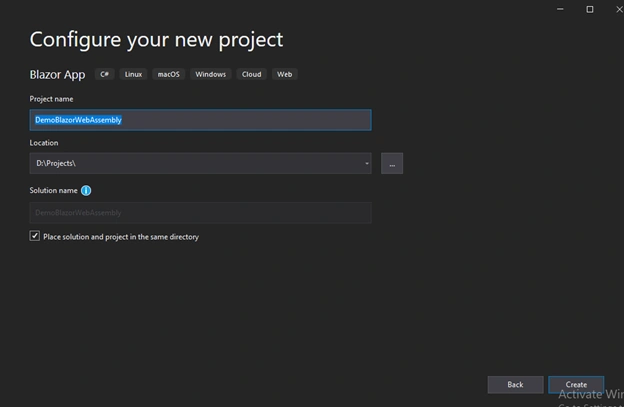
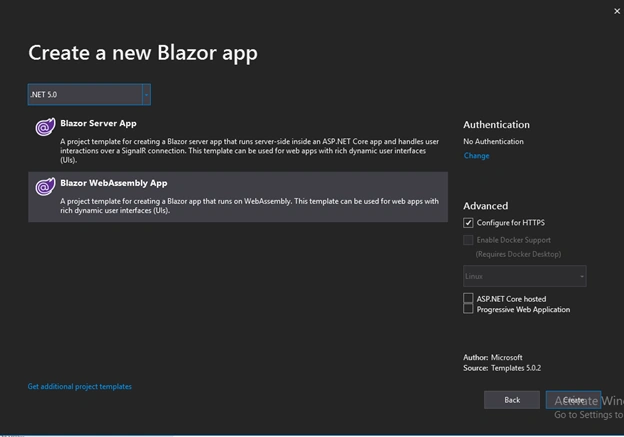
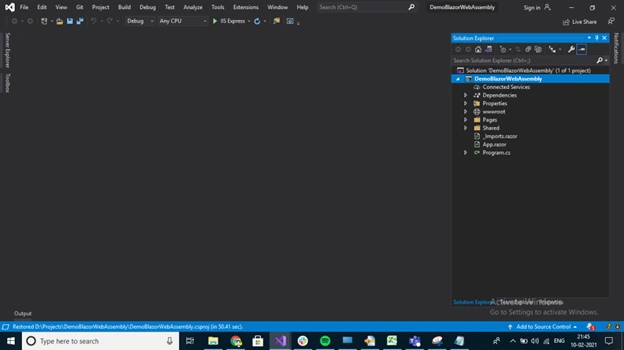
- Getting started with Blazor
- Blazor WebAssemby & Blazor Server
What is Blazor
A Blazor application is a build-out of the things that make up websites, like HTML and CSS and also C# code. Blazor applications are built using Razor Components, which is an ASP.NET capability. These are the files consist of C# and HTML.
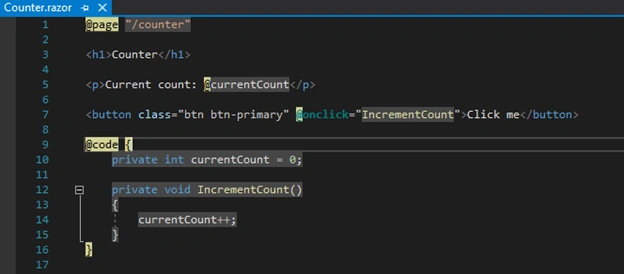
Fig.1 Sample Component Code
Let’s take an example, refer to Fig.1, the Counter.razor component has a button that triggers onclick method IncrementCount(). Both the codes reside on the same page and this is what code in Blazor applications look like, but we can also split the code and UI. The components are reusable blocks that you can use in your application and also you can nest your components.
Why should we use Blazor?
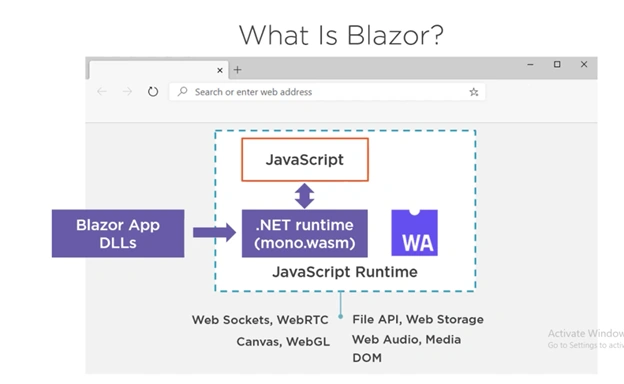
Fig.2 Blazor WebAssembly
When a Blazor application is built, it produces assemblies amongst the other things. These DLLs are .NET Standard DLLs that you can use in any other compatible application, which means you can create a Blazor Component Library and reuse it. These DLLs are everything that makes up your application and its dependencies like the system. DLLs.
In the browser, these DLLs can run by .NET runtime. This .NET runtime is a version that is compiled into WebAssembly byte code and has the WebAssembly file extension .wasm. This .NET runtime runs on WebAssembly in the browser. And in the web browser, the WebAssembly runs in the JavaScript runtime sandbox just like regular JavaScript code does. Here it runs the .NET runtime like mono.wasm which runs the DLLs of your Blazor applications.
And because all of this runs in the JavaScript runtime, your application can access the capabilities of the browser like WebSockets, the File API, and the DOM. It uses this to access the DOM to create and update the UI on the screen. Also, it runs in the JavaScript runtime your application code can interact with JavaScript Code. You can call JavaScript from C#, and JavaScript can call your C# Code.
Belal El-ThorPosted Dec 29, 2025, 1:58 PM
Nice article sir Sundaram Subramanian
Deepak TewatiaPosted Mar 9, 2022, 5:27 AM
Nice article sir Sundaram Subramanian
Supi MonPosted Jul 9, 2021, 6:39 AM
So webassembly and javascript dont run in the same runtime rather they run in the same sandbox unlike what you wrote here ==> "And because all of this runs in the JavaScript runtime, your application can access the capabilities of the browser like WebSockets, the File API, and the DOM."
Supi MonPosted Jul 9, 2021, 6:37 AM
"And in the web browser, the WebAssembly runs in the JavaScript runtime sandbox just like regular JavaScript code does." <== I think you are misunderstanding runtime sandbox and runtime. Javascript code is run by Javascript runtime, and javascript runtime is run within the sandbox created either in the browser or on the server.
Mahesh ChandPosted Mar 25, 2021, 1:05 PM
Thank you, Sundaram Subramanian. Nice article. Could you please add another section to this article on when to choose Blazor server vs WebAssembly.