

Boolean Keyword in Java
The Boolean Keyword is a primary data type in Java. It is a primitive data type used in many programming contexts, including conditional statements, loops, and methods. It specifies a single piece of information, and it is impossible to describe its size. There are just two possible values that can be stored: true or false. The Boolean keyword is used to declare a variable that can hold a true or false value. To declare a boolean variable in Java, you use the keyword Boolean followed by the variable name and an optional initial value, like this.
Syntax
boolean isReady = true;
In this syntax, we declare an " isReady " boolean variable and assign it the "true.". The value can also be assigned later in the program like this.
boolean isReady;
isReady = false;
Boolean variables can be used in conditional statements to control program flow like this.
Simple Boolean Method in Java
This Example demonstrates the use of a simple if-else statement to compare two numbers and print the smaller of the two. Here's a breakdown of the code:
 class demoprogram {
    public static void main(String[] args) {
        int number1 = 40;
        int number2 = 50;
        boolean a1 = true;
        boolean a2 = false;
        if (number1 < number2) {
            System.out.println(a1);
        } else {
            System.out.println(a2);
        }
    }
}
This program defines a class named demoprogram which contains a main method. The main method initializes two integer variables, number1, and number2, with 40 and 50, respectively. It also initializes two boolean variables, a1 and a2, with the values of true and false, respectively.
The main method then uses an if-else statement to compare number1 and number2. If number1 is less than number2, the program prints the value of a1 (which is true) to the console. Otherwise, the program prints the value of a2 (which is false) to the console.
In this case, the program will print the value of a1 (which is true) to the console since 40 is less than 50. Therefore, the output of the program will be:
Here is the output that would be produced by running this program
Output
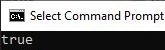
Since number1 is less than number2, the program prints the value of the a1 variable, which is set to true.
Comparing the variables in Java
This Java example demonstrates the use of Boolean variables and the equality operator. Here's a breakdown of the code:
class demoprogram {
    public static void main(String[] args) {
        boolean a1 = true;
        boolean b2 = false;
        boolean c3 = (a1 == b2);
        System.out.println(a1);
        System.out.println(b2);
        System.out.println(c3);
    }
}
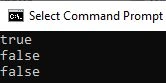
This Example begins by declaring two boolean variables, a1 and b2, and initializing them to true and false, respectively. It then displays a third boolean variable, c3, and sets its value to the result of the expression (a1 == b2). This expression uses the equality operator == to compare the values of a1 and b2. Since a1 is true and b2 is false, c3 will be false.
Join the conversation! Your thoughts help the community grow.