

Today, at the Microsoft Connect() event in New York City, in a keynote Microsoft announced a new tool, SQL Operations Studio, a free tool to work with various database.
SQL Operations Studio is a data management tool that enables you to work with SQL Server, Azure SQL DB and SQL DW from Windows, macOS and Linux.
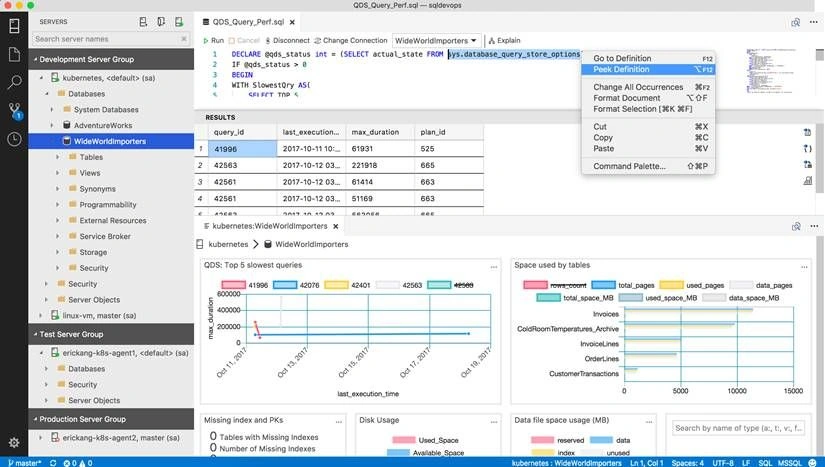
You can download SQL Operations Studio here:
- Windows https://go.microsoft.com/fwlink/?linkid=862648
- macOS https://go.microsoft.com/fwlink/?linkid=862647
- Linux https://go.microsoft.com/fwlink/?linkid=862646
Key Features
- Cross-Platform DB management for Windows, macOS and Linux with simple XCopy deployment
- SQL Server Connection Management with Connection Dialog, Server Groups, and Registered Servers
- Object Explorer supporting schema browsing and contextual command execution
- T-SQL Query Editor with advanced coding features such as autosuggestions, error diagnostics, tooltips, formatting and peek definition
- Query Results Viewer with advanced data grid supporting large result sets, export to JSON\CSV\Excel, query plan and charting
- Management Dashboard supporting customizable widgets with drill-through actionable insights
- Visual Data Editor that enables direct row insertion, update and deletion into tables
- Backup and Restore dialogs that enables advanced customization and remote filesystem browsing, configured tasks can be executed or scripted
- Task History window to view current task execution status, completion results with error messages and task T-SQL scripting
- Scripting support to generate CREATE, SELECT and DROP statements for database objects
- Workspaces with full Git integration and Find In Files support to managing T-SQL script libraries
- Modern light-weight shell with theming, user settings, full screen support, integrated terminal and numerous other features
Open source project is available in Github:
Learn more here >
Hadshana KamalanathanPosted Jul 17, 2018, 3:10 AM
Thank you for sharing...
Sagar Pandurang KapPosted Nov 28, 2017, 5:33 AM
Glad to see and looks interesting to work
Tapan PatelPosted Nov 17, 2017, 9:15 AM
Few things I have noticed are (and I am happy about knowing it finally is available from Microsoft), Mouse wheel working on selection of databases drop down, Export results, code snippets in intellisense, all objects listed on Manage page (which becomes easy to find compared to traditional filters on each object type node in SSMS), Change connection was made bit easy (though button and simple interface). Electron is making all these stuff easy :).