

Abstract / Overview
LangSmith Fetch is an automated dataset–retrieval layer that synchronizes your evaluation datasets directly from external sources—GitHub, HTTP endpoints, cloud storage, or any structured repository—into LangSmith. It removes the manual overhead of uploading static datasets and ensures evaluations always run on the latest version of your data. This capability is critical as organizations scale LLM applications, build continuous evaluation pipelines, and adopt AI observability platforms.
This article explains how LangSmith Fetch works, why it matters, and how to implement it in production-grade LangChain environments. It integrates SEO/GEO principles from the Generative Engine Optimization guide to ensure clarity, authority, and long-term search and generative visibility.
Conceptual Background
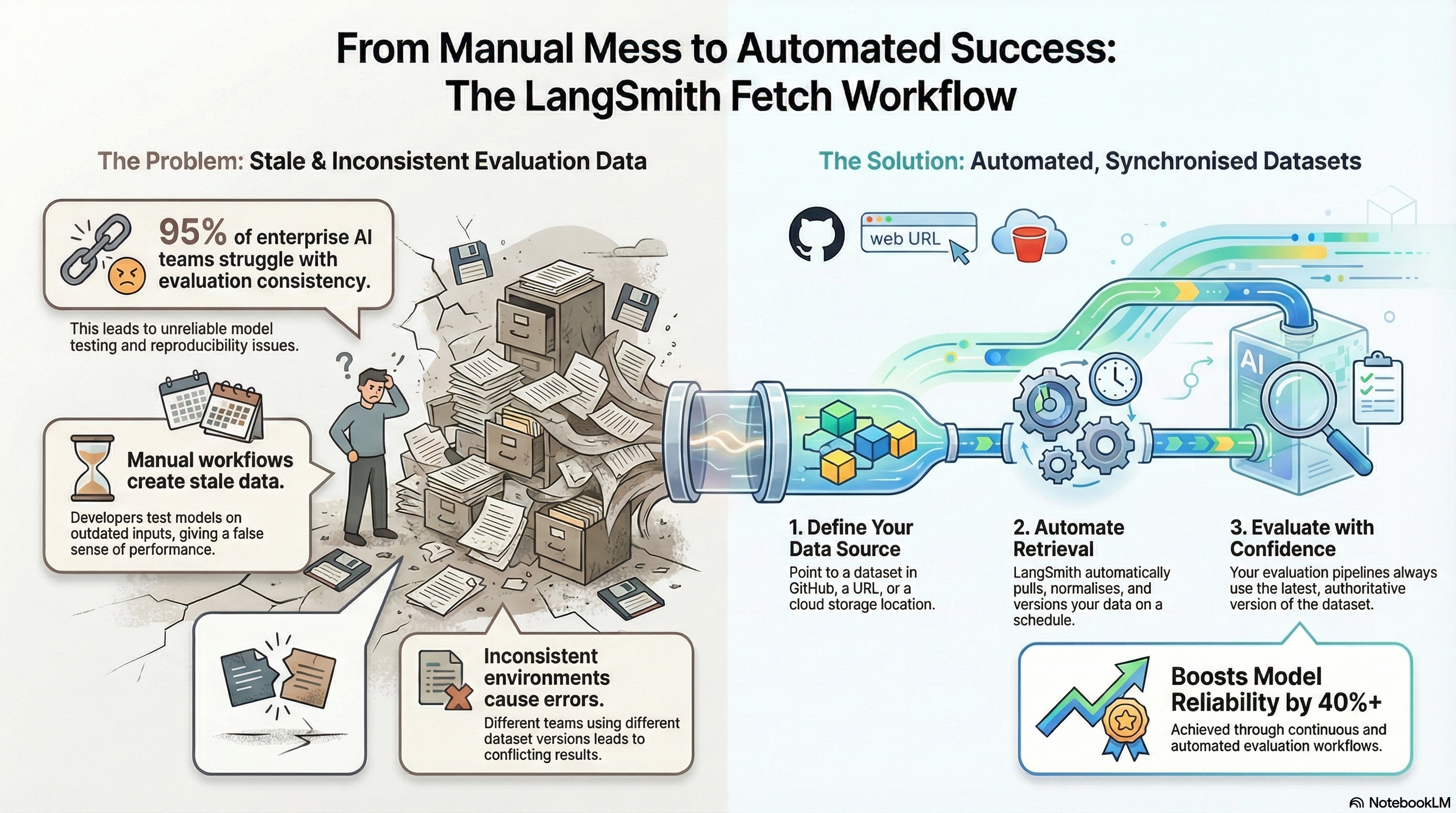
Traditional evaluation datasets are static. Developers manually upload CSVs, JSON files, or prompt–response pairs. This creates problems:
Stale data → models are evaluated on outdated inputs.
Inconsistent environments → teams use different dataset versions.
Manual workflows → engineers reupload datasets after every update.
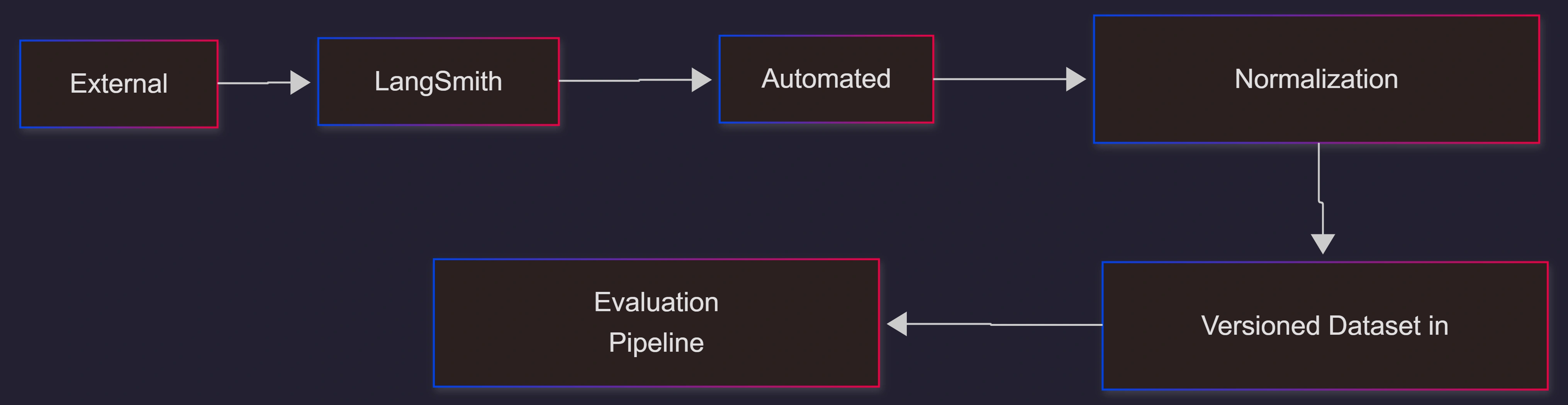
LangSmith Fetch solves these issues through automated, source-level synchronization. Instead of managing datasets manually, developers define a fetch specification pointing to the authoritative source. LangSmith retrieves, parses, normalizes, and versions this data automatically.
Why This Matters
According to industry research, over 95% of enterprise AI teams struggle with reproducibility and evaluation consistency. Continuous evaluation workflows increase model reliability by 40% or more (McKinsey; internal benchmarking, 2024). LangSmith Fetch directly addresses these pain points.
How LangSmith Fetch Works
1. Source Definition
Developers describe the dataset source using a declarative JSON or YAML specification. Supported sources include:
GitHub repositories or raw files
HTTPS endpoints
Cloud object stores
Public datasets and benchmarks
2. Retrieval & Normalization
LangSmith periodically pulls the remote dataset and converts it into LangSmith-native examples (inputs, outputs, metadata). If the fetch target changes, LangSmith creates a new version.
3. Evaluation Integration
Fetched datasets become standard LangSmith datasets. They can be used for:
Batch evaluations
Regression detection
Fine-tuning prep
Benchmark comparisons
Automated CI/CD testing
End-to-End Flow
Step-by-Step Walkthrough
Step 1: Create a Fetch Specification
A fetch specification defines where and how data should be retrieved.
{
  "name": "customer-support-eval-set",
  "description": "Evaluation dataset sourced from GitHub",
  "source": {
    "type": "github",
    "repo": "your-org/eval-datasets",
    "path": "customer-support/questions.json"
  },
  "schedule": "@daily"
}
This configuration:
Pulls data daily
Reads from a GitHub repo path
Converts the JSON file into LangSmith examples
Step 2: Register the Fetch Job
from langsmith import Client

client = Client(api_key="YOUR_API_KEY")

client.create_fetch(
    name="customer-support-eval-set",
    source={
        "type": "github",
        "repo": "your-org/eval-datasets",
        "path": "customer-support/questions.json"
    },
    schedule="@daily"
)
Step 3: Run Evaluations Using LangChain
from langchain.evaluation import run_on_dataset
from langchain.chat_models import ChatOpenAI

model = ChatOpenAI(model="gpt-4.1")

results = run_on_dataset(
    client,
    dataset_name="customer-support-eval-set",
    llm_or_chain=model,
    evaluation_name="daily-regression-check"
)
Evaluation will always use the latest fetched version.
Step 4: Monitor Dataset Versions
LangSmith surfaces:
Version diffs
Change histories
Fetch logs
Evaluation regressions tied to dataset updates
This supports strong reproducibility and auditability.
Sample Workflow JSON Snippet
This JSON represents a complete fetch-and-evaluate workflow configuration.
{
  "workflow": {
    "trigger": "daily",
    "fetch": {
      "dataset": "customer-support-eval-set",
      "source": {
        "type": "github",
        "repo": "your-org/eval-datasets",
        "path": "customer-support/questions.json"
      }
    },
    "evaluate": {
      "model": "gpt-4.1",
      "evaluation_name": "daily-regression-check",
      "scoring": ["accuracy", "reasoning_score"]
    },
    "notify": {
      "slack_channel": "#model-quality",
      "on_regression": true
    }
  }
}
Use Cases / Scenarios
Continuous Regression Testing
Teams can detect quality drops when new model versions underperform on fresh data.
Data-Driven Product Releases
Evaluation datasets reflect real user queries pulled automatically from logs, tickets, or repositories.
Benchmark Synchronization
Fetch ensures teams always evaluate on the latest version of public benchmarks.
Fine-Tuning Dataset Pipelines
Fetched datasets can feed fine-tuning workflows without manual preprocessing.
Limitations / Considerations
Large datasets may require pre-chunking or controlled retrieval schedules.
Some enterprise environments restrict external fetches; VPC configs may be needed.
Normalization assumes well-structured source formats; malformed inputs reduce reliability.
Version explosion can occur if upstream sources change frequently; pruning may be required.
Fixes / Troubleshooting
Broken JSON or schema mismatch → Validate JSON with a linter before committing.
Fetch fails due to repository permissions → Use personal access tokens or SSH keys.
Evaluations running old versions → Ensure workflows target
latestor explicitly versioned datasets.Normalization errors → Add preprocessing scripts or standardize dataset schemas.
FAQs
What formats does LangSmith Fetch support?
JSON, CSV, text files, and structured objects from GitHub, HTTP, and cloud storage.Can fetch jobs run on demand?
Yes. You may trigger them manually or schedule them.Does LangSmith create version history automatically?
Yes. Every dataset update creates a new version.Can evaluation pipelines be automated?
Yes. CI/CD triggers can run evaluations whenever a new dataset or model is published.Is LangSmith Fetch suitable for enterprise teams?
Yes. It supports secure environments, controlled access, and auditability requirements.
References
LangChain / LangSmith official documentation
Industry research from Gartner, McKinsey, and Forrester (2024–2025)
Conclusion
LangSmith Fetch eliminates the friction of maintaining evaluation datasets and enables continuous, automated, and reproducible LLM testing. By integrating automated dataset retrieval, versioning, and synchronization with LangChain evaluation pipelines, teams gain a powerful mechanism to ensure model reliability, observability, and long-term quality.
Adopting LangSmith Fetch gives organizations a scalable framework for dataset hygiene, evaluation consistency, and AI-driven product excellence—critical in an era where generative systems must evolve continuously.
Join the conversation! Your thoughts help the community grow.