

Introduction
Windows 8 is a hot topic in the Operating Systems market; it is not yet launched but its preview versions are making a great impression among developers. It has launched three versions so far; Developer Preview, Consumer Preview, and Release Preview. The Windows App Store in Windows 8 is a major attraction. In this article, I will get you started with Windows 8 application development.
Starting with development, we need some developer tools for Windows 8
- Visual Studio 11 or Visual Studio 12 RC
- Windows 8 SDK
- App Certification Kit
Well if you use Visual Studio 12 RC it contains all the developer tools, though Visual Studio 12 RC cannot be installed onto the Consumer Preview; for this, you need either Developer Preview or Release Preview.
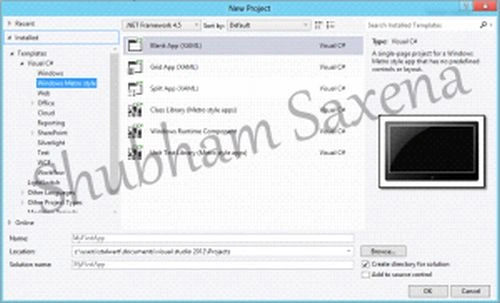
Create a new project. Under the templates section you will see Windows Metro Style:
There are three types of apps which can be developed:
- Blank App - This is the minimal application for a Windows Metro style framework. It is used to create basic applications.
- Grid App - This can be used to create multi-page projects for navigating multiple layers of content with item details displayed on a detailed page. This can be used to create a panoramic view also.
- Split App - This defines two different sections where you can create a project for navigating among a master list of items while viewing their details on the same page.
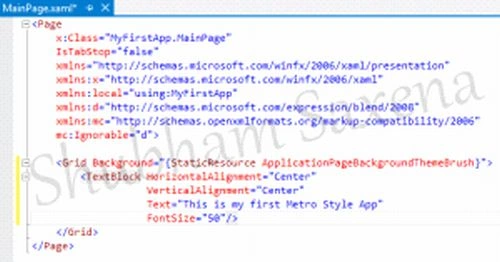
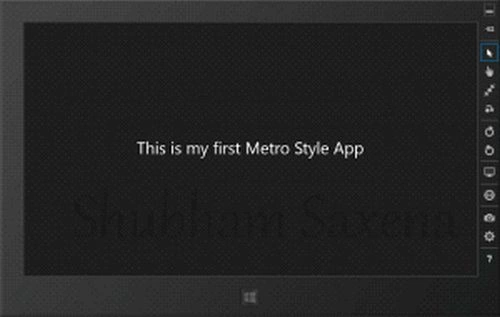
For this article, I'm using a Blank App Type. The following figure will clarify everything I'm talking about.
Summary
In this article, we learned about Windows 8 Development, Getting Started.
Shubham SaxenaPosted Jul 17, 2012, 10:25 AM
thanks to everyone.
Shubham SrivastavaPosted Jul 17, 2012, 10:08 AM
Nice start shubham. welcome in Metro Style Application Programming.
Arun ChoudharyeditedPosted Jul 17, 2012, 10:00 AMEdited Jul 17, 2012, 10:02 AM
Shubham great starting windows 8 article. Basically Windows 8 metro UI is a new OS. You have done awesome work on Windows 8.
tom linkerPosted Jul 17, 2012, 9:57 AM
Perfect Article Shubham, Cong!
Shubham SaxenaPosted Jul 17, 2012, 9:32 AM
@dinesh sir - sure sir will do my job tonight... currently writing some on asp.net
Dinesh BeniwalPosted Jul 17, 2012, 9:04 AM
Shubham we are expecting some more articles from you on Windows 8.
Shubham SaxenaPosted Jul 17, 2012, 8:52 AM
@mahesh sir - m 19 :P yeah sure i wud love to meet you. @abhimanyu sir - thanx.
Mahesh ChandPosted Jul 17, 2012, 8:32 AM
Yes great start Shubham. Looks like you are 15 years old :) and from Mathura. Meet me next time I visit Kosi Kalan :).
Abhimanyu K VatsaPosted Jul 17, 2012, 8:28 AM
great start by a young guy like me. keep it up.
Shubham SaxenaPosted Jul 17, 2012, 3:53 AM
thank you dinesh sir...
Dinesh BeniwalPosted Jul 16, 2012, 11:27 PM
Good start shubham