

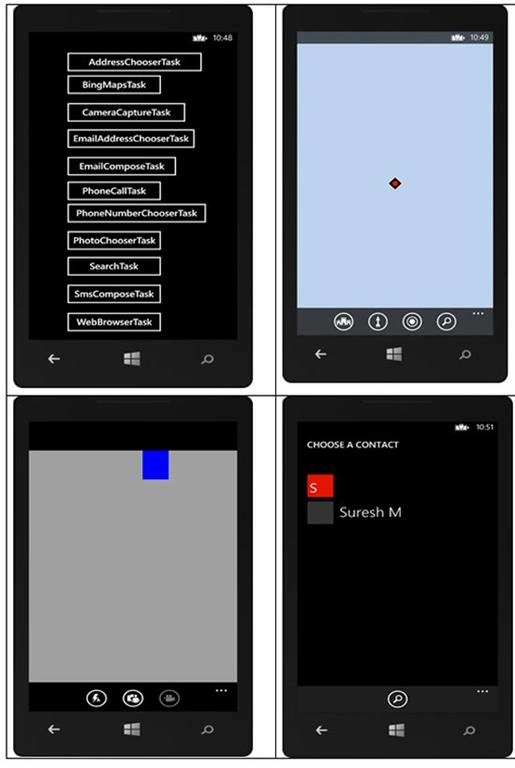
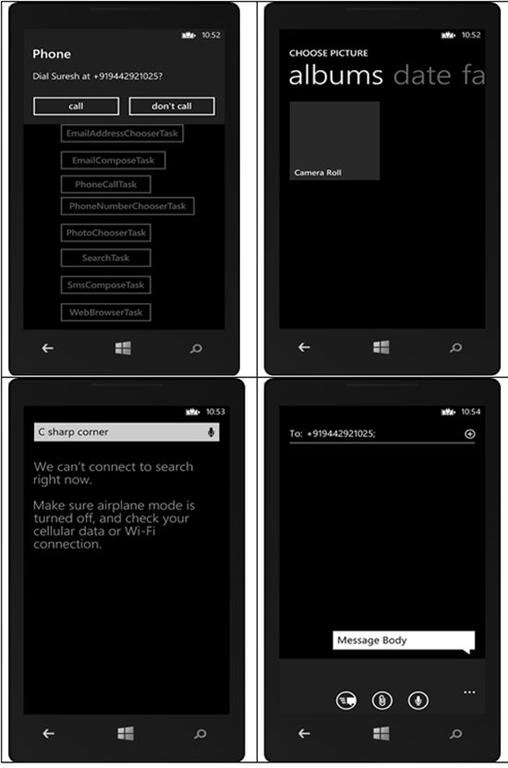
The following is the list of launchers and choosers in Windows Phone 8.
| AddressChooserTask | Allows an application to launch the Contact application |
| BingMapsTask | Allows an application to launch the Bing Maps |
| CameraCaptureTask | Allows an application to launch the Camera application |
| EmailAddressChooserTask | Allows an application to launch the Contacts application |
| EmailComposeTask | Allows an application to launch the Email application |
| PhoneCallTask | Allows an application to launch the Phone application |
| PhoneNumberChooserTask | Allows an application to launch the Phone Contact application |
| PhotoChooserTask | Allows an application to launch the Photo Chooser application |
| SearchTask | Allows an application to launch the Web Search application |
| SmsComposeTask | Allows an application to launch the Messaging application to compose new SMS |
| WebBrowserTask | Allows an application to launch the browser |
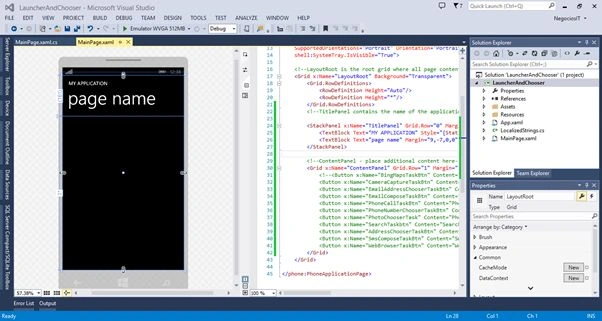
Let us see the procedure for doing this in Windows Phone 8. Create a new project with a valid name. Once everything is ready our project looks as in the following screen.
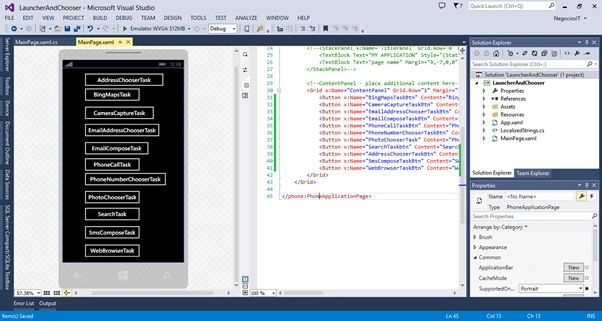
Now add a Button control to trigger the Launcher and Chooser as shown in the following screen.
XAML Code
- <phone:PhoneApplicationPage
- x:Class="LauncherAndChooser.MainPage"
- xmlns="http://schemas.microsoft.com/winfx/2006/xaml/presentation"
- xmlns:x="http://schemas.microsoft.com/winfx/2006/xaml"
- xmlns:phone="clr-namespace:Microsoft.Phone.Controls;assembly=Microsoft.Phone"
- xmlns:shell="clr-namespace:Microsoft.Phone.Shell;assembly=Microsoft.Phone"
- xmlns:d="http://schemas.microsoft.com/expression/blend/2008"
- xmlns:mc="http://schemas.openxmlformats.org/markup-compatibility/2006"
- mc:Ignorable="d"
- FontFamily="{StaticResource PhoneFontFamilyNormal}"
- FontSize="{StaticResource PhoneFontSizeNormal}"
- Foreground="{StaticResource PhoneForegroundBrush}"
- SupportedOrientations="Portrait" Orientation="Portrait"
- shell:SystemTray.IsVisible="True">
- <!--LayoutRoot is the root grid where all page content is placed-->
- <Grid x:Name="LayoutRoot" Background="Transparent">
- <Grid.RowDefinitions>
- <RowDefinition Height="Auto"/>
- <RowDefinition Height="*"/>
- </Grid.RowDefinitions>
- <Grid x:Name="ContentPanel" Grid.Row="1" Margin="12,0,12,0">
- <Button x:Name="BingMapsTaskBtn" Content="BingMapsTask" HorizontalAlignment="Left" Margin="65,69,0,0" VerticalAlignment="Top" Width="239" Click="BingMapsTaskBtn_Click"/>
- <Button x:Name="CameraCaptureTaskBtn" Content="CameraCaptureTask" HorizontalAlignment="Left" Margin="65,141,0,0" VerticalAlignment="Top" Width="295" Click="CameraCaptureTaskBtn_Click"/>
- <Button x:Name="EmailAddressChooserTaskBtn" Content="EmailAddressChooserTask" HorizontalAlignment="Left" Margin="65,209,0,0" VerticalAlignment="Top" Width="317" Click="EmailAddressChooserTaskBtn_Click"/>
- <Button x:Name="EmailComposeTaskBtn" Content="EmailComposeTask" HorizontalAlignment="Left" Margin="65,281,0,0" VerticalAlignment="Top" Width="274" Click="EmailComposeTaskBtn_Click"/>
- <Button x:Name="PhoneCallTaskBtn" Content="PhoneCallTask" HorizontalAlignment="Left" Margin="65,345,0,0" VerticalAlignment="Top" Width="239" Click="PhoneCallTaskBtn_Click"/>
- <Button x:Name="PhoneNumberChooserTaskBtn" Content="PhoneNumberChooserTask" HorizontalAlignment="Left" Margin="65,403,0,0" VerticalAlignment="Top" Width="343" Click="PhoneNumberChooserTaskBtn_Click"/>
- <Button x:Name="PhotoChooserTask" Content="PhotoChooserTask" HorizontalAlignment="Left" Margin="65,474,0,0" VerticalAlignment="Top" Width="239" Click="PhotoChooserTask_Click"/>
- <Button x:Name="SearchTaskbtn" Content="SearchTask" HorizontalAlignment="Left" Margin="65,541,0,0" VerticalAlignment="Top" Width="239" Click="SearchTaskbtn_Click"/>
- <Button x:Name="AddressChooserTaskBtn" Content="AddressChooserTask" HorizontalAlignment="Left" Margin="65,10,0,0" VerticalAlignment="Top" Width="333" Click="AddressChooserTaskBtn_Click" />
- <Button x:Name="SmsComposeTaskBtn" Content="SmsComposeTask" HorizontalAlignment="Left" Margin="65,613,0,0" VerticalAlignment="Top" Width="239" Click="SmsComposeTaskBtn_Click"/>
- <Button x:Name="WebBrowserTaskBtn" Content="WebBrowserTask" HorizontalAlignment="Left" Margin="65,686,0,0" VerticalAlignment="Top" Width="239" Click="WebBrowserTaskBtn_Click"/>
- </Grid>
- </Grid>
- </phone:PhoneApplicationPage>
Kumaresh RajalingamPosted Feb 19, 2016, 7:58 PM
good one
Kumaresh RajalingamPosted Feb 19, 2016, 7:58 PM
Nice explanation
Sr KarthigaPosted Feb 16, 2016, 10:16 PM
Nice explanation
Sr KarthigaPosted Feb 16, 2016, 10:16 PM
Good one
Suresh MPosted Apr 26, 2015, 11:59 PM
Thank you Santhakumar
Santhakumar MunuswamyPosted Apr 25, 2015, 7:56 AM
Thanks for nice article
Santhakumar MunuswamyPosted Apr 25, 2015, 7:56 AM
Good work
Vithal WadjePosted Feb 26, 2015, 12:27 PM
nice
Sibeesh VenuPosted Feb 25, 2015, 11:42 PM
Suresh M You are welcome.
Suresh MPosted Feb 25, 2015, 10:58 PM
Thanks ..........
Rahul Kumar SaxenaPosted Feb 25, 2015, 11:49 AM
Great Work...
Sibeesh VenuPosted Feb 25, 2015, 10:12 AM
Good One.