

Introduction
A highly requested Notification Center feature is now available in WindowsPhone 8.1. Action Center will allow you to quickly access the settings pages like Airplane mode, Wi-Fi Settings, Bluetooth settings and so on. This will also report about alerts, non-toast notifications, update histories and so on. Action Center is available via a swipe down from the top of your device, even from the lock screen. However I am proud to say this is the longest article in my blog :).
Fortunately a developer can access the "Action Center" like the following variety of ways.
- Sending a local toast notification to the Action Center with a popup.
- Sending a toast notification directly to Action Center, without showing a popup.
- Remove a notification from the Action Center.
- Update a notification from the Action Center.
- Make sure you've downloaded and installed the Windows Phone 8.1 SDK. For more information, see Get the SDK.
- I assume you're going to test your app on the Windows Phone emulator. If you want to test your app on a phone, you need to use some additional steps. For more info, see Register your Windows Phone device for development.
- This article assumes you're using Microsoft Visual Studio Express 2013 for Windows.
Description
Previously in WindowsPhone 8.0, there was no Action Center in the phone. One of the biggest changes in Windows Phone 8.1 was the introduction of the Windows Phone Action Center. So the Action Center will allow you to quickly access the settings pages like Airplane mode, Wi-Fi Settings, Bluetooth settings and so on. Ok, it's time to start development with the following procedure.
Step 1
- Open Microsoft Visual Studio Express 2013 for Windows.
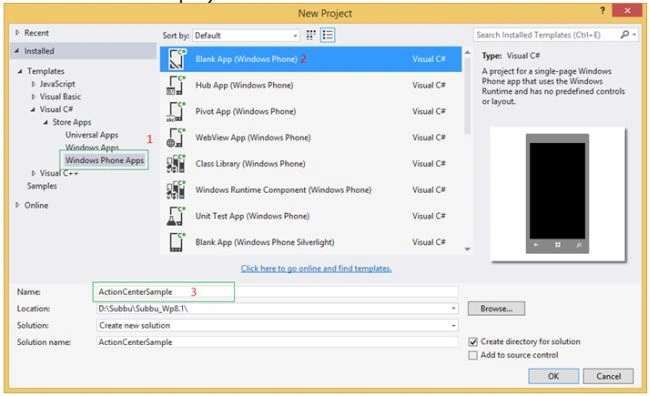
- Create a new project using the "Blank App" template available under Visual C# -> Store Apps -> Windows Phone Apps. (For example project name: ActionCenterSample.)
Add the following XAML code to the MainPage.xaml page and run the app.
- <Grid Background="White">
- <ScrollViewer ZoomMode="Enabled">
- <StackPanel Margin="5" Orientation="Vertical">
- <!--Title of tutorial-->
- <TextBlock Margin="5" TextLineBounds="Full" FontSize="28" Text="WP8.1 ActionCenter Tutorials" Foreground="#FF1BC982" />
- <Rectangle Fill="Blue" Height="0.5"/>
- <!--Iteracting with Action Center-->
- <Button Name="BtnSendToast" HorizontalAlignment="Stretch" Content="Send notification with toast popup" Background="#FF3FD483" Click="BtnSendToast_Click"/>
- <Button Name="BtnSendToastNoPopup" HorizontalAlignment="Stretch" Content="Send notification without toast popup" Background="#FF3FD483" Click="BtnSendToastNoPopup_Click"/>
- <Button Name="BtnRemoveToast" HorizontalAlignment="Stretch" Content="Remove notifications from app" Background="#FF3FD483"/>
- <Button Name="BtnUpdateToast" HorizontalAlignment="Stretch" Content="Update notifications from app" Background="#FF3FD483" Click="BtnUpdateToast_Click"/>
- <!--About ActionCenter-->
- <TextBox VerticalAlignment="Bottom" Header="About ActionCenter:" TextWrapping="Wrap" BorderBrush="#FF23E0D8" Foreground="#FF736B74" IsHitTestVisible="False" IsColorFontEnabled="true">
- <TextBox.HeaderTemplate>
- <DataTemplate>
- <TextBlock Text="{Binding}" FontSize="23" Foreground="#FFD318E6"/>
- </DataTemplate>
- </TextBox.HeaderTemplate>
- <TextBox.Text >
- A highly requested Notification Center feature included in Windows Phone 8.1,Action Center will allow you to quickly access the settings pages like Airplane mode, Wi-Fi Settings, Bluetooth settings etc.
- from a native app. This will also report you about alerts, non-toast notifications, update histories etc.Action Center is available via a swipe down from the top of your device, even from the lock screen.
- </TextBox.Text>
- </TextBox>
- </StackPanel>
- </ScrollViewer>
- </Grid>
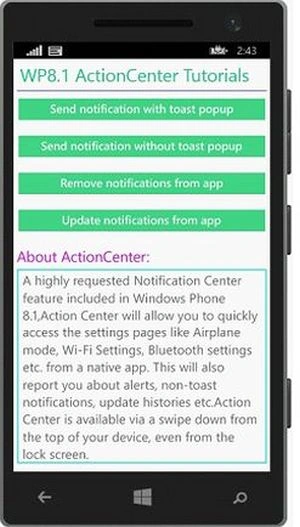
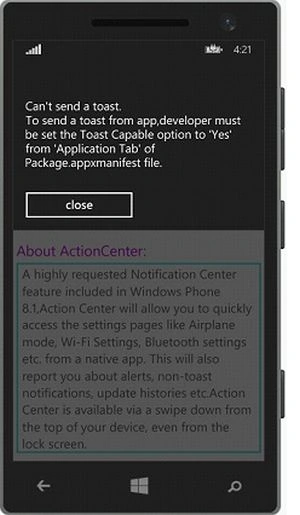
Note: To interact with the Windows Phone Notification Center, the developer must be set the Toast Capable option to "Yes" from the "Application Tab" of the Package.appxmanifest file.

Otherwise when you click on the send notification button from the MainPage, you will get a warning like this.
Step 3
Before starting to send notifications from the app we need to check the following phone NotificationSettings using the "ToastNotificationManager" class.
- public bool CanSendToasts()
- {
- bool canSend = true;
- var NotifierStatus = ToastNotificationManager.CreateToastNotifier();
- //Check Notification settings status
- if (NotifierStatus.Setting != NotificationSetting.Enabled)
- {
- string ReasonMessage = "unknown error";
- switch (NotifierStatus.Setting)
- {
- case NotificationSetting.DisabledByGroupPolicy:
- ReasonMessage = "An administrator has disabled all notifications on this computer through group policy. The group policy setting overrides the user's setting.";
- break;
- case NotificationSetting.DisabledByManifest:
- ReasonMessage = "To send a toast from app,developer must be set Toast Capable option to 'Yes' from 'Application Tab' of Package.appxmanifest file.";
- break;
- case NotificationSetting.DisabledForApplication:
- ReasonMessage = "The user has disabled notifications for this app.";
- break;
- case NotificationSetting.DisabledForUser:
- ReasonMessage = "The user or administrator has disabled all notifications for this user on this computer.";
- break;
- }
- string errroMessage = String.Format("Can't send a toast.\n{0}", ReasonMessage);
- DisplayMessage(errroMessage);
- canSend = false;
- }
- return canSend;
- }
Step 4
Let's assume we pass all the "NotificationSettings". And now we are ready to send local toast notifications to the Action Center. For simplicity I made a common method to send local toast notifications. So the helper method name is MakingToastNotification() that is having parameters (ToastTitle ,ToastBody ,Tag,Group, IsToastPopUpRequired).
- public void MakingToastNotification(string ToastTitle, string ToastBody, string strTag, string strGroup, bool IsToastPopUpRequired)
- {
- // Using the ToastText02 toast template. This template contains a maximum of two text elements. The first text element is treated as a header text and is always bold.
- ToastTemplateType toastTemplate = ToastTemplateType.ToastText02;
- // Retrieve the content part of the toast so we can change the text.
- XmlDocument toastXml = ToastNotificationManager.GetTemplateContent(toastTemplate);
- //Find the text component of the content
- XmlNodeList toastTextElements = toastXml.GetElementsByTagName("text");
- // Set the text on the toast.
- // The first line of text in the ToastText02 template is treated as header text, and will be bold.
- toastTextElements[0].AppendChild(toastXml.CreateTextNode(ToastTitle));//Toast notification title
- toastTextElements[1].AppendChild(toastXml.CreateTextNode(ToastBody + " (Tag:" + strTag + ", Group:" + strGroup + ")"));//Toast notificat ion body
- // Set the duration on the toast
- IXmlNode toastNode = toastXml.SelectSingleNode("/toast");
- ((XmlElement)toastNode).SetAttribute("duration", "long");
- ToastNotification toast = new ToastNotification(toastXml);
- toast.ExpirationTime = DateTimeOffset.UtcNow.AddSeconds(10);
- //Check Toast popup required to display
- if(!IsToastPopUpRequired)
- {
- toast.SuppressPopup = true;//to send notification directly to action center without displaying a popup on phone.
- }
- //Note: Tag & Group properties are optional,but these are userful for delete/update particular notification from app
- toast.Tag = strTag;
- toast.Group = strGroup;
- ToastNotificationManager.CreateToastNotifier().Show(toast);
- }
Step 5
Now we have made all the necessary methods for interacting with the notification center. OK let's play with the following Action Center interactions from the app.
- Sending a local notification to the Action Center
Initially the Action Center will show you the "no notifications" message.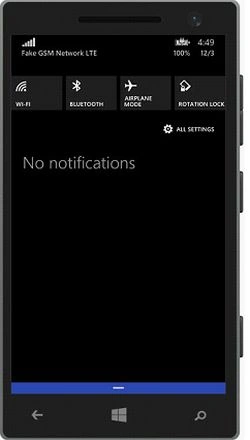
In the following code I am trying to send a local toast notification to the Action Center with a toast popup, so I set the fifth parameter of the helper method (IsToastPopUpRequired) to "true".
- //Sending local toast notifications to action scenter with popup .
- int ToastCount = 0;
- private void BtnSendToast_Click(object sender, RoutedEventArgs e)
- {
- //Check notificationsettings status from user device
- if (CanSendToasts())
- {
- MakingToastNotification("Toast_with_Popup: ", "Notitification " + ToastCount++, "T" + ToastCount.ToString(), "G1", true);
- }
- }
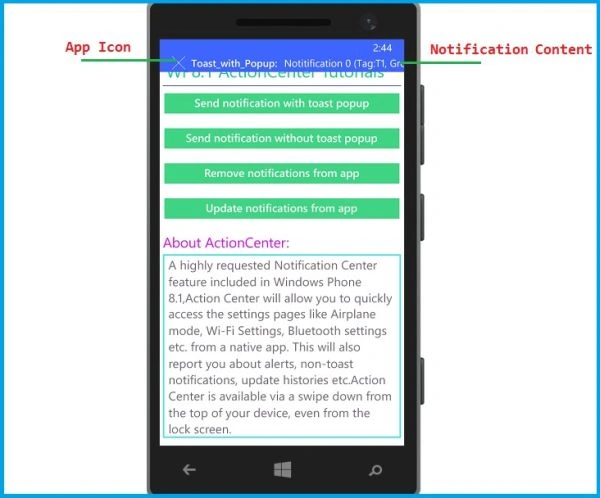
After sending some local notifications, our app notifications will be shown in the Action Center like this: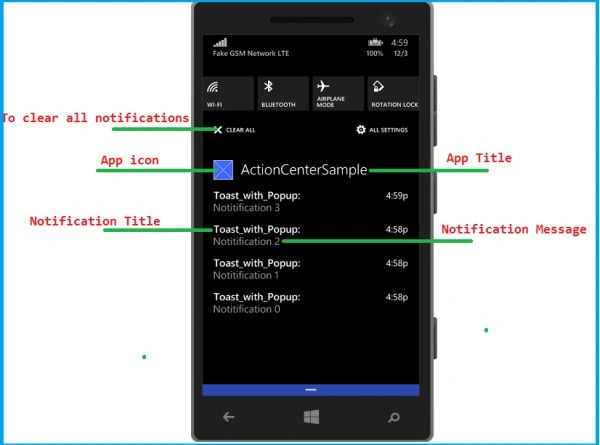
- Sending a local notification to the Action Center without toast popup
In the following code I am trying to send local toast notification to the Action Center without showing a toast popup, so I set the fifth parameter of the helper method (IsToastPopUpRequired) to "false".
- //Sending local toast notifications to action scenter without popup .
- private void BtnSendToastNoPopup_Click(object sender, RoutedEventArgs e)
- {
- //Check notification settings status from user device
- if (CanSendToasts())
- {
- MakingToastNotification("Toast_without_Popup: ", "Notitification " + ToastCount++, "T"+ToastCount.ToString(), "G2", false);
- }
- }
- Remove specific notification from the Action Center
We can remove a specific notification based on its Tag and Group property values. Here I am trying to remove the notification that has the Tag property value of "T1", however I am also showing other ways for removing notification in comment lines.
- //Remove notifications from code .
- private void BtnRemoveToast_Click(object sender, RoutedEventArgs e)
- {
- //To Remove all notifications with the given Tag id
- ToastNotificationManager.History.Remove("T1");
- //To Remove all notifications with the given Tag id and Group id
- //ToastNotificationManager.History.RemoveGroup("T1","G1");
- //To Remove all notifications with the given Group id
- // ToastNotificationManager.History.RemoveGroup("G1");
- //To Remove all notifications
- //ToastNotificationManager.History.Clear();
- DisplayMessage("Notifications with Tag 'T1' have been removed.\n Open action center to verify.");
- }
- Update specific notification from the Action Center
We can update a specific notification based on its Tag and Group property values. Here, I am trying to update the notification with the Tag property value of "T1" and Group property value of "G1".
- //Update notifications from code .
- private void BtnUpdateToast_Click(object sender, RoutedEventArgs e)
- {
- MakingToastNotification("Toast_without_Popup: ", "Notitification 1 is updated ","T1", "G1", false);//Update the notification whi ch is having Tag T1 ,Group G1
- DisplayMessage("Notifications has been updated with new content.");
- }
Join the conversation! Your thoughts help the community grow.