

Introduction
Java provides a special
type of class called an abstract class which helps us to organize our classes
based on common methods. An abstract class lets you put the common method names
in one abstract class without having to write the actual implementation code. In
another words we can say that an abstract class is a class that is declared by
using the abstract keyword.
It may or may not have abstract methods. Abstract classes cannot be
instantiated, but they can be extended into sub-classes.
Why We Use Abstract Classes: There are situations in which you will want
to define a super class that declares the structure of a given abstraction
without providing a complete implementation of every method. That is, sometimes
you will want to create a super class that only defines a generalized form that
will be shared by all of its subclasses, leaving it to each subclass to fill in
the details. Such a class determines the nature of the methods that the
subclasses must implement. One way this situation can occur is when a superclass
is unable to create a meaningful implementation for a method. This is the case
with the class Figure used in the preceding example. The definition of area( )
is simply a placeholder. It will not compute and display the area of any type of
object.
As you will see as you create your own class libraries, it is not uncommon for a
method to have no meaningful definition in the context of its superclass. You
can handle this situation two ways. One way, as shown in the previous example,
is to simply have it report a warning message. While this approach can be useful
in certain situations—such as debugging—it is not usually appropriate. You may
have methods which must be overridden by the subclass in order for the subclass
to have any meaning. Consider the class Triangle. It has no meaning if area( )
is not defined. In this case, you want some way to ensure that a subclass does,
indeed, override all necessary methods. Java's solution to this problem is the
abstract method.
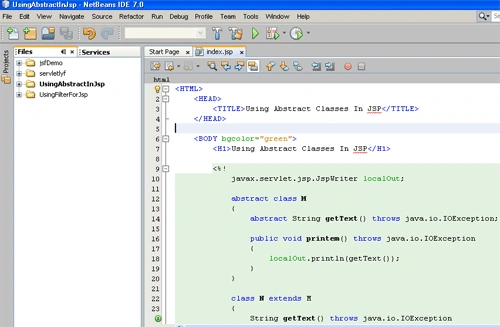
An application of abstract class with JSP: Here we are going to prepare an application of abstract class with JSP , we using NetBeans IDE(7.0) for it.
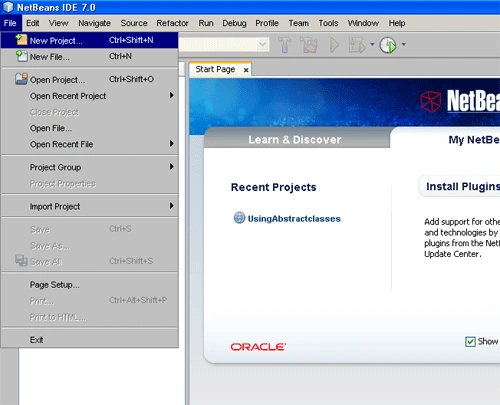
Step 1 : Creating a new project: In this step we click on the file menu and select New Project option:
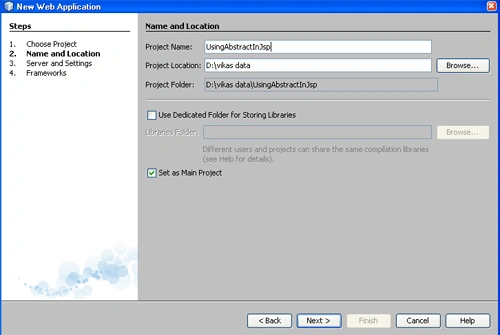
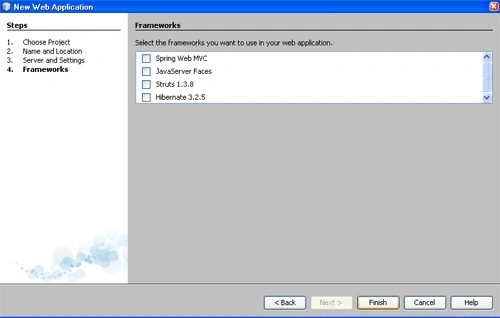
Step 2 : Choosing Project: In this step we select the project type. We select java web application and click on the Next button:


Join the conversation! Your thoughts help the community grow.