

DependencyService in Xamarin
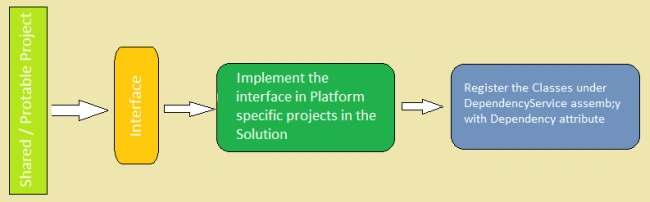
- Declare an interface in the Shared / Portable project.
- Implement the interface in the platform-specific projects.
- Register the class under the DependencyService Assembly with the Dependency attribute.
- Call the DependencyService.get method with the Interface. It will identify the platform and execute the implementation.
- The class that implements the Interface must have a parameterless constructor defined.
- The [assembly:] attribute must be declared above the namespace. I have often seen developers making this mistake.
- The implementation must be done in each platform-specific project in the Solution. It has a valid reason as well. Since we are implementing it in a shared repository, it is obvious that we will use the same code base for all of the platforms. In that case, the platform doesn't have the implementation so we will using aNullReferenceException.
Let's do it
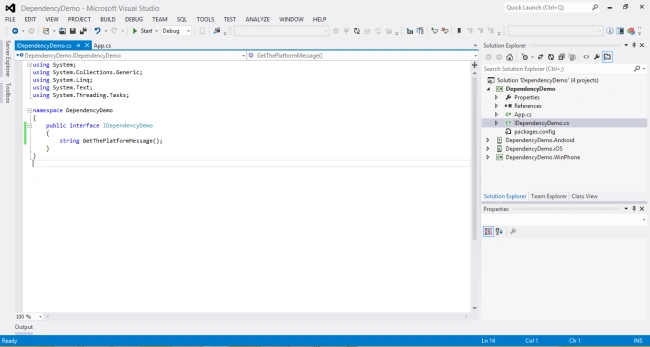
Let's create a Xamarin.Forms Portable project with iOS, Android and Windows Phone. Name it DependencyDemo. Once the Solution is ready, add a new interface to the Portable project and name it asIDependencyDemo, add the following code to the interface.
- namespace DependencyDemo
- {
- public interface IDependencyDemo
- {
- string GetThePlatformMessage();
- }
- }
- [assembly: Xamarin.Forms.Dependency(typeof(DependencyDemo.Droid.DependencyImplementation))]
- namespace DependencyDemo.Droid
- {
- public class DependencyImplementation:IDependencyDemo
- {
- public string GetThePlatformMessage()
- {
- return "I am Android";
- }
- }
- }
Kishore ReddyPosted Feb 22, 2018, 4:50 AM
How to implement this without Xamarin forms
BUISSART THOMASPosted Jun 29, 2016, 10:16 AM
Your question means you have not understood the target of this service.
Arvind ChourasiyaPosted May 30, 2016, 10:24 AM
is there any code which is equivalent to android?
Arvind ChourasiyaPosted May 30, 2016, 10:23 AM
how can i use this one in Xamarin android= var dataBaseAccess = DependencyService.Get<DatabaseAccess>();
Nirmal HotaPosted Feb 25, 2015, 10:08 AM
Thanks Rahul :)
Rahul Kumar SaxenaPosted Feb 24, 2015, 7:33 AM
Good Work bro...
Sibeesh VenuPosted Feb 23, 2015, 8:57 AM
Nirmal Hota You are welcome.
Nirmal HotaPosted Feb 23, 2015, 7:37 AM
Thanks Sibeesh
Sibeesh VenuPosted Feb 23, 2015, 7:26 AM
Good One.