

Introduction
In this article, we will learn how we can create, retrieve and delete the folders on SharePoint libraries, using PnP PowerShell. The Client Side Object Model is used internally for these operations.
Prerequisite
You need to have PowerShell 3.0, available on a Windows machine. You need to install or import PnP PowerShell packages. You can download the installers or view more documentation from the official site. The installers are available here. Online version installer is preferred for On Premise or Office 365 operations. You can also install all the three installers for testing (SharePoint 2013, 2016, online).
The PnP PowerShell is supported by SharePoint 2013, SharePoint 2016 On Premises and Office 365 versions. The following operations are tested on SharePoint 2013 and Office 365 environments.
Connect To Site
Connect to the site, using the snippet, given below. PnP PowerShell code, given below, helps in getting the current context of the site, using the Client Side Object Model (CSOM).
- $siteurl = "https://abc.sharepoint.com"
- Connect-SPOnline -Url $siteurl
- $ctx = Get-SPOContext
Create SharePoint Folder
The folders can be created, using Add-SPOFolder command on SharePoint sites. The required parameters for creating a folder are:
- Name
- Folder source URL
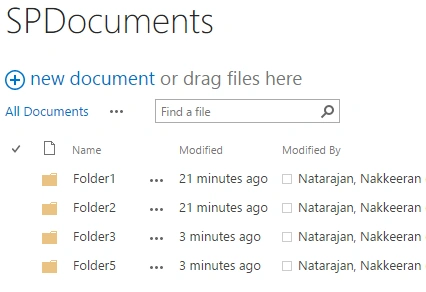
The code snippet, given below, helps in creating a folder on a SharePoint library, using PnP PowerShell. In this example, SPDocuments is the document library created on the site.
- Add-SPOFolder -Name "Folder1" -Folder "/SPDocuments"
Ensure-SPOFolder is used to check if the folder exists. If it doesn’t exist, the folder will be created. This operation will return the object of the folder created/retrieved.
- Ensure-SPOFolder -SiteRelativePath "/SPDocuments/Folder3"
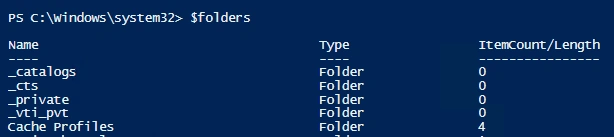
The folders can be retrieved from SharePoint libraries, using PnP PowerShell. The filters like item type or item name can be used to trim the result set. Few properties like name, items count, folder URL can be retrieved from each of the items retrieved.
Emml AmpsPosted May 4, 2018, 6:22 PM
Hi, I want to use this script to find out folders with Unique permissions. Please are you able to help? Add-Type -Path "C:\Program Files\SharePoint Online Management Shell\Microsoft.Online.SharePoint.PowerShell\Microsoft.SharePoint.Client.dll" Add-Type -Path "C:\Program Files\SharePoint Online Management Shell\Microsoft.Online.SharePoint.PowerShell\Microsoft.SharePoint.Client.Runtime.dll" $siteurl = "https://company.sharepoint.com/sites/Teamsite" Connect-PnPOnline -Url $siteurl $folders = Get-PNPFolderItem -FolderSiteRelativeUrl "/Shared Documents/Folder/Subfolder" foreach($folderitem in $folders){ Write-Host $folderitem.name }
Yohannes WOLDEABIBPosted Apr 11, 2018, 10:26 AM
Great Post!! short and precise i like it
Shobana JPosted Jul 13, 2016, 2:54 AM
Good one
kalu singh raoPosted Jul 13, 2016, 1:31 AM
Nice...