

Introduction
In my previous article, I explained about Windows Form Application using Arduino and in this article, I'll show you how to use FSR Sensor to fade LED. This sensor is simple to set up and great for sensing pressure.
Requirements
- Arduino Uno
- Force Sensitive Sensor
- Bread Board
- 10K ohm Resistor
- 220k ohm Resistor
- Led
Connection
- FSR pin-1 to Analog A0
- FSR pin-2 to 5v
- Led anode pin-3
- Cathode pin to Gnd
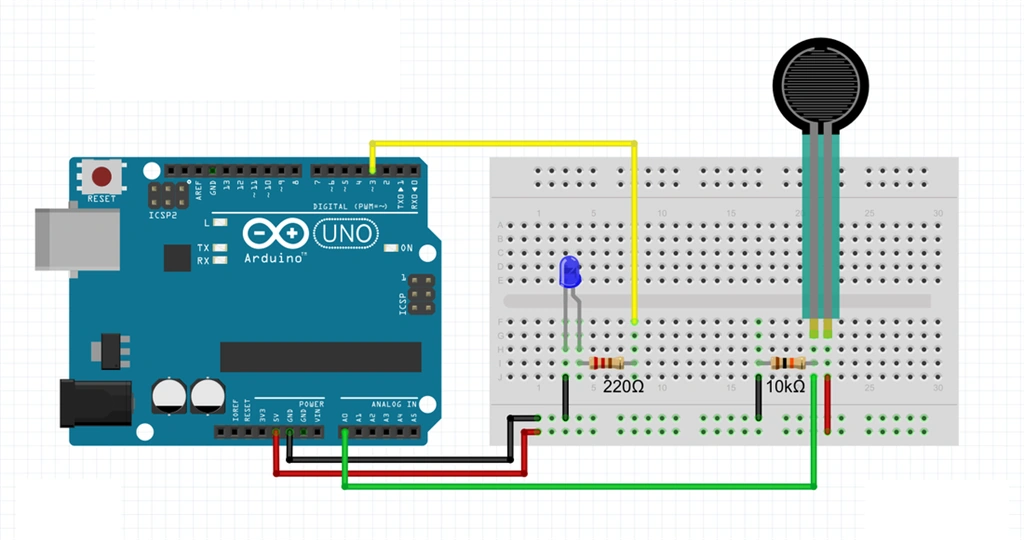
- int ledpin = 3;
- int sensorPin = A1;
- int value;
- void setup()
- {
- pinMode(ledpin, OUTPUT);
- Serial.begin(9600); // Baud Rate
- }
- void loop()
- {
- value = analogRead(sensorPin);
- Serial.println(value);
- value = map(value, 0, 1023, 0, 255);
- Map value 0 - 1023 to 0 - 255(PWM)
- analogWrite(ledpin, value);
- delay(100);
- }
Explanation
Initialize the value ledpin=3 digital and Sensorpin=A1 as an analog and declare the value as an int. In the Setup() function set the pinMode to the LED as OUTPUT and set the baud rate(9600). In the loop() function, we want to set the conditions for Force Sensitive Sensor.
- Value=analogRead(sensorPin) // Read and save the Analog value from the pote
- Serial.println(value) // Print the value
- value=map(value,0,1023,0,255) //Map value
- analogWrite(ledPin,value //Send PWM value to led
- PWM //Pulse Width Modulation
- delay(1000) //Set delay time to 1sec
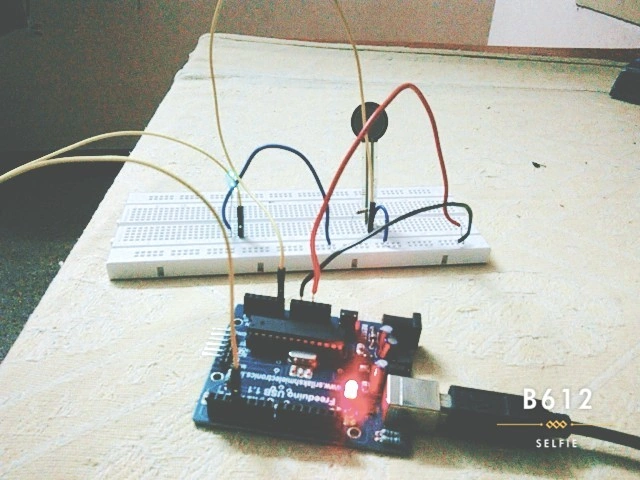
Output
Conclusion
And finally, I conclude that we can fade an LED using a Force Sensing Resistor.
Santhakumar MunuswamyPosted Jan 24, 2016, 10:57 AM
Thanks for nice share
Gowtham KPosted Jan 24, 2016, 6:27 AM
Nice Share
Kumaresh RajalingamPosted Jan 23, 2016, 7:34 AM
Thanks Karthiga
Sr KarthigaPosted Jan 23, 2016, 5:23 AM
Good one