

This article has been excerpted from book "Graphics Programming with GDI+".
In viewing and manipulating images, GDI+ provides significant improvements over it predecessor, GDI. In this article we will discuss the following topics:
-
Basic imaging-related classes defined in the .NET Framework library
-
The difference between raster and vector images
-
The Image class, its properties, and its methods
-
Writing an image viewer application
-
Opening and viewing images
-
Retrieving image properties
-
Creating thumbnails
-
Rotating and flipping images
-
Zooming in and out on images
-
Saving and skewing images
-
Changing the resolution and scaling of images
-
Playing animated images
-
The Bitmap class, its properties, and its methods
-
Using the Icon class to work with icons
-
Drawing transparent images
-
Using the PictureBox control to draw images.
As we said earlier, the graphics-related functionality in the .NET Framework class library is defined in the System.Drawing namespace and its helper namespaces. The imaging functionality is divided into two categories by separation into two namespaces. Basic imaging functionality is defined in the System.Drawing namespace; advanced imaging functionality is defined in the System.Drawing.Imaging namespace.
Raster and Vector Images
The graphics world divides images into two types: raster and vector.
A raster image (also called bitmap) is a collection of one or more pixels. Each pixel of the image can be controlled individually, which means that each pixel of the image can have a different color or shade. In a raster image that contains a line and a rectangle, the line and rectangle is each a sequence of pixels. Raster images require higher resolutions and antialiasing for a smooth appearance and are best suited for photographs and images with shading.
A vector image is a collection of one or more vectors. Mathematically, a vector is a combination of a magnitude and direction, which can be used to represent the relationships between points, lines, curves, and filled areas. In vector images, a vector is the entity to be controlled. Each vector can have a separate color or shade. So a vector image with a line and a rectangle is set of vectors in which each vector has different properties, such as color or shade. Vector graphics are mathematically described and appear smooth at any size or resolution, and they are often used by mechanical and architectural engineers.
Vector images can be transformed from one state to another without any loss of data. Transforming raster images, however, may cause data loss or reduce the quality of images. For example, in the zoomed raster image shown in Figure 7.1, the boundary of the image is blurry.
In the zoomed vector image of Figure 7.2, however, the outer boundary of the image is sharper.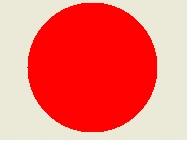
FIGURE 7.1: A zoomed raster image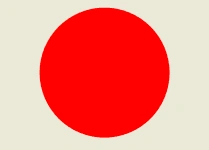
FIGURE 7.2: A zoomed vector image
Raster Image Formats
A bitmap is usually stored in an array of bits that specify the color of each pixel in a rectangular array of pixels. The bitmap's height and width are measure in pixels. The number of bits per pixel specifies the number of colors that can be assigned to that pixel, according to the equation
Nc = 2Bp
Where
Nc = the number of colors that each pixel can display
Bp = the number of bits per pixel
For example, if Bp = 8, the Nc = 28 = 256 colors. If Bp =24, then Nc =224 = 16,777,216 colors. Table 7.1 shows the number of bits and number of possible colors that can be assigned to a pixel.
Bitmap with 1 bit per pixel are called monochrome images. Monochrome images generally store two colors: black and white.
Graphics File Formats
There are many bitmap image formats, including the following:
-
BMP
-
GIF
-
JPEG
-
EXIF
-
PNG
-
TIFF
Join the conversation! Your thoughts help the community grow.