

Introduction
The latest version of ASP.NET Identity: 2.0.0-beta1 has been recently revealed and I've also described it in Identity New Release. The beta1 version is the update of last the alpha1 version of ASP.NET Identity. There are various new features released with it, like two-factor authentication and much more along with a few bug fixes.
In that context, I am using it in my web application for a better understanding of the UserManager class. We'll use the Visual Studio 2013 RTM version for creating the web application using MVC Project Template for the ASP.NET Identity new release. As a default, the MVC application has the 1.0.0 version of Identity in which the UserManager class is instantiated directly that has a few issues defined later in here. These bugs have been fixed in this new version release.
UserManager and UserStore Classes
The ASP.NET Identity has the UserManger and UserStore classes. The UserManger is the prominent class for performing the operations in the identity system like registering a new user. The UserStore is the subordinate class that is used to define entities like users and roles, are persisted. The Stores are the closely coupled with the persistence mechanism, but Managers are decoupled from stores. That means you can replace the persistence mechanism without disrupting the entire application.
In this article, we'll configure the UserManger class in the MVC application. The default version of Identity is 1.0.0, so we need to migrate it to the 2.0.-beta1. We'll also work with the password validation customization. So, let's start with the following procedure:
- Create the MVC Application
- Upgrading Identity to Beta1 Release
- Working with UserManager
- Customizing Password Validations
Create the MVC Application
In this section we'll create the web application using the MVC project template using the following procedure.
Step 1: Open Visual Studio 2013 and click on "New Project".
Step 2: Select the ASP.NET Web Application and enter the name for the app.

Step 3: Select the MVC Project Template from the "One ASP.NET Wizard".

Visual Studio automatically creates the application and we can see that the Identity default version is 1.0.0 in the Packages.config file:
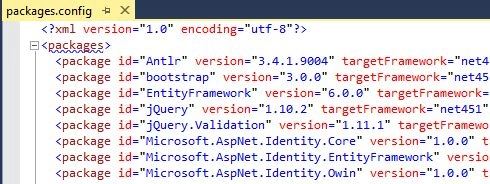
You can also see the UserManager class in the AccountController.cs file for defining the user account management actions:
- public AccountController()
- : this(new UserManager<ApplicationUser>(new UserStore<ApplicationUser>(new ApplicationDbContext())))
- {
- }
- public AccountController(UserManager<ApplicationUser> userManager)
- {
- UserManager = userManager;
- }
- public UserManager<ApplicationUser> UserManager { get; private set; }
In the code above, the UserManager is the property of UserManager type that is also set in the constructor. The UserManager class takes in an instance of the UserStore class that implements operations on the user that are persistence-specific. In our case, we have aUserStore class that implements these operations specific to the Entity Framework.
Problem
Here, if the UserManager has the two instances and in the request that are working on the same user, they would be working with the two different instances of the user object. In here, the changes either they made or made by other, would not reverse. So, to preserve the changes back to database would lead to incorrect changes being made to the user object. The same is applied for using the DbContext clss.
Solution
It can be resolved by storing the instance of UserManager and DbContext per the request and reuse them in the entire solution. So, proceed to the next step.
Working with UserManager
In this section we'll migrate the Identity to Identity 2.0.0-beta1 version and work with the UserManager class. So, start with the following procedure.
Step 1: In the Solution Explorer, right-click on the project and click on "Manage NuGet Packages".
Step 2: Update the Identity packages from the NuGet Gallery as shown below:
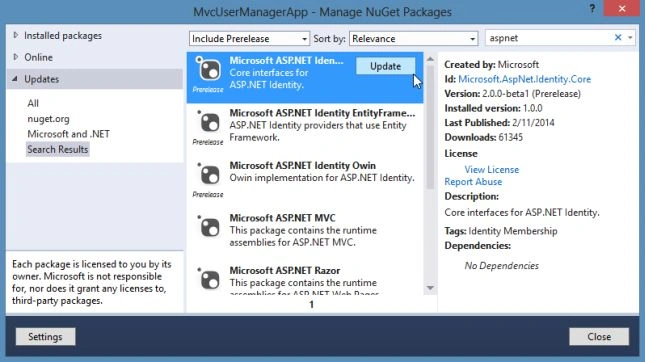
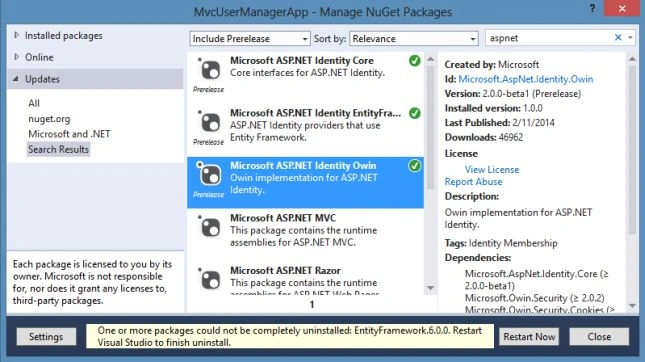
Once the packages are installed, save the application and restart Visual Studio from the wizard as shown below:
Step 3: In the App_Start folder, create a new class named IdentityConfig and replace the code with the code below:
- using Microsoft.AspNet.Identity;
- using Microsoft.AspNet.Identity.EntityFramework;
- using Microsoft.AspNet.Identity.Owin;
- using Microsoft.Owin;
- using MvcUserManagerApp.Models;
- namespace MvcUserManagerApp.App_Start
- {
- public class ApplicationUserManager : UserManager<ApplicationUser>
- {
- public ApplicationUserManager(IUserStore<ApplicationUser> store)
- : base(store)
- {
- }
- public static ApplicationUserManager Create(IdentityFactoryOptions<ApplicationUserManager> factoryOptions, IOwinContext context)
- {
- var UserManager = new ApplicationUserManager(new UserStore<ApplicationUser>(context.Get<ApplicationDbContext>()));
- return UserManager;
- }
- }
- }
Mehul MakwanaPosted Aug 5, 2015, 10:26 AM
one doubt here, since it is a static method "Create" isn't it expected to work on static instance rather than different instances? why is the need to create static? Another question, I want to move ApplicationUserManager to my service layer, so how do i get owin context, from which i can retrieve userManager instance ? Thanks for help.