

In this article we can see some examples of accessing SharePoint list data using a REST service
SharePoint 2013 adds the ability for you to remotely interact with SharePoint sites using REST. You can interact directly with SharePoint objects by using any technology that supports standard REST capabilities.
To access SharePoint resources using REST, construct a RESTful HTTP request, using the Open Data Protocol (OData) standard, that corresponds to the desired client object model API as in the following example.
Client object model method:
List.GetByTitle(listname)
REST endpoint:
http://server/site/_api/lists/getbytitle('listname')
The client.svc web service in SharePoint handles the HTTP request and serves the appropriate response in either Atom or JavaScript Object Notation (JSON) format. Your client application must then parse that response. The figure below shows a high-level view of the SharePoint REST architecture.
Create a console application
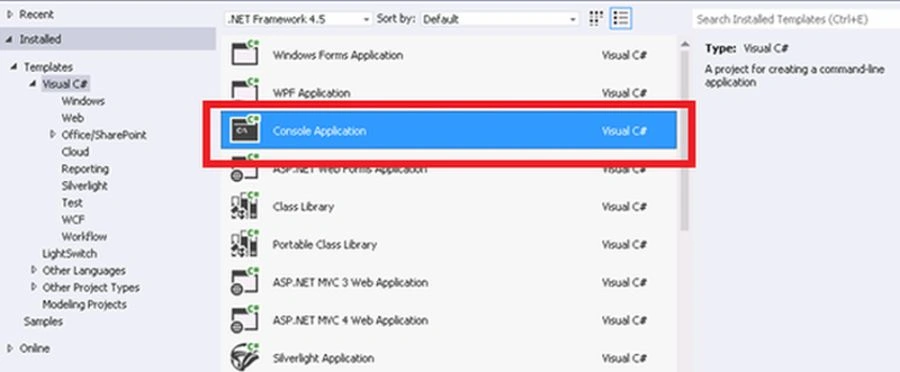
From the Visual Studio Idle select a console application to start our project. Please provide a location and other details before you create the project
To access SharePoint resources using REST, construct a RESTful HTTP request, using the Open Data Protocol (OData) standard, that corresponds to the desired client object model API as in the following example.
Client object model method:
List.GetByTitle(listname)
REST endpoint:
http://server/site/_api/lists/getbytitle('listname')
The client.svc web service in SharePoint handles the HTTP request and serves the appropriate response in either Atom or JavaScript Object Notation (JSON) format. Your client application must then parse that response. The figure below shows a high-level view of the SharePoint REST architecture.
Create a console application
From the Visual Studio Idle select a console application to start our project. Please provide a location and other details before you create the project
How to install JSON.NET
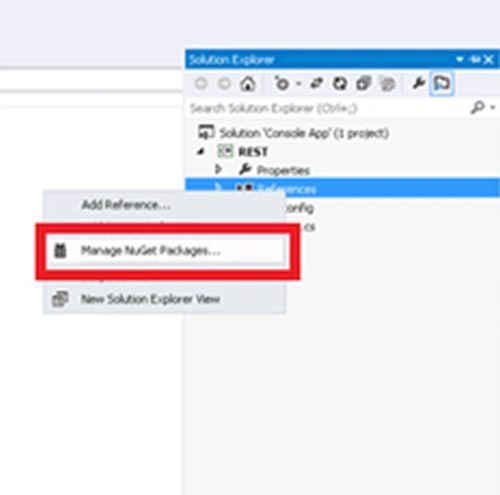
From the Solution Explorer click on Manage NuGet Packages.You will get the following screen:
Select on Json.Net and click install.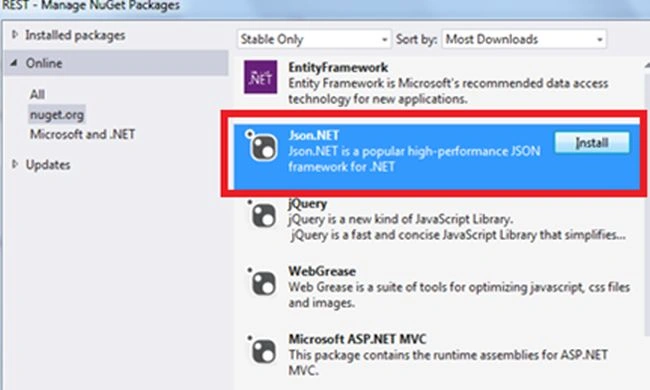
In this article, I am explaining two approaches for accessing a REST service, one using JSON.Net and the other method using XML.
Code to Access REST Using JSON
tank taeyangPosted Oct 6, 2020, 8:22 PM
If I dont want use this authentication method( NetworkCredential cred = new System.Net.NetworkCredential("username", password", "domain"); ), any others method I can use?
Salana DharmaraoPosted Jul 30, 2019, 7:58 AM
I am getting 401 after adding EndpointRequest.Headers.Add("X-FORMS_BASED_AUTH_ACCEPTED", "f");. Appreciate your help
Aakash MauryaPosted Jan 2, 2017, 2:03 AM
Hi, article is greatly written but the problem is I tried both of the approach and in both the approach I am getting the same error 403 Forbidden? Is there anything additional set up which we have to configure? I am using SharePoint Online environment
Dennis VossenPosted Dec 30, 2015, 4:10 PM
This is a really good article. Thanks!
Taylor LopezPosted Oct 27, 2015, 3:57 PM
If the HttpWebRequest object is a returning a "403 Forbidden" error when using GetResponse(), is that an indication of something that needs to change on the SharePoint server itself? I'm surprised this works without a SharePointOnlineCredentials object.
Abdul NabiPosted Nov 26, 2014, 3:34 AM
Nice article. Thumps Up! ...Can you please provide a article how to add items to SharePoint list.