

Introduction
Today we'll work on the membership and role management in MVC 4. The Authentication and Authorization are the main features of the web application. The default membership is also provided in many projects and this is quite inflexible in terms of the database schema. Suppose we are using the default membership, then we do not have much more control over the table in the database. This creates complexity and difficulty in the situation where the login info of the user needs to be stored in a table with the customized schema.
We'll work here with the SimpleMembership that is introduced with the WebMatrix. Now we can create a flexible model for authenticating the new users. It is based on the basic membership and roles (SimpleRole) provider of ASP.NET but wraps them in an easy and flexible way. You can also have a look at the following structure in which the hierarchy of SimpleMembership is defined:
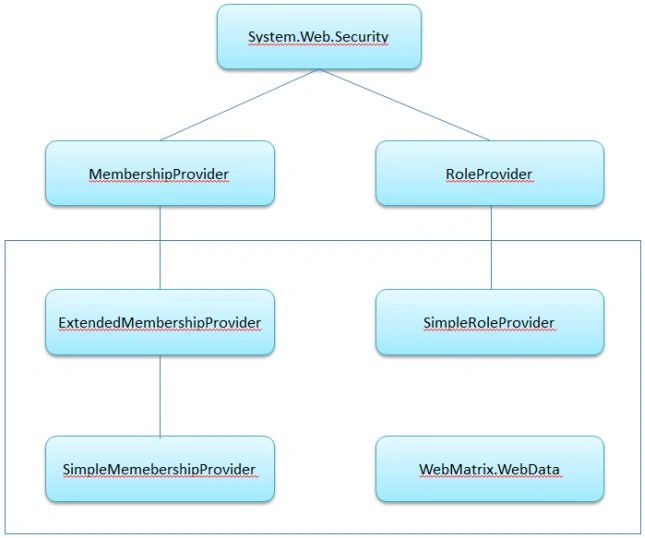
You can understand SimpleMembership better with the architecture of SimpleMembership defined above. So, let's work on the following scenario:
-
Create Database
-
Create MVC App for use SimpleMembership
-
Create Controllers
-
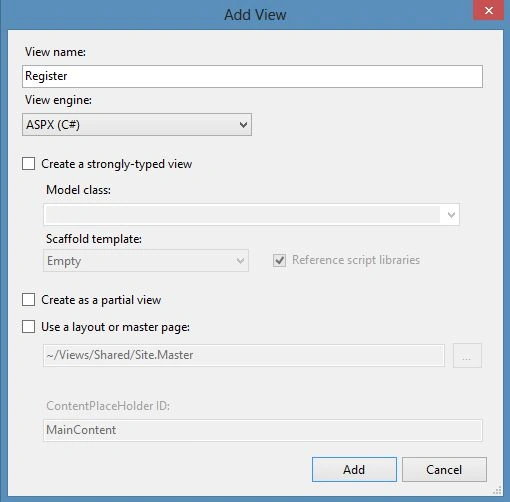
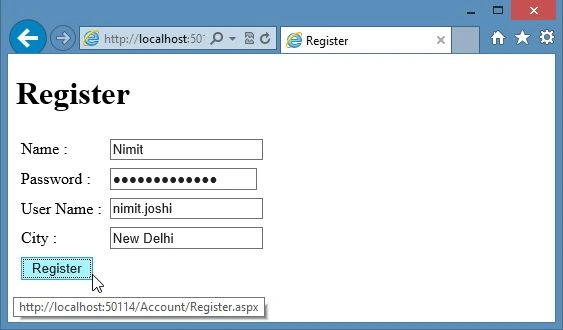
Create Registration Page
-
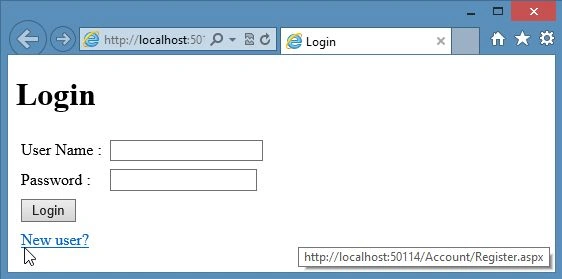
Create Login Page
Create Database
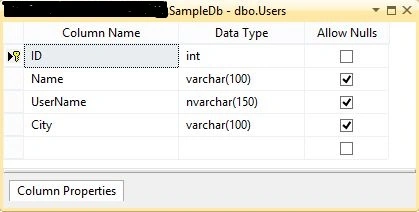
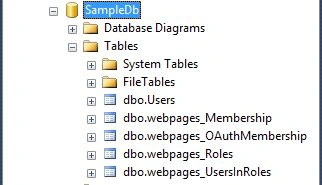
At first we need to create a database named "SampleDb" and now we'll create a table named "Users" to store the user information. You can have a look at the following table design to design the table:
Create MVC App for Use SimpleMembership
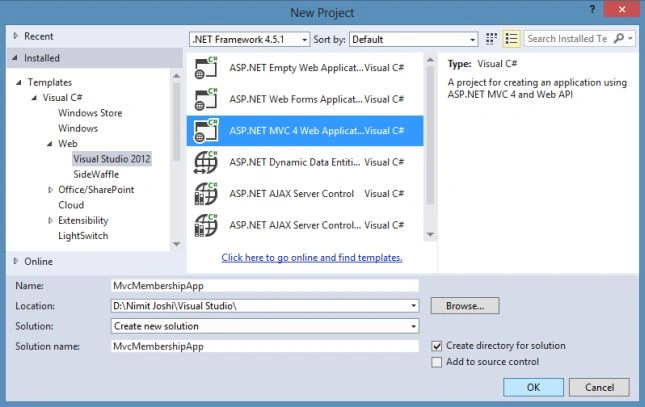
Now in this section we'll create the ASP.NET Web Application based on the MVC 4 Project Template using the following procedure.
Step 1: Open the Visual Studio and click on "New Project".
Step 2: Select the MVC 4 application as shown below:
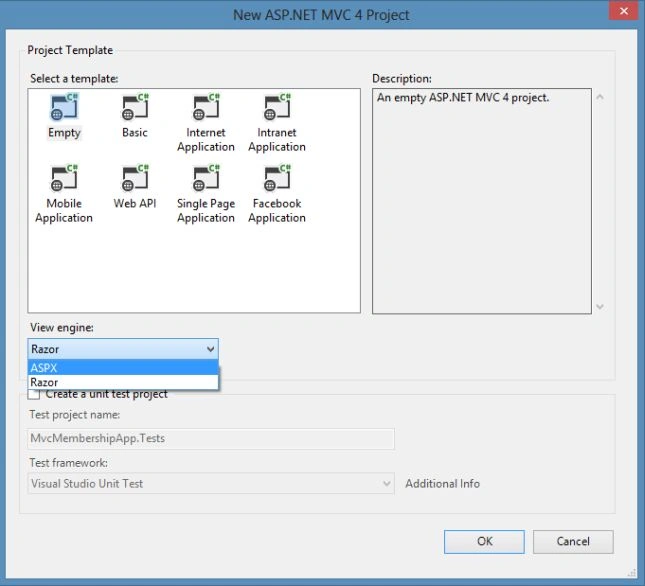
Step 3: Select an Empty Project and select "ASPX" View engine and click "OK".
Step 4: Now in the Solution Explorer, right-click on the References and select "Add References".
Step 5: Add the WebMatrix references as shown below:
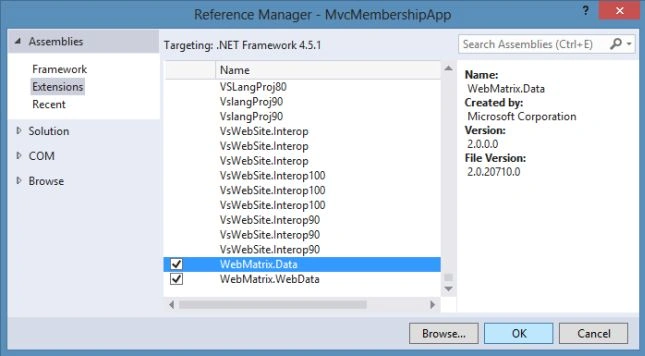
Step 6: Now open the Web.Config file and modify it with the highlighted code below:
- <system.web>
- <httpRuntime targetFramework="4.5.1" />
- <compilation debug="true" targetFramework="4.5.1" />
- <pages>
- <namespaces>
- <add namespace="System.Web.Helpers" />
- <add namespace="System.Web.Mvc" />
- <add namespace="System.Web.Mvc.Ajax" />
- <add namespace="System.Web.Mvc.Html" />
- <add namespace="System.Web.Routing" />
- <add namespace="System.Web.WebPages" />
- </namespaces>
- </pages>
- <authentication mode="Forms">
- <forms loginUrl="~/Account/Login"></forms>
- </authentication>
- <membership defaultProvider="SampleProvider">
- <providers>
- <add name="SampleProvider" type="WebMatrix.WebData.SimpleMembershipProvider, WebMatrix.WebData"/>
- </providers>
- </membership>
- <roleManager enabled="true" defaultProvider="SampleProvider">
- <providers>
- <add name="SampleProvider" type="WebMatrix.WebData.SimpleRoleProvider, WebMatrix.WebData"/>
- </providers>
- </roleManager>
- </system.web>
In the code above, you can see that the Forms authentication is enabled for the application and forms loginurl is set to the login. The SimpleMembershipProvider is also set in the providers and roleManager sections.
Step 7: Now you add the connection string to connect with the database as shown in the following code:
- <connectionStrings>
- <add name="MembershipDbContext" connectionString="Data Source=.\SQLEXPRESS;Initial Catalog=SampleDb;User ID=”UserID”;Password=”password” " providerName="System.Data.SqlClient"/>
- </connectionStrings>
Create Controllers
In this section we'll create the controllers for the application. Follow the procedure below.
Step 1: In the Solution Explorer, right-click on the Controllers folder to add a new controller.
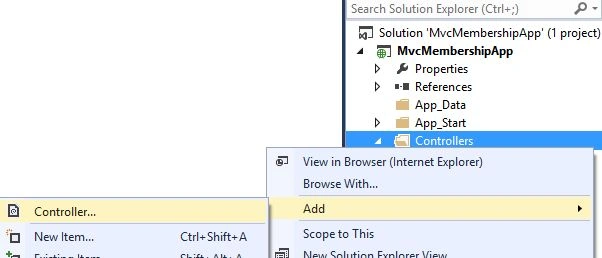
Step 2: Enter the Controller name as "Account" and click "OK".
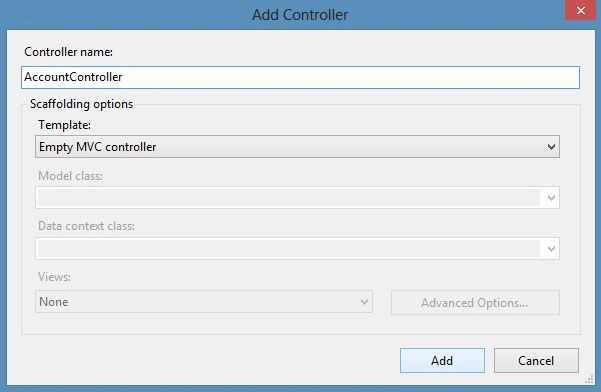
Step 3: Replace the code with the following code in the AccountController:
- using System.Web.Mvc;
- using WebMatrix.WebData;
- namespace MvcMembershipApp.Controllers
- {
- public class AccountController : Controller
- {
- //
- // GET: /Account/
- public ActionResult Index()
- {
- return View();
- }
- [HttpGet]
- public ActionResult Login()
- {
- if (!WebSecurity.Initialized)
- {
- WebSecurity.InitializeDatabaseConnection("MembershipDbContext", "Users", "ID", "Name", autoCreateTables: true);
- }
- return View();
- }
- [HttpPost]
- public ActionResult Login(FormCollection Form)
- {
- bool Authenticated = WebSecurity.Login(Form["UserName"], Form["Password"], false);
- if (Authenticated)
- {
- string Return_Url=Request.QueryString["ReturnUrl"];
- if (Return_Url == null)
- {
- Response.Redirect("/Home/Index");
- }
- else
- {
- Response.Redirect(Return_Url);
- }
- }
- return View();
- }
- [HttpGet]
- public ActionResult Register()
- {
- if (!WebSecurity.Initialized)
- {
- WebSecurity.InitializeDatabaseConnection("MembershipDbContext","Users","ID","Name",autoCreateTables:true);
- }
- return View();
- }
- [HttpPost]
- public ActionResult Register(FormCollection Form)
- {
- WebSecurity.CreateUserAndAccount(Form["Name"], Form["Password"], new { UserName = Form["UserName"], City = Form["City"] });
- Response.Redirect("~/Account/Login");
- return View();
- }
- public ActionResult Logout()
- {
- WebSecurity.Logout();
- Response.Redirect("~/Account/Login");
- return View();
- }
- }
- }
Muhafil SaiyedPosted Jun 18, 2018, 6:09 AM
Getting this error Attempt by security transparent method 'WebMatrix.WebData.PreApplicationStartCode.OnConnectionOpened(System.Object, WebMatrix.Data.ConnectionEventArgs)' to access security critical method 'System.Web.WebPages.HttpContextExtensions.RegisterForDispose(System.Web.HttpContextBase, System.IDisposable)' failed.
Dhanaji ShindePosted Nov 10, 2017, 1:57 AM
Thanks Nimit. Its really very useful
Tanmay HajraPosted Mar 9, 2017, 7:12 AM
Thanks Nimit . Its really helpful :)
Danilo AlarconPosted Feb 15, 2017, 10:58 AM
ConnectionStrings for MySql?
Test AccountPosted Apr 20, 2015, 5:43 AM
How we can get Roles of user in this scenario.
Sachin KaliaPosted Jul 8, 2014, 4:09 AM
Hey Nimit..Do you have any idea about to configure it with DataBase first approach?