

I have been writing articles about all data sources and now it is time for the SqlDataSource control.
As you may guess, the SquDataSource control in ASP.NET 3.5 is designed to work with a SQL Server database. It uses SQL Server .NET data provider internally to connect to the database.
SQL Server .NET data provider classes are defined in the System.Data.SqlClient namespace.The SqlDataSource data source control represents data in an SQL relational database to data-bound controls. You can use the SqlDataSource control in conjunction with a data-bound control to retrieve data from a relational database and to display, edit, and sort data on a Web page with little or no code. SqlDataSource control inherited from DataSourceControl class, which provides common functionality for all of these data source controls.
The SqlDataSource class provides a FilterExpression property that can be used to filter the results of calling the SqlDataSource class' Select method.
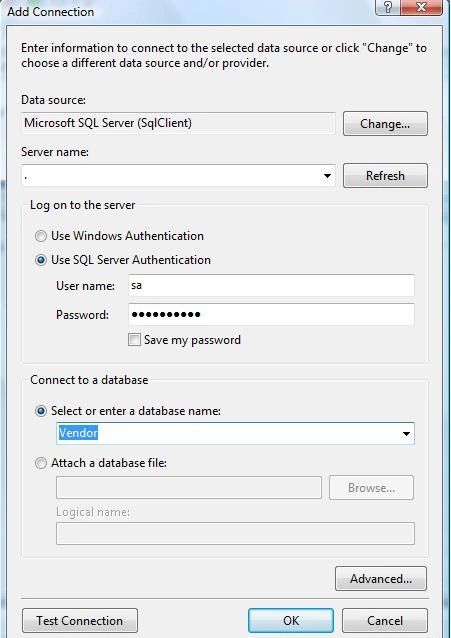
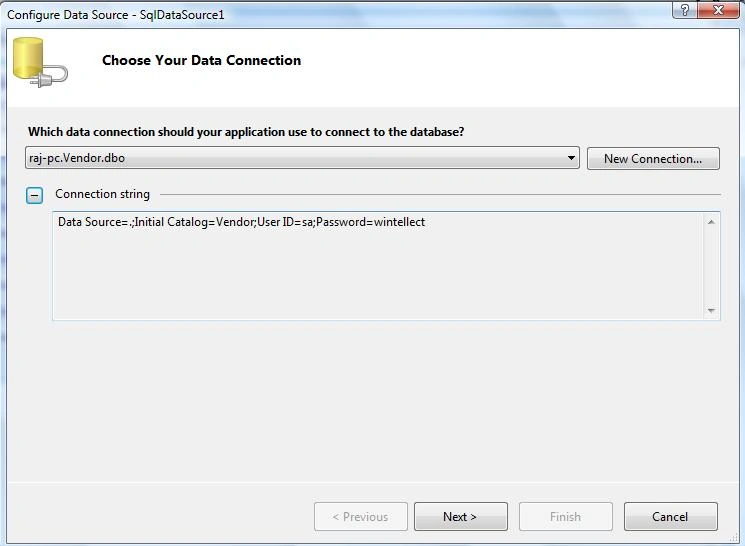
To connect to a database, you must set the ConnectionString property to a valid connection string. The SqlDataSource can support any SQL relational database that can be connected to using an ADO.NET provider, such as the SqlClient, OleDb, Odbc, or OracleClient.
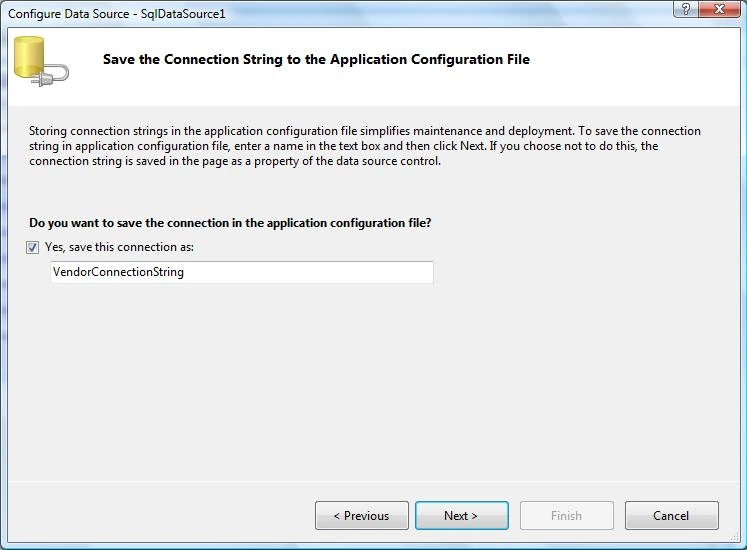
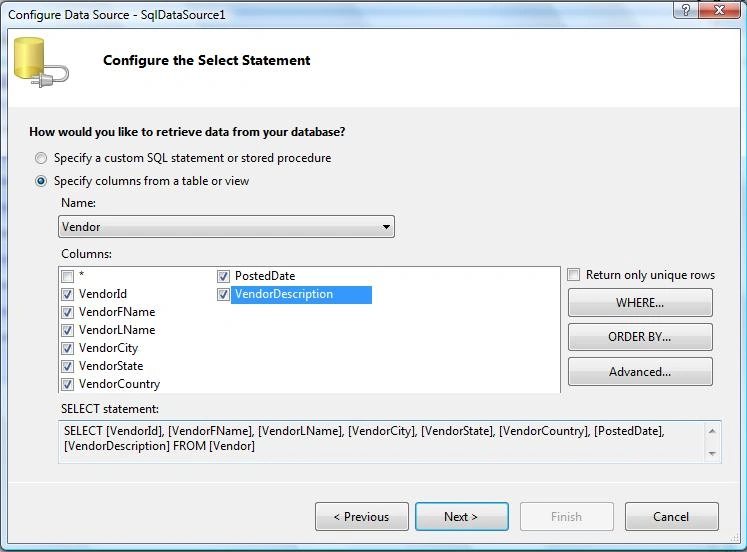
This example shows how to Select, Insert, Update data from database using SqlDataSource control without writing a single line of code. How cool is that?
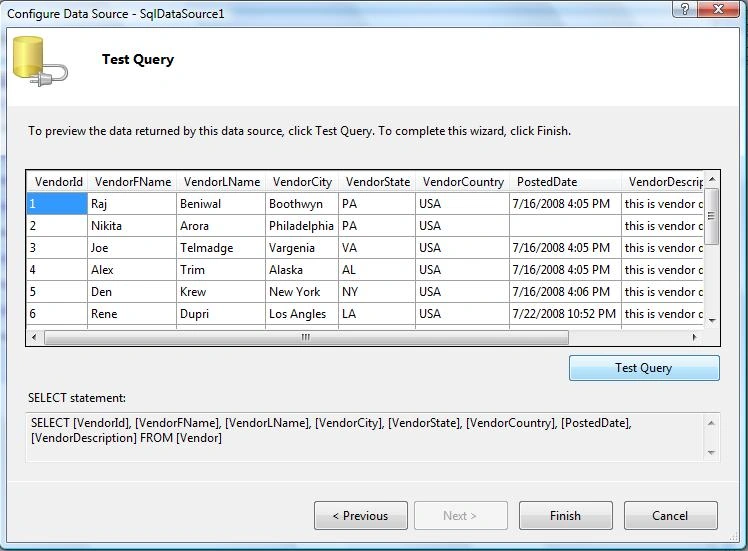
This is for select data from a database.
<asp:SqlDataSource ID="SqlDataSource1" runat="server"
ConnectionString="<%$ ConnectionStrings:VendorConnectionString %>" SelectCommand="SELECT [VendorId], [VendorFName], [VendorLName], [VendorCity], [VendorState], [VendorCountry], [PostedDate], [VendorDescription] FROM [Vendor]">
</asp:SqlDataSource>
This is for update data into a database:
<asp:SqlDataSource ID="SqlDataSource1" runat="server"
ConnectionString="<%$ ConnectionStrings:VendorConnectionString %>"
SelectCommand="SELECT [VendorId], [VendorFName], [VendorLName], [VendorCity], [VendorState], [VendorCountry], [PostedDate], [VendorDescription] FROM [Vendor]"
UpdateCommand="UPDATE Vendor SET VendorFName = @VendorFName, VendorLName = @VendorLName, VendorCity = @VendorCity, VendorState = @VendorState, VendorCountry = @VendorCountry, VendorDescription = @VendorDescription WHERE VendorId = @VendorId">
<UpdateParameters>
<asp:FormParameter Name="VendorId" FormField="VendorId" />
<asp:FormParameter Name="VendorFName" FormField="VendorFName" />
<asp:FormParameter Name="VendorLName" FormField="VendorLName" />
<asp:FormParameter Name="VendorCity" FormField="VendorCity" />
<asp:FormParameter Name="VendorState" FormField="VendorState" />
<asp:FormParameter Name="VendorCountry" FormField="VendorCountry" />
<asp:FormParameter Name="VendorDescription" FormField="VendorFName" />
</UpdateParameters>
</asp:SqlDataSource>
This is for insert data into a database:
<asp:SqlDataSource ID="SqlDataSource1" runat="server"
ConnectionString="<%$ ConnectionStrings:VendorConnectionString %>"
SelectCommand="SELECT [VendorId], [VendorFName], [VendorLName], [VendorCity], [VendorState], [VendorCountry], [PostedDate], [VendorDescription] FROM [Vendor
InsertCommand="INSERT INTO Vendor(VendorFName, VendorLName, VendorCIty, VendorState, VendorCountry, VendorDescription) VALUES (@VendorFName, @VendorLName, @VendorCity, @VendorState, @VendorCountry, @VendorDescription)"
<InsertParameters>
<asp:FormParameter Name="VendorFName" FormField="VendorFName" />
<asp:FormParameter Name="VendorLName" FormField="VendorLName" />
<asp:FormParameter Name="VendorCity" FormField="VendorCity" />
<asp:FormParameter Name="VendorState" FormField="VendorState" />
<asp:FormParameter Name="VendorCountry" FormField="VendorCountry" />
<asp:FormParameter Name="VendorDescription" FormField="VendorFName" />
</InsertParameters>
</asp:SqlDataSource>
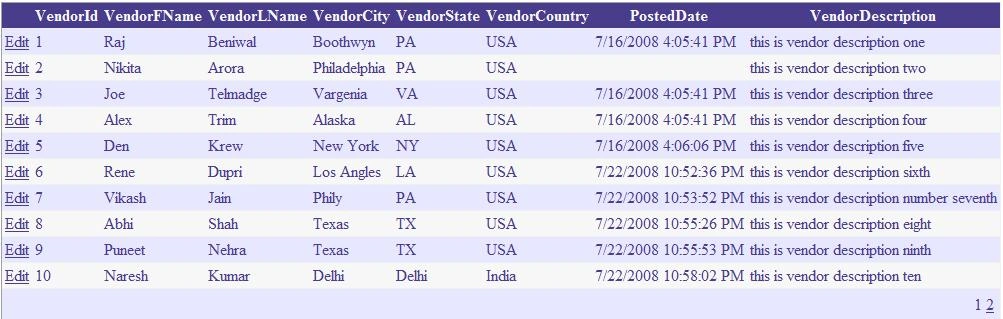
After setting up the data source, now I will display data in a GridView control. In GridView control, you just set the DataSourceID property of the GridView control to the data source control we created above.
Tom TurnerPosted Jul 26, 2010, 1:18 PM
Very nice article with lots of great hints. Have you ever used a SqlDataSource with an Ajax ComboBox. I have been working with it and the Select command to fill the list works fine, but I would also like to use the Insert functionality of the SqlDataSource to allow my users to add new items to the database table behind the list. I am able to capture the ItemInserting event, put up a message box to allow the user to insert the new item or cancel. From that point I'm not sure what to do. I want somehow to invoke the InsertCommad of my SqlDataSource control but I'm hot sure how. Can you help? Thanks Tom
Kaan AcarPosted Jul 9, 2010, 8:45 AM
Güzel ve gerçekten çok aranan bir makale
Dorababu MekaPosted May 19, 2009, 3:39 AM
Dear Rajkumar, I need the following requirement with Asp in C# code. I need to design a web page with some textboxes and labels. I will create a table emp in SQL. When ever i click on Add button it should add the data given in textboxes in to table. Like that if i have to modify it should modify. When i click on delete button it should ask the Empid to delete. When i click on search button it should verify whether the emp exists by entering either Id or Name. Can u mail this requirement to [email protected]. Thanks in Advance