

Introduction
When you want to wrap multiple views in a
single window and navigate thought them with a Tab Container, you have to use
Tab Layouts. The container object for TabLayout is Android.Widget.TabHost. When
the user selects a tab, this object sends a message to the parent container,
TabHost, to tell it to switch the displayed page.
TabHost is used to navigate through multiple
views within the same activity.
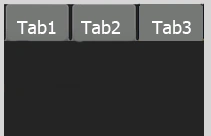
syntex:
[Android.Runtime.Register("android/widget/TabWidget")]
public class TabWidget : LinearLayout, Android.Views.View.IOnFocusChangeListener
public class TabWidget : LinearLayout, Android.Views.View.IOnFocusChangeListener
The Activity of Tab Layout goes like:
Activity
-TabHost
-TabWidget
-FrameLayout
-TabsContent
- First, we create TabHost
- Than create TabWidget
- Than Create FrameLayout
- Last, create the Content for the Tabs
Let's look at an example in which you'll create a
tabbed UI that uses a separate an Activity for each tab:
Step 1: Start a new Mono for Android
Application in Visual Studio 2010 named AndroidTabLayout.
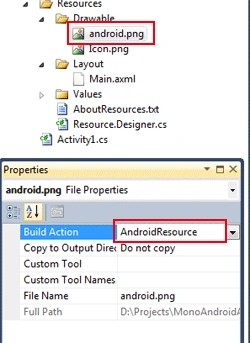
Step 2: Add the images to your project
Resources/Drawable/ like I add android.png and, and set the Build Action of
image to AndroidResource in the property window.
Step 3 : Open the Resources/Layout/Main.axml
file and edit the code like below code:
Main.axml file:
- <?xml version="1.0" encoding="utf-8"?>
- <TabHost xmlns:android="http://schemas.android.com/apk/res/android"
- android:id="@android:id/tabh"
- android:layout_width="fill_parent"
- android:layout_height="fill_parent">
- <LinearLayout
- android:orientation="vertical"
- android:layout_width="fill_parent"
- android:layout_height="fill_parent">
- <TabWidget
- android:id="@android:id/alltabs"
- android:layout_width="fill_parent"
- android:layout_height="wrap_content" />
- <FrameLayout
- android:id="@android:id/tabcontents"
- android:layout_width="fill_parent"
- android:layout_height="fill_parent">
- <ImageView
- android:id="@+id/imageview1"
- android:src="@drawable/android"
- android:layout_width="wrap_content"
- android:layout_height="wrap_content"/>
- <TextView
- android:id="@+id/textview1"
- android:layout_width="fill_parent"
- android:layout_height="fill_parent"
- android:textSize="15px"
- android:text="ANDROID" />
- <TextView
- android:id="@+id/textview2"
- android:layout_width="fill_parent"
- android:layout_height="fill_parent"
- android:textSize="15px"
- android:text="Android is a software stack for mobile devices that includes an operating system,
- middleware and key applications. The Android SDK provides the tools and APIs
- necessary to begin developing applications on the Android platform using the Java
- programming language." />
- </FrameLayout>
- </LinearLayout>
- </TabHost>


jose fidalgoPosted Aug 9, 2013, 11:10 AM
to where this set the tabhost, give me also error AddTab (??sp1);
AndrewPosted Jan 22, 2013, 5:03 PM
I had to make the following changes for my proj to compile: android:id="@+id/tabh" android:id="@+id/alltabs" android:id="@+id/tabcontents"
SaqiPosted Jun 27, 2012, 8:49 AM
thanks . how to set image background tab button.